Welcome to the February issue of Tiger Bytes. This is a SPECIAL NOTEBOOKLM EDITION of your monthly dose of technology tips and tricks delivered to your inbox for you to use.

Introducing NotebookLM: A Safer AI "Walled Garden" for Grades 4-12


As Artificial Intelligence becomes a growing part of our world, we recognize the importance of teaching students how to use AI responsibly. There is also a real problem with the "shadow use" of AI, where students use unmonitored, off-the-grid tools like the free versions of ChatGPT or public Gemini. The AI Coalition has recommended a much safer alternative, and students in grades 4-12 are now able to access NotebookLM.


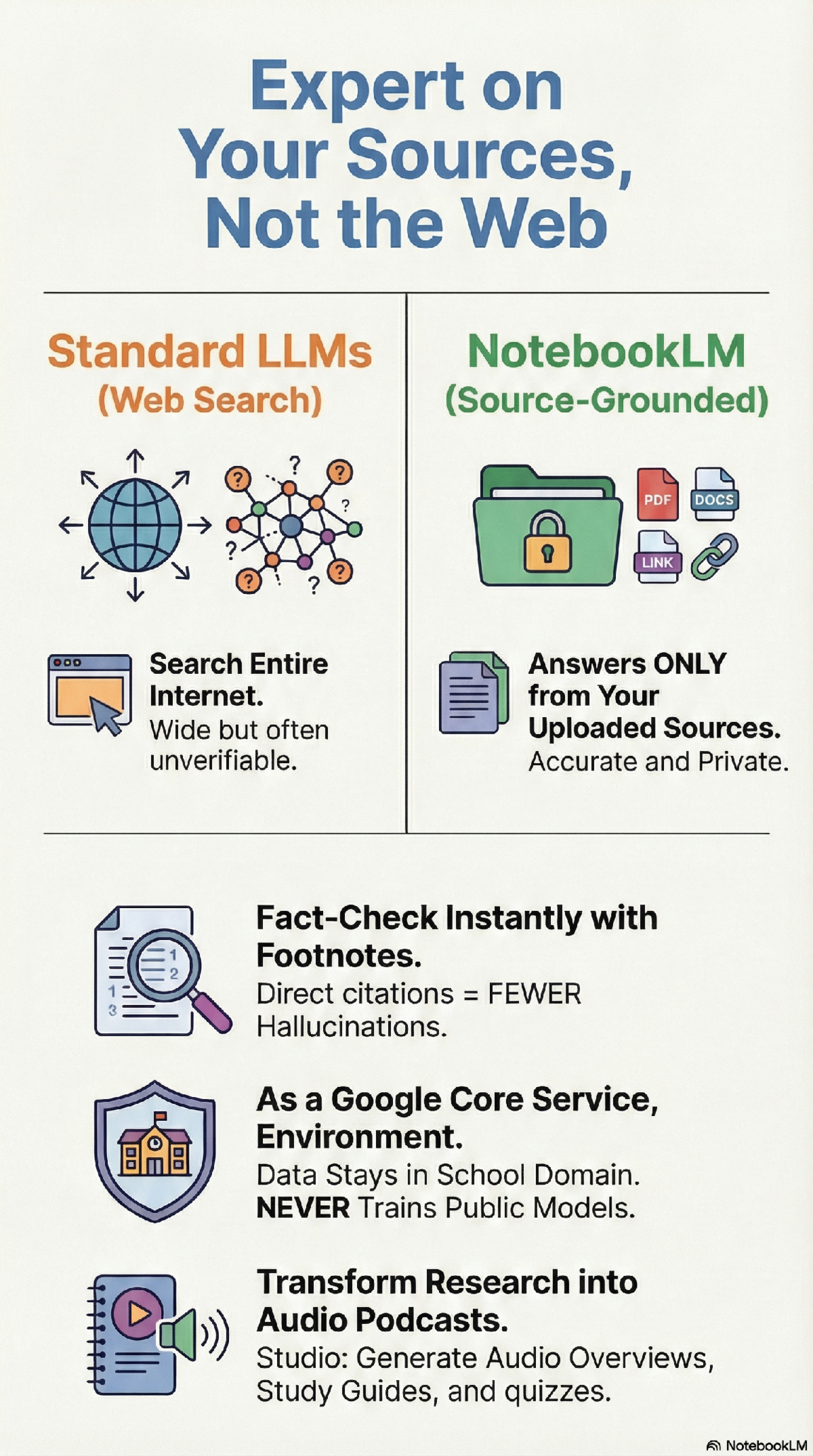
NotebookLM: An Expert on Your Sources, Not the Web


Standard Large Language Models (LLM), like ChatGPT, pull information from the entire open internet. This can sometimes lead to confusing or made-up information. NotebookLM is a "source-grounded" tool. NotebookLM acts as a personalized research assistant that only knows what the user gives it. Teachers and students must upload their own sources, like PDFs, Google Docs, videos, or class notes. NotebookLM will only generate answers based on those specific documents, and it provides footnotes citing exactly where the information came from within the source. This significantly reducing the risk of "hallucinations".


Clarifying Our Path: New Generative AI Expectations for Teachers and Students


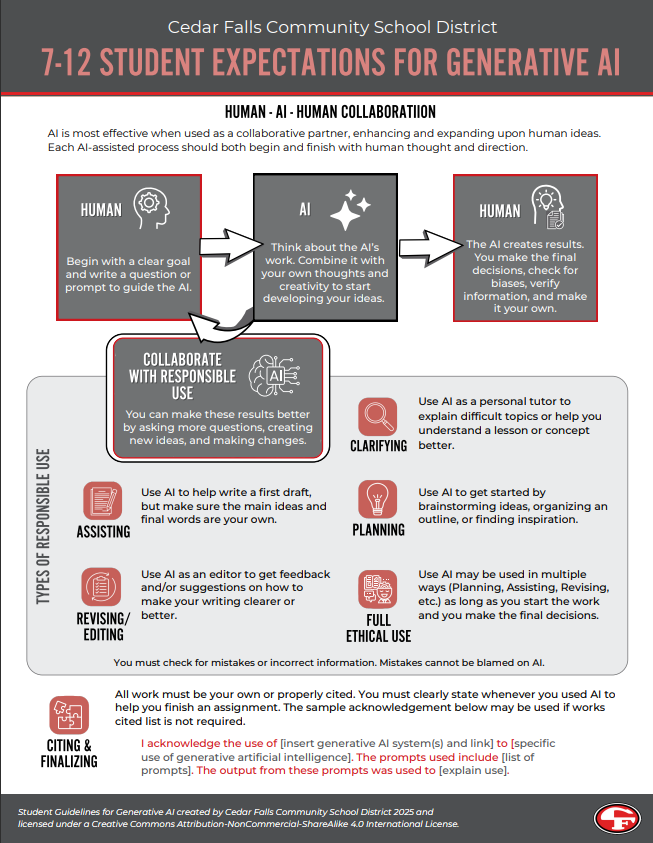
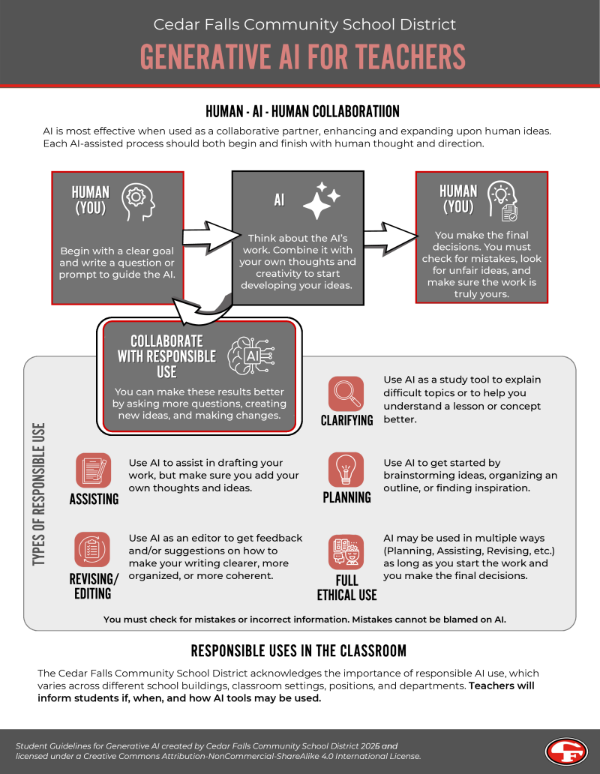
The Cedar Falls Community School District believes that AI should not be used as a shortcut to bypass work but as a collaborative thinking partner. Our approach to this is the "Human-AI-Human Collaboration Loop". This means every AI-assisted process must begin with human thought and direction, and finish with the student critically evaluating, refining, taking ownership of the final product, and siting how AI was used. 

To support this work, the district’s AI Coalition in collaboration with other district stakeholders, has developed the 7-12 Student Expectations for Generative AI and Generative AI for Teachers. These documents are designed to provide clear, consistent messaging. Teachers will inform students if, when, and how AI tools may be used for specific assignments and projects. By establishing these shared expectations, we can partner with parents and students to help use AI more ethically, safely, and as a tool to not replace, but enhance student learning, thinking, and creativity.


Ideas on Ways to Use NotebookLM as a Teacher

  • Curriculum Alignment: Upload your entire 6-week unit plan and ask: "Identify any gaps where I haven't addressed [State Standard X]."
  • IEP/504 Synthesis: (Reminder: Use de-identified data!) Upload progress notes and evaluations to quickly summarize a student’s strengths and needed accommodations for a meeting.
  • Differentiated Reading: Upload a complex scientific article. Ask NotebookLM: "Rewrite a summary of this for a 5th-grade reading level while keeping the key vocabulary."
  • The "Instant Quiz": Use the Study Guide feature to instantly generate a 10-question quiz with an answer key based only on the chapter you are teaching next week.
  • Audio or Video Overview: Upload unit materials as sources and use the Audio Overview and Video Overview buttons to create audio or video based off of the unit materials to provide a variety of accessibility to your content.


Take a look at Google NotebookLM for teachers: 10 things to know for educators for even more ideas and how to get started!


Thank You Teachers: You are Appreciated!

This video is in appreciation for all of the efforts that teachers are doing within our district.