Welcome to the November issue of Tiger Bytes. This is your monthly dose of technology tips and tricks created by your Secondary BTIL team members and delivered to your inbox for you to use.


Curriculum Connections: Use Planner 5D for More Than Planning

by Jake Bates & Nate Norby


Planner 5D is a free online software program that I use with a Frank Lloyd Wright architecture unit. It connects to 21st century skills of creativity, critical thinking, and flexibility and adaptability. It also could connect to mathematical concepts like building to scale, project management such as estimating costs of supplies, and other learning applications you or your students could think of. This allows most students who do not want to use graph paper to show their work an alternative that has a learning curve but keeps them engaged. (*There is a teacher version that allows you to have multiple licenses for students giving them access to more features than just what is available to the general public. All you have to do is email them with your request and they will ask for identification to prove you are a teacher. I send them a link to our staff photo page and you are good to go. The program keeps your class in one place.)


Google Tips & Tricks: Screen Recordings in Google Slides

by Baily Klammer & Maria Hoekstra

An alternative screen recording feature is built into Google Slides. There is no limit on recordings you make, you can pre-plan where your face is on each slide, and the recordings are saved right inside the Google Slides file.


Click on the video to see how it's done!


Teacher Hack: AEA Digital Resource Access

by Abby Hendrickson, Jen Paulsen, and Leah Cahill


Access to AEA Databases has changed for the 2025-26 school year. Students can now access direct links to resources via their Rapid Identity portal (https://my.cfschools.org/) by finding the folder marked “AEA Digital Resources.” Because these are direct links, no username or password is needed. Teachers will soon be able to access these resources utilizing the same method.


Resource to highlight

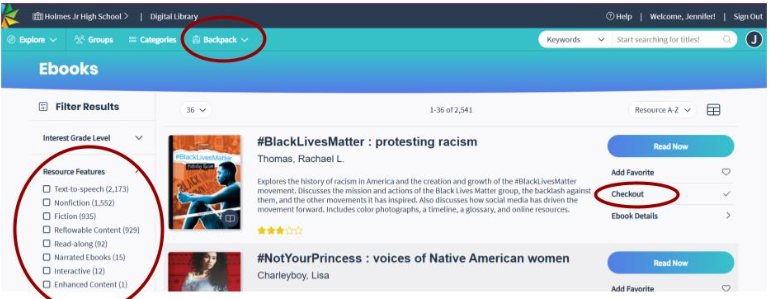
On MackinVIA, in addition to eBooks, there are a variety of types of audiobooks kids can access: narrated, talk-to-text, and read-alongs which you can search under "Resource Features" on the left.


  • To save books, students will need to click "Log In" at the top right, and "Log In" again on the next screen. Then their name will appear in the top right next to "Sign Out." 
  • Below the "Log In," it will say "Read Now," "Add Favorite," or "Checkout." Make sure students click "Checkout" instead of "Read Now." Otherwise, other students can check the book out while they're reading it, and they'll lose access to it for a few weeks. 
  • You can make sure it is checked out by looking at their "Backpack" at the top. 
 

Curriculum Connections: HCC Composition I: Ethical Use of AI in Research/Writing

by Claire Mueller


Prelim Research: After students had done preliminary research on a topic using Credo and Wikipedia, students wrote a research question for feedback, as well as domain specific questions and evidence of the problem. After revising their research questions, they wrote a draft of their Exploratory Annotated Bibliography introduction, explaining their prelim research process, the problem, why it interests them, at least four angles of vision (perspectives/stakeholders), and how they got to their current research question.


Important Note: The above process was completed before using a chatbot; these were all of their initial ideas. Because they aren’t experts in the field that they chose, before they started researching, students used ChatGPT to narrow their questions and ask about various perspectives and key terms that they didn’t consider at first.


Chatbot Convo: The following are prompts we used in ChatGPT, noting that they will need to show this process and attribute any new information in their introductions:


Using ChatGPT responsibly to guide your research plan and for setting up for effective research. (The language in the syllabus stands–it is NOT okay to use AI for research or writing this piece). Have your secondary research question(s) handy. Try these prompts, and these prompts ONLY:


I need to reference multiple perspectives in my research about (name your topic area). So far I have (name a few). What perspectives am I missing?


What are some search terms that I might use in databases to research (name your topic - not question)?


SAVE your chats → Copy/paste your chat into your Research Plan doc and use this information to solidify your introduction before starting research tomorrow.