|
NEW SSL Certificate Available Now
BridgePay is announcing the current PayGuardian Desktop SSL certificate will expire at
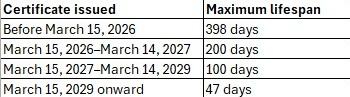
8:00 p.m. EST on August 29th. All industry SSL certificates now only have a 6 month life span and must be updated bi-annually. The new SSL certificate is available now and we are encouraging customers to renew early to avoid any service interruption.
PayGuardian Desktop users will have two paths available to address the upcoming SSL certificate expiration.
1) Upgrade to current version of PayGuardian. The current available version of PGD 2.4.23 includes the latest SSL certificate and an enhancement to automatically check and download future updated SSL certs when the Restart PayGuardian Service is run from your Windows start menu. This is the most user-friendly option for updating these annual certs. We encourage all integrators to upgrade to 2.4.23, not only for this SSL cert enhancement, but to stay current with updates relevant to available features and security protocols.
Users of PayGuardian Desktop 2.4.13 or newer will only need to use the Restart PayGuardian Service to automatically download the updated SSL certificate.
This SSL certificate expiration requires a manual update to
PayGuardian Desktop 2.4.12 or older
2) Users of PayGuardian Desktop 2.4.12 or older will need to manually update to the new SSL cert to avoid security warning pop-ups presented while trying to run a transaction. PayGuardian Desktop integrators and resellers must take action such as integration testing and end user notification to avoid processing interruptions (e.g. warning pop-ups for users). The user will need to utilize the BridgePay SSL Cert update tool, which is available for download using these instructions.
How do I check my PayGuardian version?
Open your PayGuardian app on your desktop (select the PayGuardian icon from your Windows task bar). In the PayGuardian app, go to Help then About to view the version.
BridgePay is encouraging all Integrators to support version 2.4.23 to allow users to receive the user friendly automatic detection and installation of the annual SSL renewal.
|