DEVELOPMENTAL SCREENING PROGRAM

Sparkler Tip of the Month

August 5, 2025 | Issue 1

Adding Families to Your Sparkler Dashboard

Welcome to all Help Me Grow Sparkler program partners! This monthly message will offer you tips on using your Sparkler dashboard. This month we want to focus on adding families.

IMPORTANT!

Do not  manually add families yourself, unless you have written consent to do so. Families should be directed to download the Sparkler: Play for Parenting app and create a profile.

Your program has a special code that allows your families to link with you. Once families download the app on their phone or tablet, they should enter your program's unique code (typically this code starts with OH and includes letters representative of your program, such as OHLLA for Lisa's Little Angels).

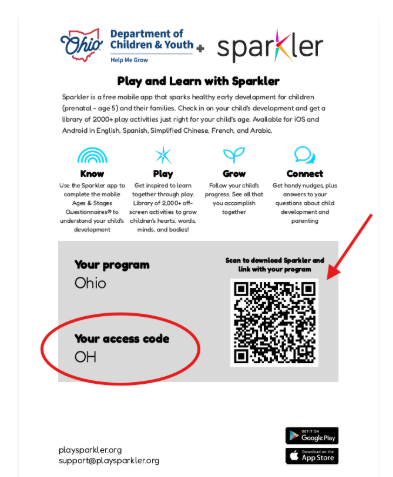
Now, there's an even easier way for families to link to your program. There's a flyer available in your Sparkler dashboard that has a QR code just for your program. When families use this QR code to download the Sparkler: Play for Parenting app, they can automatically link to your program.


Here's how to find the flyer with your program's QR code:

1. Log onto your Sparkler Dashboard at https://app.playsparkler.com/dashboard/login.

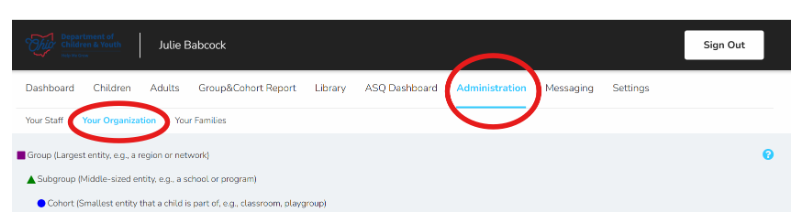
2. Navigate to the Administration tab, then Your Organization. (Note: Don't panic if you don't see this tab. Once your account is created it can take up to 10 days for this tab to appear).

3. Click on the arrow next to the green triangle and then download the flyer by clicking on the paper icon next to your unique access code. Select if you would like the flyer in English, Spanish, or Chinese. (French & Arabic are coming soon!)


4. A PDF of the flyer will be generated and downloaded to your computer. Open the PDF and print the flyer to distribute or hang up in a place where families will see it. You may also choose to email the flyer to families or post the flyer to your preferred social media platform. 


5. When families scan the QR code, they will be taken directly to the Google Play or Apple App Store to download the Sparkler: Play for Parenting app.


Your program's unique access code will automatically populate within their Sparkler profile.


(Note: if the family has previously downloaded the Sparkler: Play for Parenting app, your program will be automatically added to their app when they scan the QR code.)


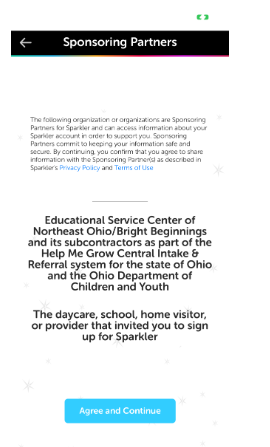
6. To recap: Families should be directed to download the Sparkler: Play for Parenting app and create a profile. By directing families to download the app, consent for data sharing is secured during the creation of their account (see consent language below). If you decide to manually add families, you must gain this consent in written form with a signature from each family on the form. Here is a link to a sample form.


Consent Language:

The following organization(s) are Sponsoring Partners for Sparkler and can acccess information about your Sparkler account in order to support you. Sponsoring Partners commit to keeping your information safe and secure. By continuing, you confirm that you agree to share information with the Sponsoring Partner(s) as described in Sparkler's Privacy Policy and Terms of Use.

You can always find more information, videos, and additional resources at helpmegrow.org/asqproviders


The page also has all the information needed to become a Help Me Grow Sparkler Program Partner. Encourage your colleagues to be part of Ohio's Developmental Screening program!

Have A Question About Using Sparkler?

Project coordinator, Julie Babcock, from Bright Beginnings continues to offer opportunities to connect. Every Wednesday at 1:30pm she hosts open office hours.


Drop in to ask a question, hear implementation ideas from other professionals, or share your ASQ success story.


Register for a Wednesday session via Zoom at this link.

It's Easy to Refer to Help Me Grow

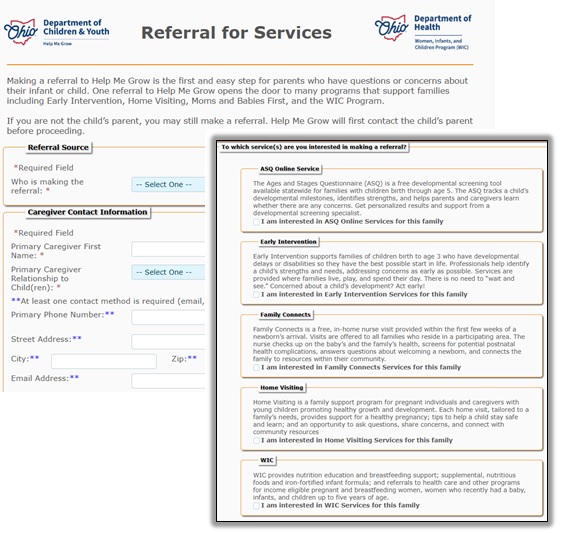
You can easily refer a child for ASQ or other services from Help Me Grow, and even Ohio's WIC program. Our updated web referral form is simple and secure. Find it at our web site and choose the service (one or more) for which you'd like to refer yourself or someone else:

  • ASQ Online
  • Early Intervention
  • Family Connects Ohio
  • Home Visiting
  • WIC

Once we receive the referral, Help Me Grow will be in touch to connect the family to the best service and provider that meets their needs.


Need a Resource?


Help Me Grow has a robust, regularly updated, online directory full of resources for families in the prenatal stage or who have children under six-years-old. Help Me Grow's Community Resource Directory offers easy search options, too.


From WIC locations to early childhood mental health providers, the directory provides resources available in all 88 Ohio counties.


Search results can be shared easily via email or links can be copied to put in a text message. Organizations can add their info if they don't see it listed, and providers can submit changes if information needs to be updated.

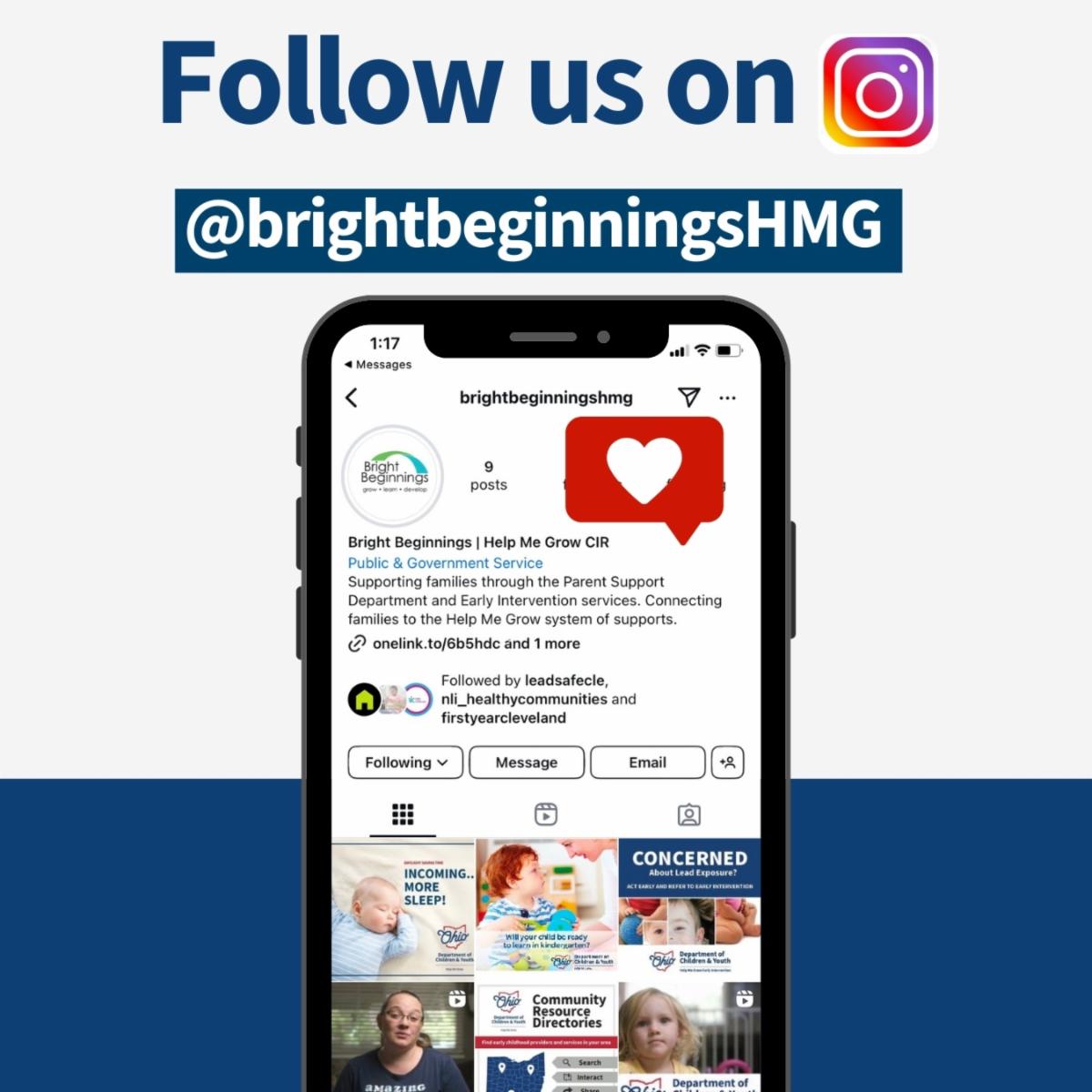
Bright Beginnings offers tips, facts, stories, even play ideas at its Instagram @brightbeginningshmg. Follow us today!

Bright Beginnings is the state contracted provider of Help Me Grow Central Intake & Referral. It is also a leader in providing services to help young children grow, learn, and develop to their fullest potential.

Know someone who could benefit from information in this newsletter? Have them sign up to receive it at helpmegrow.org/ASQ.