Spring 2023 CACFP Child Enrollment and Income Application Renewal Now Open |
|
Dear Karamu Providers:
As a Child and Adult Care Food Program (CACFP) participant, you are required to submit a properly completed CACFP child enrollment application (signed by a parent or guardian) for each child that you claim on the food program. Enrollment applications are valid for one year and must be renewed annually. Our Spring 2023 child enrollment renewal campaign is now underway. During this campaign, we will be renewing all applications that are expired or will expire between now and May 31st, 2023. In conjunction with renewing the child enrollment applications, we are also renewing each child's income eligibility application.
Please Renew Your Applications Electronically
We are encouraging all childcare centers to complete their annual renewal electronically using the eForms options offered in Kidkare by Minute Menu. eForms is quick and easy to use and cuts down on the volume of paperwork you have to handle. It also provides you a signed copy of both the enrollment application and income application stored electronically in your Kidkare account.
Some Parents Will Receive Email Notifications Automatically
Enrollment and income renewal applications for all children will be released in eForms within the next 48 hours of this notice. Once the applications are released in eForms, parents who have an e-mail address on file in Minutemenu or Kidkare will automatically receive an e-mail on behalf of your center inviting them to renew their child's application. Please be sure to let the parents know to watch for the e-mail as some of them may end up going to their SPAM or junk mail folder. (Click here to view a sample of the e-mail the parent will receive). For those with no e-mail address on file, you can have the parents complete the renewals while on-site in your center. See the instructions provided below.
If You Prefer To Renew on Paper
If you prefer to complete your renewals on paper, you can print copies of the joint enrollment / income application provided below. If you would rather have us send you paper copies, please contact us and we will send some to you by postal mail.
Finally, please be sure to see the Frequently Asked Questions (FAQ) provided below and please do not hesitate to contact us if you have questions.
Thanks, and stay safe, everyone!
Tony Corley
President || Director of Child Nutrition Programs
Karamu Nutrition Program Inc.
|
|
Enrollment Renewal Instructions |
|
STEP 1: REVIEW the list of children whose applications must be renewed.
Providers can check the eForms Status list in Kidkare to see the list of children that we have released for renewal. For Kidkare users, simply login into Kidkare, click eForms on the menu at the left side of the page and then click on "View Status". The list of children waiting to be renewed will display.
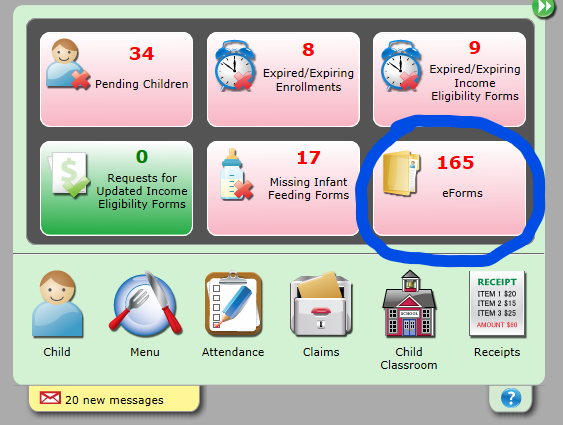
For Minute Menu users, log into Minute Menu and on your dashboard click the button that says "eForms". This will automatically log you into Kidkare and take you to the eForms Status list.
STEP 2: SELECT the option by which you want to renew your applications and then get started!
Please see the "Enrollment Renewal Options" section below. You can choose to use eForms and have the parents renew by e-mail or they can renew onsite while at your childcare center using a computer or mobile device that you make accessible to them. You can also choose to renew the old-fashioned way - on paper. If you want to use a combination of all three methods that's perfectly OK also!
STEP 3: TRACK your renewal status daily and complete all of the renewals by the deadline.
This simply requires that you guide parents to complete their renewal and that you keep up with the renewal status in Kidkare. As eForms renewals are completed by e-mail or on-site in your center, you will see the "Invitation Status" in the Kidkare eForms Status list change to "completed". As you complete forms on paper, you should go into the eForms Status list and click on the pencil icon next to the child's name. This allows you to indicate that the application was completed manually on paper.
|
|
Enrollment Renewal Options |
|
 |
OPTION 1: Application Renewal by E-mailing the Parent Using eForms
(1) Log into your Kidkare account at www.kidkare.com. Childcare centers should use the same username and password you use for Minute Menu. If you do not know your username and password, please contact us.
(2) Once you log in, click eForms on the menu at the left side of the page and then click on "View Status". The list of children waiting to be renewed will display.
(3) If we have an e-mail address on file for the parent, when we released the application renewal to you in eForms, the renewal request was automatically e-mailed to the parents also. You should let them know to expect an e-mail from you (or from the childcare center) with the return address of noreply@kidkare.com
(4) Children with no e-mail address on file will display with an envelope icon with a red "x" on top of it.
- To enter an e-mail address, click on the child's name, enter the parent's e-mail address and then click update. Then move to step #5.
- If you do not have an e-mail address for the parent, please stop here and follow the instructions for "Application Renewal On-Site Using eForms" or "Application Renewal Using Paper Forms".
(5) Once you return to the eForms screen, you must send the application renewal invitation to the parents by clicking on the envelope icon on the right side of the screen. An e-mail notice will automatically be sent to the parent in your name from noreply@kidkare.com
(6) Once the parents receive the e-mail, it will contain a link for them to setup a Kidkare account and complete the renewal for their children. For parents of children enrolled in childcare centers, they will be asked to complete the enrollment renewal as well as an income application renewal.
(7) Once the parent completes the electronic form and clicks submit, a signed copy of the enrollment (and income application if applicable) will be electronically delivered to Karamu. After Karamu approves and signs the document, a downloadable copy will also be saved for you in Kidkare.
|
|
|
|
OPTION 2: Application Renewal On-Site Using eForms
(1) If the parent has no e-mail address (or if you simply prefer to have them complete the renewal in your presence) you can have them sign the enrollment renewal onsite at your facility using a computer or mobile device you provide. (This feature works best from a desktop computer or tablet).
(2) From your childcare computer or mobile device, log into your Kidkare account at www.kidkare.com.
(3) Click eForms on the menu at the left side of the page. The list of children waiting to be renewed will display.
(4) Click on the document icon on the right side of the screen - enter the child's birthdate when prompted. (The birthdate entered must match the birthdate recorded in Kidkare).
(5) When the enrollment application opens, have the parent click through each page and make any changes that are required. (Press continue or next to navigate to the next page of the file).
(6) On the final screen, the parent must type in their name and sign the form in the space provided - then click submit. (Parents will be prompted to complete an eForm income eligibility application after signing the eForm enrollment renewal).
(7) Once the parent signs the form and clicks submit, a signed copy of the enrollment (and income application if applicable) will be electronically delivered to Karamu. Once Karamu signs and approves the document, a downloadable copy will also be saved for you in Kidkare.
(8) Have the parent repeat this process for each of their enrolled children.
|
|
|
|
OPTION 3: Application Renewal Using Paper Forms
While we encourage everyone to renew their applications electronically, we understand some may not be able to. In this case, you may complete the renewal on paper using Karamu's Consolidated Enrollment & Income Eligibility Application which can be accessed by clicking here or clicking on the image at the right . This form is provided as a fillable PDF that can be filled out electronically, however, it must be printed and signed manually, or it can be signed electronically using a 3rd party application. You can also print blank copies of the form and have them filled out manually.
If you prefer to have us send you paper copies instead of using the electronic form or printing your own copies, please contact us and we will send paper applications to you by postal mail.
As you complete forms on paper, you should go into the eForms Status list (see Enrollment Renewal Instructions above) and click on the pencil icon next to the child's name. This allows you to indicate that the application was completed manually on paper.
For your convenience, you can return your renewals by emailing to karamu@karamu.org, faxing to 901.327.8405, or by mailing to our main office address. If you fax or email you do not have to mail us the original forms; please keep them on file in your childcare facility. If you send the forms by postal mail, be sure to keep the carbon copy for your records.
|
|
Click Below to Play a Short Video on How to Use eForms (6:17) |
|
Click Below to Play a Short Video on How to Renew Applications On-Site in eForms (3:51) |
|
Frequently Asked Questions |
|
Question 1: What happens when a child enrollment or income application expires?
Answer: When a child enrollment application expires, all meals claimed for that child will be denied and the child will be classified in the "paid" category regardless of income eligibility status. When an income eligibility application expires, the child is moved to the "paid" category. If you are a for profit center, you may also be disqualified from submitting a claim if the total number of children classified as free and reduced falls below 25% of your total enrollment.
|
|
Question 2: Do I have to renew all of my applications at the same time?
Answer: You only need to renew the applications for those children whose applications have expired or will be expiring soon. Although we are asking you to renew all applications that expire over the next few months, the frequency with which you choose to renew applications is strictly up to you. Providers have the option to choose how often to renew applications as long as each application is renewed annually. Some people prefer to renew all of their applications at the same time (to include children recently enrolled), some prefer to renew all of the applications expiring in the coming month, and some people like to renew all of the applications expiring in the next 3 to 6 months. Again, it's totally up to you. What's important is making sure each child has a new application submitted before their current application expires.
|
|
Question 3: How do I know which applications have expired or will expire soon?
Answer: Providers are advised of expired or expiring applications each month on the Center Error Letter that we mail with your monthly reimbursement statement. There are also visual indicators in the Minute Menu and Kidkare Dashboards.
|
|
|
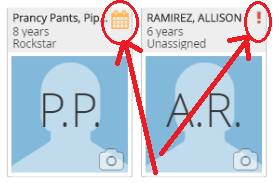
In Kidkare, a calendar icon next to a child's name indicates an application that will expire within the current month. A red exclamation point indicates a child whose application may have already expired. Simply click on the child's icon to open the file and see which application needs to be updated.
You can also run a child roster report in Kidkare by clicking on the Reports menu, selecting Children as the report category, selecting Child Roster as the report, and then selecting the current month and clicking the [Run] button. The child roster report provides the enrollment application expiration date ("expires" column) and the income application expiration date ("IEF Exp" column).
|
|
|
|
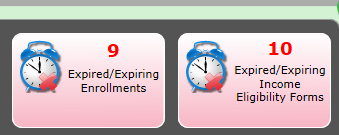
In Minute Menu, when you log in, the dashboard provides a count of the number of enrollment and income applications that have either expired or will expire within the current month. Simply click on the button to see the list of the children.
You can also run a child roster report in Minute Menu by clicking on the Reports menu, selecting Children, selecting Child Roster, and then selecting any day in the current month and clicking the [Continue] button. The child roster report provides the enrollment application expiration date ("expires" column) and the income application expiration date ("IEF Exp" column).
|
|
|
|
Providers can also check the eForms menu in Kidkare to see the list of children that we have released for renewal in eForms. For Kidkare users, simply login into Kidkare, click eForms on the menu at the left side of the page and then click on "View Status". The list of children waiting to be renewed will display. For Minute Menu users, log into Minute Menu and on your dashboard click the button that says "eForms". This will automatically log you into Kidkare and take you to the eForms Status list. |
|
|
Question 4: I just enrolled a lot of children a couple of months ago. Do I have to renew their applications even though they don't expire until many months from now?
Answer: As stated above, for this renewal, we are asking you to renew all applications that have expired or will expire between now and May 31st, 2023. Providers have the option to choose how often to renew applications as long as each application is renewed annually.
|
|
Question 5: There are children on my roll that are no longer in my care. Am I able to withdraw them on my own or do I have to send in a drop notice to Karamu?
Answer: Providers have the capability to withdraw children in both Kidkare and Minute Menu. In Kidkare, click on the icon for the child you wish to drop and then click the [Withdraw] button. Select the withdrawal date and then click the [Withdraw] button again. In Minute Menu, click on "Children" on the menu bar at the top of the page. When the children window opens, use the drop-down button to select the child you want to withdraw. On the child's page, click the [Withdraw] button, select a withdrawal date, and the click the [Continue] button. Note: When selecting a withdrawal date in Kidkare or Minute Menu, be sure you enter a date that is the same as or later than the last day meals were actually claimed for the child. If you select a date that occurs before the last meals were claimed, meals may be denied.
|
|
Question 6: Why are we only renewing applications that expire over the next few months?
Answer: We are constantly looking for ways to improve our processes to help make CACFP participation as easy as possible for our childcare providers. For years we have done annual renewals which many of you are accustomed to. This process started back in the late1990s when the state agencies insisted on having a new application for each child at the start of the fiscal year which begins on October 1st. The state agencies eventually went away from that requirement, but it hasn't been so easy for us to. Annual renewals end up causing you to have to do lots of application renewals at one time and forces us to have to process thousands of applications at the same time. We want to get away from that annual burden. A semi-annual renewal is the first step. Eventually, we want to go away from the big renewal campaigns altogether and have all providers renew applications each month as they expire - which many of you are already doing. This provides a more manageable process for all of us.
|
|
Question 7: I have a lot of state paid children. Shouldn't they all be classified in the Free category based on the case number provided on the childcare certificate?
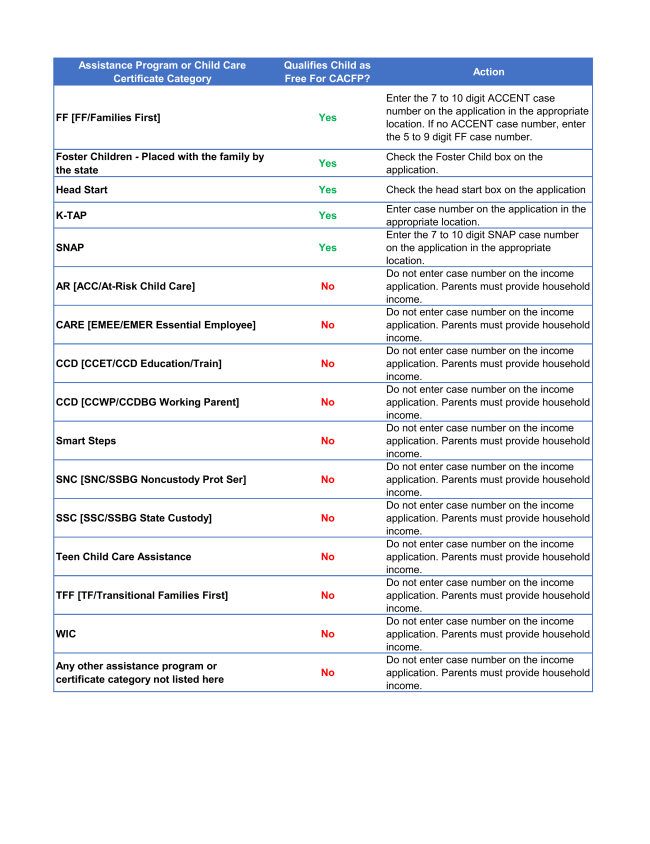
Answer: No - being state paid does not mean a child automatically qualifies as Free. Only those children who are on SNAP, K-TAP (Kentucky only), or whose Tennessee childcare certificate identifies them as Families First Childcare Assistance will qualify in the free category based on the childcare certificate status. This is because children in these categories have already met the federal income eligibility requirements to qualify as Free on the CACFP.
If you have a state paid child who does not fall into one of these categories, then you must have the parents complete the income section of the child's income eligibility application. Entering a case number on the application for any category other than those that are qualifying is a violation of CACFP policy.
(Click here or on the image for additional guidance on qualifying certificate programs).
|
|
Karamu Inc. | 901.327.8401 | 2670 Union Ave Ext. Suite 900, Memphis TN 38112 | www.karamu.org |
|
This institution is an equal opportunity provider. |
|
|
|
|
|
|