Reporting Suspicious Emails with AI Security Mailbox


Team UES,


As we often share, your vigilance against cybersecurity threats helps protect our networks and your data. We have a few quick reminders and an exciting tool to help us work together to combat cyber threats:

WHAT to Report:

  • Phishing emails or suspicious links.
  • Unauthorized access or unusual activity on your accounts.
  • Lost or stolen devices.
  • Malware warnings or unusual system behavior.
  • Anything that feels “off” in your digital workspace.

When you report, include as many details as you can (date, time, suspicious activity).

Remember to continue to take your monthly assigned Cybersecurity Awareness Training in UES University to help you identify threats. It only takes a few minutes.

HOW to Report:

  • Email Us: Send details to ServiceDesk@TeamUES.com
  • Call the UES IT Service Desk: 1-877-UES-SDGO (877-837-7346).
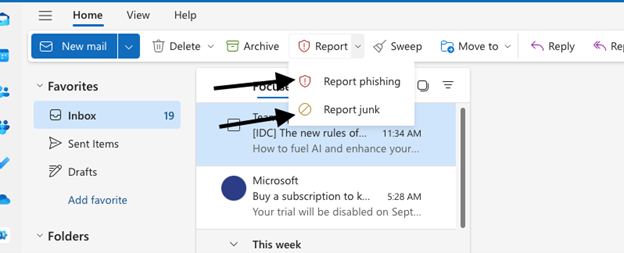
  • Report suspicious emails with the Report Message Button:

To help you report suspicious emails, we're excited to introduce a new feature called the AI Security Mailbox, powered by Abnormal Security. If you see that a suspicious email has bypassed our security, you can report it using the Report Message button that will appear in your Outlook ribbon beginning Monday, December 16. Abnormal Security will analyze your submission and take appropriate action.


If an email looks suspicious (requests sensitive information, has poor spelling or grammar, links that don't match where they say they go when you hover over them, includes strange looking attachments, etc.) you can report it as a suspected phishing attempt. Learn more about how to identify a phishing attempt.


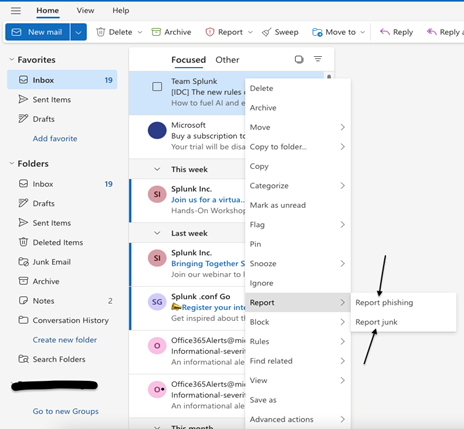
When in doubt, report it! You can report it as phishing or junk from either the top bar in your Outlook while the email is selected:

Or you can report it by right clicking the email itself in your inbox and clicking 'Report':

To learn more about the new reporting tool, please explore this interactive demo:

Learn more about AI Security Mailbox

Remember: Reporting incidents helps us protect everyone. When in doubt, report it out! Thank you for helping keep UES secure!

This information is for internal use only. Please do not share externally.