Fiscal Year 2019-2020
Watch a special video message from your Seeds Family.
RECORDED LESSONS - Now Showing!

As promised, we recorded the live video lessons so far and have uploaded them to our website.

You can watch them here. We keep adding more, so check back often.
NEW TOPICS Added to Live Video Lessons

The schedule for this week's live video lessons is now posted. Video lessons are a great way to see what the tutor is talking about!

It's simple!

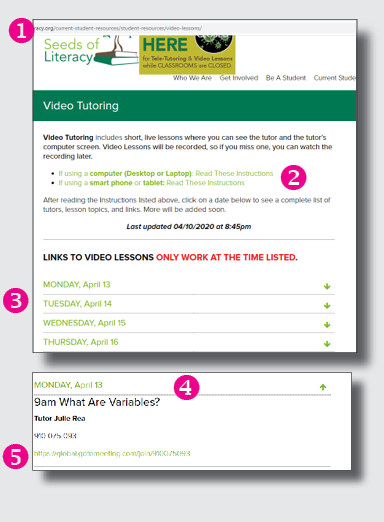
  1. Visit the Video Tutoring page on the website.
  2. Read the instructions for Desktop/Laptop OR Smartphone/Tablet (You do not need to read both sets of instructions --Just the one that matches the device you are using.)
  3. Click the day you want to receive tutoring. (Remember, these lessons are LIVE.)
  4. Review the list of of times and topics and select the one that interests you.
  5. 15 minutes BEFORE the lesson is scheduled to start, start your device and prepare to click the link. If the link does not work, you are not close enough to the start time.
How To Get Your $1,200 Check From The Government
For some people, the payment will be automatic. For others, you will need to use the Non-Filer tool.

The IRS has created a tool to ensure you receive your $1,200 (+$500 per child under 17 years old) stimulus relief check, even if you don't file taxes: the Non-Filer tool.

Who should use the Non-Filers tool?

  • Lower Income: Those who did not file 2018 or 2019 because they are below the normal income limits for a tax return: Single filers who made less than $12,200 / married couples making less than $24,400 in 2019.

  • Veterans beneficiaries and SSI recipients: can use this tool, or wait for the IRS review

  • Social Security, SSDI, and Railroad Retirement beneficiaries with qualifying dependents: automatically receive the $1,200 Economic Impact Payment. You can use the Non Filer tool to claim $500 per child under the age of 17 in the household.

Automatic Payments will begin next week.

Easier Access to WIC Services
Due to the pandemic, appointments and nutritional services will now be made over-the-phone .

Normally, WIC would screen potential participants by in-office appointments only, requiring documentation such as proof of income, residence, identification and proof of pregnancy.

Now, participants will make a “modified” appointment where participants stay in their cars in the WIC parking lot . A WIC Staff member approaches the car, gets the WIC Nutrition Card and the remainder of the appointment is conducted via cell phone.
Legal Aid Launches Worker Information Line
Do you have questions about:
  • how to receive your last paycheck?
  • apply for unemployment?
  • find out if you qualify for unemployment?
  • and more?

Call 216-861-5889.

Leave a message with your name, phone number, and a description of your question.

A specialist will call you back within 3 days (during business hours of 9am and 5pm, Monday through Friday.)

New Rules for Unemployment During COVID19
Painting, Yoga, & More - FREE
The Center on Trauma and Adversity  now offers FREE community virtual wellness, including painting, yoga and more.

Fight stress and trauma and connect with others.

RESOURCES YOU MAY HAVE MISSED: read last week's news
CLICK BUTTONS BELOW FOR
RESOURCES FOR LEARNING AT HOME