|
Having friends and family over for the holidays and you need to share your Wi-Fi password.
Here's how to be able to just share it instead of reading out a long string of capitalized and non-capitalized letters and numbers over and over again to multiple people is a much better, not to mention quicker, option.
Important Note: For this to work, make sure all of the following apply:
- Wi-Fi & Bluetooth are turned on. (Settings)
- All parties are signed into iCloud with their Apple ID.
- All parties' email addresses connected to their iCloud accounts are saved in all parties' Contacts.
- All parties' devices are nearby, within Bluetooth and Wi-Fi range (30 feet)
Once you've confirmed you meet all of the above stipulations, here is how to share your Wi-Fi password with your friends:
- To start, the recipient needs to open the Settings > tap Wi-Fi.
- They will then tap your Wi-Fi network.
- Bring the two devices close together.
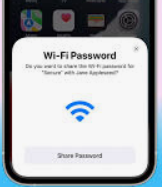
- On your iPhone, you will receive a notification asking if you’d like to share the Wi-Fi password. Simply tap Share Password.
- Tap Done. You can do this as many times as you need to until all parties have access to the internet!
Thanx to iPhone Life.
|