| |
| |
| |
-
As a user of Microsoft technologies, you are receiving this publication to stay informed about critical topics such as Microsoft licensing, price increases, end-of-life dates, technical updates, security notices, and more.
If you do not want to continue receiving TOP STORIES, click on the unsubscribe link at the bottom of the mail.
-
Another 3 New vendors Jetbrains, Foxit and firefly.ai are added.
-
Microsoft EoL section updated for April 2027 - New update coming in August
-
DarkWeb Weekly Intelligence Report #181- bad guys getting AI cheap!
-
Microsoft Promotions - Some are out, and surprisingly they have to do with AI.
-
Low end hardware going up - not even cheap gets to stay cheap!
-
New Outlook gets a new Skin - Taken from the old so you'll like it.
-
Get more storage for your email - Microsoft doubles your storage.
-
Task Manager Upgraded - A great diagnostics tool often overlooked
-
Microsoft Product Rename Tracker - Names change enough to warrant a website!
-
Windows Server 2022 Support ends - and that's just the start!
-
Changing your google password not enough - you may need help with this.
-
Credential Phishing Attempt - You proudly authenticate and it was a fake site!
-
MessiahGPT - AI for evil at $8 per month
-
No macOS printer driver? - No problem! 1 developer + Claude and you have one!
| | | | |
|
Microsoft Modernisation strategy has been updated. This addresses key EoL dates, price increases and updates up to 1 April 2027
New report in August.
| |
| |
We scan the DarkWeb continuously for Hacker signals and Ransomware attacks.
Click above for the report from our live dashboard that we will publish weekly (but actually updated continuously).
This is part of the DarkWeb monitoring services included with many of BUI's managed services offerings. This report is live, and this is a "snapshot" of the top 10 events as of Sunday Afternoon.
| | Click button above for last weeks news. | |
| | | |
|
Jetbrains, Foxit and firefly.ai have been added for this week.
See below for Linkedin
Try out our AI to see whats been added since launch.
| | Get all the releases for the next 4 weeks in South Africa. Coyote vs. ACME FALL 2: Deadpoint and Spiderman are the movies to look out for. | | |
Register with the link above and get access to the entire TOP STORIES Archive with an AI to help you find what you want. You can also find all the vendors added to FirstMarketPlace and get a whole lot of detail about them!
It's in Beta so it could make mistakes.
| | | | |
Microsoft New Promotions
The promotions are here! See the link below!
| |
Entry Level GPU's and Monitors going up!
Last week in TOP STORIES #180 I warned that IT infrastructure shortages are real and lasting, with prices rising across PCs, servers and networking.
Unfortunately, the problem is now spreading further down the food chain.
PC Partner Group, behind brands including ZOTAC, INNO3D and Manli, is warning that entry-level graphics cards could face even more severe shortages during H2 2026, as graphics memory costs continue rising. The cheaper end of the market is particularly vulnerable because there is very little margin available to absorb increases.
And now monitors are joining the price increase misery.
AOC has announced price increases across its monitor range in China, while KTC has separately warned that rising component costs can no longer simply be absorbed. Importantly, monitor panels themselves are not necessarily the problem, higher costs are spreading through chips, motherboards and the rest of the bill of materials.
This reinforces the warning from TOP STORIES #180. It is no longer just AI servers, high-end GPUs and enterprise infrastructure getting hammered.
Even relatively ordinary equipment is being affected.
IDC expects average PC selling prices to rise 18.3% (and probably more for SA) during 2026, while continuing DRAM and NAND increases will work their way through notebooks and other devices.
So don't assume you can simply move down the specification sheet to escape the increases. The cheaper end of the market may actually become harder to get as well as more expensive.
The advice remains the same, plan further ahead, sweat what you already own, remain flexible on brands and configurations, but do not under-specify new corporate PCs simply to hit last year's budget.
Please contact your First Technology Group account manager to connect you with our hardware specialists to review your refresh roadmap before shortages and price increases make the decisions for you.
| |
Maybe a Skin will persuade you to switch!
Microsoft has found another way to persuade stubborn Classic Outlook users to move to New Outlook..... make the New Outlook look like Classic Outlook!
A new optional “Outlook Classic” appearance setting is being rolled out that changes the styling, layout, typography, icons and some interactions to make New Outlook feel more familiar. Microsoft may even enable it automatically for some users as they migrate.
This is only a skin! Underneath, New Outlook is still the WebView2-based application. It does not magically restore every Classic Outlook feature, COM add-in or legacy workflow.
Long-time TOP STORIES readers will recognise the continuing saga. We have repeatedly covered the resistance to New Outlook, while also documenting Microsoft steadily adding functionality.
In #122 Microsoft added PST export, in #170 we noted that the villagers had still not put down their pitchforks, and in #176 Microsoft was amusingly adding more Copilot functionality to Classic Outlook while simultaneously trying to get everybody off it.
Microsoft does, have good reasons for the migration. New Outlook is more closely aligned with Microsoft 365, easier to secure and support, removes decades of legacy baggage and is much better positioned for Copilot and whatever Microsoft adds next.
It is still a bit funny that Microsoft is now trying to make the “new” Outlook look like the “old” Outlook to persuade people to use the new one!
Classic Outlook remains supported for some time, but the transition towards New Outlook continues and ultimately migration is inevitable. Start identifying COM add-ins, PST dependencies, offline requirements, integrations and users with complex workflows now rather than discovering them when Microsoft makes the decision for you.
Please contact your First Technology Group account manager to connect you with our First Digital experts to review your Outlook environment and develop a structured migration plan to New Outlook.
| |
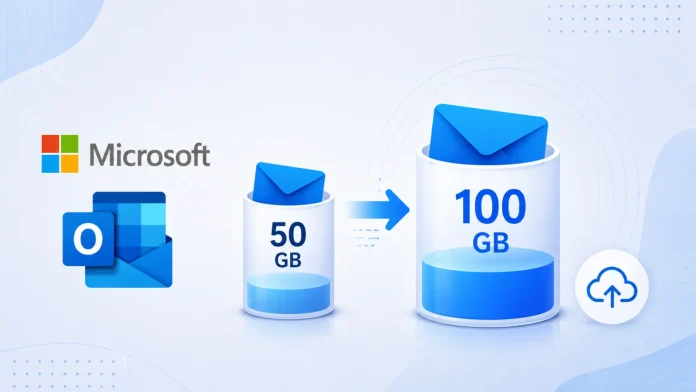
Microsoft Doubles Business Mailboxes to 100GB
Microsoft has quietly given some Microsoft 365 Business users a very useful upgrade, doubling their primary Exchange Online mailbox from 50GB to 100GB.
The increase applies to Microsoft 365 Business Basic, Business Standard and Business Premium, and is being rolled out automatically between June and September 2026.
I checked my own Business account and, yes, my mailbox is now 100GB. Sometimes Microsoft does give you more without strings attached!
There are some important points. This is additional primary mailbox capacity, it does not add Exchange Online Plan 2 archive or compliance functionality, and standalone Exchange Online Plan 1 remains limited to 50GB.
Administrators can also have customised quotas that prevent the automatic increase from appearing.
Please contact your First Technology Group account manager to connect you with our Microsoft specialists to check your Microsoft 365 licensing and confirm that the additional 50GB mailbox entitlement has been provisioned and is available to your users.
| |
Task Manager Gets an AI Upgrade
Microsoft has now detailed some useful improvements to Windows 11 Task Manager, particularly for the new generation of PCs running local AI workloads.
On supported machines you can now see which applications are actually using the NPU, which NPU engine they are using, and how much dedicated and shared NPU memory they are consuming. GPU-based neural engines are also exposed, giving developers and IT teams a much clearer picture of where AI processing is actually taking place.
This is especially useful for developers. If an AI application is hammering the CPU while the NPU and GPU neural engines are doing nothing, there is a pretty good clue that the application may not be taking advantage of the expensive AI hardware you bought!
Task Manager is not just for developers.
It remains one of the simplest tools for finding a misbehaving application. Sort the processes by CPU, memory, disk or GPU usage and you can often immediately identify what is making a perfectly good PC feel slow.
The enhanced reporting now extends that same visibility to NPU utilisation and AI workloads. Microsoft specifically recommends Task Manager as a first-line troubleshooting tool for identifying processes consuming abnormal resources.
This fits neatly with our continuing theme of sweating the hardware you already own. Before deciding that somebody needs a faster PC or more RAM, take a look at what is actually consuming the resources. A badly behaving application, unnecessary background process, a runaway browser tab or a poorly optimised AI workload may be the real culprit.
Please contact your First Technology Group account manager to connect you with our Windows specialists to help optimise your Windows 11 environment, identify resource-hungry applications and establish whether the problem is really the hardware, the Windows image, or the software running on top of it.
| |
Microsoft Product Rename Tracker
If you have ever looked at an old Microsoft licence schedule and wondered what the product you bought is actually called TODAY, you are definitely not alone.
Microsoft MVP Loryan Strant has created The Rebrand Registry, an unofficial but extremely useful database tracking Microsoft's long history of renaming products. It currently covers 72 products and 158 rebrand records, and apparently 2023 alone managed 18 product renames.
Apart from seeing the funny side of this, it could actually be VERY useful.
During a SAM engagement or software audit you regularly encounter old invoices, licence schedules, contracts and asset records using names that Microsoft abandoned years ago.
Was it Azure Active Directory, Azure AD, Core CAL or Microsoft Entra ID? System Centre Configuration Manager, SCCM, Microsoft Endpoint Configuration Manager, or Microsoft Configuration Manager?
The registry lets you trace the naming history and work out what that old product is called today.
There is even a Rebrand Risk Index predicting which Microsoft product might be renamed next. I would NOT recommend using that for your licensing forecast!
Warning! This is NOT an official Microsoft resource. Use it to help identify the product lineage, then confirm licensing and entitlement against Microsoft's Product Terms, licensing guides and your actual agreements.
Please contact your First Technology Group account manager to connect you with our Microsoft licensing and SAM specialists to help make sense of what you bought, what Microsoft calls it now, and most importantly, whether you are still correctly licensed for it.
| |
Windows Server 2022 support ends soon (and that's the minor part)
Microsoft has reminded customers that Windows Server 2022 reaches the end of mainstream support on 13 October 2026.
Note the server does NOT suddenly become unsupported. It moves into Extended Support, with security updates continuing until 14 October 2031. However, mainstream fixes and product development stop, and Microsoft is clearly steering customers towards Windows Server 2025.
The bigger story is that the EoL wheel NEVER stops grinding. There are several other deadlines that should already be on infrastructure roadmaps.
-
Windows 11 24H2 Home and Pro - support ends 13 October 2026.
Enterprise and Education 24H2 remain supported until 12 October 2027. Windows 11 Enterprise and Education 23H2 reach end of support on 10 November 2026.
-
Office 2021 and Office LTSC 2021 - support ends 13 October 2026.
-
Windows Server 2012/R2 ESU Year 3 - the final ESU year ends 13 October 2026.
-
Office Online Server - retires 31 December 2026.
-
Windows Server 2016 - Extended Support ends 12 January 2027.
-
Windows 10 Enterprise LTSC 2021 - support ends 12 January 2027.
-
SQL Server 2017 - Extended Support ends in October 2027, which may sound far away, but SQL migrations have a nasty habit of taking longer than expected.
And remember, SQL Server 2016 plus SharePoint Server 2016 and 2019 already reached end of support on 14 July 2026. If you still have them, the planning deadline has already passed.
This should NOT become another exercise in simply replacing every old server with a new server.
Use these deadlines to review the applications sitting on the infrastructure, retire what is no longer required, consolidate where possible, optimise what remains, upgrade where appropriate and decide which workloads should remain on-premises, move to newer platforms, or migrate to Azure or another cloud platform.
And most importantly, do not simply migrate yesterday's technical debt into tomorrow's cloud bill!
The problem is becoming more urgent because hardware shortages are making infrastructure refreshes slower and considerably more expensive.
TOP STORIES #180 already warned that infrastructure lead times are stretching and that waiting for hardware availability and pricing to return to "normal" is no longer a strategy.
That means EoL planning now needs to happen well before the Microsoft deadline. Waiting until a server actually reaches end of support and then discovering that the replacement hardware has a lengthy lead time is going to be an increasingly painful way to run an infrastructure programme.
Please contact your First Technology Group account manager to connect you with our infrastructure, Microsoft, Azure, licensing and application specialists to inventory what is approaching end of support and develop a coordinated programme to retire, consolidate, optimise, upgrade or migrate each workload according to the applications it actually serves.
With the EoL wheel grinding away and hardware shortages getting worse, the earlier this work starts, the more options you will still have.
| | | | |
Changing your Google password may NOT kick the attacker out!
This is a particularly nasty evolution of phishing.
A toolkit called iAuthFlow v2 can trick a user into signing into what appears to be Google, relay the authentication in real time, then use that legitimate authenticated session to register a new passkey controlled by the attacker.
In the demonstration analysed by Abnormal Security, the new passkey was created just six seconds after authentication.
The really worrying part is what happens next. Changing the password and terminating existing sessions may NOT be enough. The attacker's passkey is a separate authentication credential and can remain registered, allowing them back into the account. Importantly, the cryptography behind passkeys has not been broken, the attacker has persuaded the human to provide the authenticated session needed to add their own passkey.
Cleaning this up is not necessarily something the average user should attempt alone. You may need to check and remove unknown passkeys and security keys, OAuth permissions, recovery methods, delegated access, devices, Gmail forwarding rules and filters, and review security and sign-in activity. Google confirms that passkeys and devices must be reviewed and removed separately.
So once again, the human remains the weakest link, and security awareness training has to keep changing as the attacks change. If somebody suspects they have fallen for an attack like this, they should immediately contact their IT/security team, or their security awareness training provider who can refer them to appropriate technical expertise. Do not assume that changing the password means the problem has gone away.
Please contact your First Technology Group account manager to connect you with our security specialists to help review your identity security, phishing protection and, critically, your continuously updated user security awareness training.
| |
Microsoft Credential Phishing Attempt.
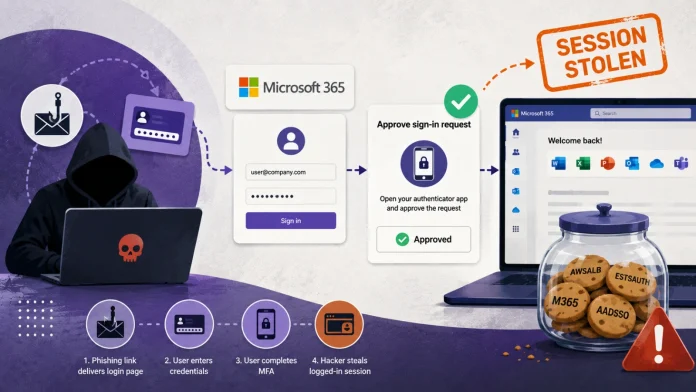
A phishing-as-a-service platform called Mirage2FA is showing why MFA alone is no longer enough.
Instead of trying to defeat MFA, the attacker sits between the user and Microsoft 365. The victim enters their real credentials and completes MFA normally, but the phishing site then steals the authenticated session cookie that Microsoft issues afterwards. The attacker can reuse that session to access Outlook, SharePoint, OneDrive and other Microsoft 365 services without another MFA prompt.
Researchers identified 9,426 targeted accounts across 94 countries, including South Africa, with thousands showing signs of potential compromise. Mobile devices are particularly attractive because it is harder for users to spot suspicious URLs on a small screen.
Once again, the human remains the weakest link. The technology can be working exactly as designed, including MFA, but one convincing login page can still hand an attacker an authenticated session.
This is why security awareness training cannot be an annual tick-box exercise. Phishing techniques are changing constantly, so training has to change constantly as well. Users need to understand today's attacks, not the phishing examples they were shown two years ago.
Technically, organisations should also consider phishing-resistant authentication such as FIDO2, Conditional Access and Continuous Access Evaluation.
Please contact your First Technology Group account manager to connect you with our security specialists to review your Microsoft 365 security posture, strengthen phishing-resistant authentication and, just as importantly, ensure that your users receive continuously updated security awareness training based on the attacks happening now.
| |
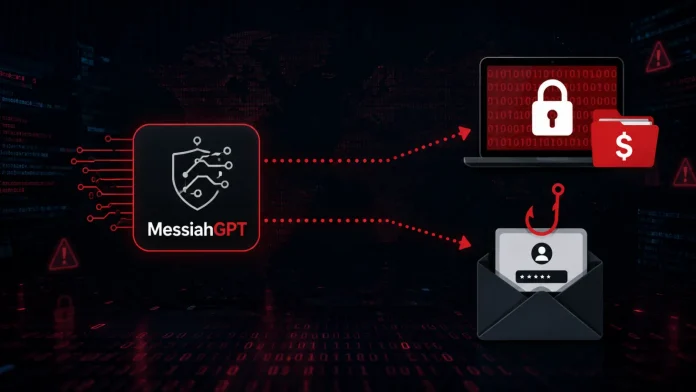
MessiahGPT, an AI for Evil at $8 per month
A criminal AI service called MessiahGPT is being openly promoted to hackers to help create ransomware, phishing kits, malicious scripts and social engineering attacks.
It even offers free queries before subscriptions reportedly start at around $8 per month. Trellix has confirmed the service is live, although some of the grander technical claims made by its operators cannot be independently verified.
That price is the scary part - the barrier to entry in the evil club is very low.
AI is lowering the skills and cost required to become a cybercriminal. Somebody who previously needed to know how to write convincing phishing emails, create malicious code or customise an attack can increasingly ask an AI to help do it for them.
Worse, the AI can keep producing different versions for different companies, departments, languages and situations, making attacks harder for traditional filters to recognise.
The bigger lesson is that the tricks being used against humans are now changing MUCH faster.
I warned in TOP STORIES #179 that generic awareness training is no longer enough, and #180 continued the theme with fake hotel and airline WiFi, voice-message phishing and attacks targeting personal photographs.
The common thread is that users need to know what criminals are doing NOW, not what they were taught on last year's security course.
AI just puts an accelerator on the problem.
Security technology remains essential, but security awareness training needs to become continuous, customised and regularly refreshed around the latest attacks. The bad guys have AI helping them learn new tricks, your users need to keep learning them as well!
Please contact your First Technology Group account manager to connect you with our security specialists to review your security controls and, just as importantly, implement customised, role-based security awareness training that is continually updated as the threats change.
| | | | |
| |
One Developer and Claude wrote a macOS printer driver
A developer has used Claude Code to create working macOS support for an HP Laser 1008a, a printer that HP only supported on Windows and Linux. The printer uses a proprietary SPL3 language, with no AirPrint, PostScript or PCL support, so this was NOT simply asking AI to tidy up a few lines of code. In around 30 to 40 prompts, Claude helped analyse the printer, work through the existing Linux driver and ultimately produce a working macOS driver package.
There is an important detail, Claude got things wrong along the way and the developer had to correct it. But he also says he learnt about macOS printer drivers while building it.
This is another example of the change we have been following in TOP STORIES. AI is moving from answering questions to actually doing technical work, and giving skilled people the ability to tackle problems outside their normal area of expertise.
Microsoft Discovery is doing this with research, coding agents are doing it with software, and increasingly AI will become another member of the technical team.
It also reinforces another recurring lesson. Don't build your AI strategy around whichever model happens to be winning this week. Build a secure, governed AI environment where your people can use the right model and Agent for the job, while controlling access to corporate data AND keeping an eye on that consumption meter!
Please contact your First Technology Group account manager to connect you with our Cloud, AI, data and security specialists to help turn AI from something your staff chat to..... into something that actually gets useful work done.
| | | | |