JUICE JACKING


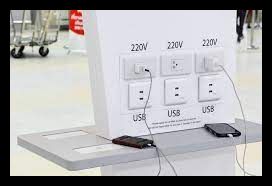
Juice Jacking has been in the news due to a recent FBI warning, but it's an old scam that bears repeating. As a refresher, juice jacking is when hackers install malicious code into public charging stations to read and steal data from mobile devices as well as track them. While it’s more likely to impact Android smartphones than iPhone and iPad, the latter are not invincible to such attacks.


We’ve all been there - you’re traveling, maybe you’re at an airport or a train station, and you realize that your phone could do with a bit of a charge. Luckily for you, right by where you’re sitting, potentially even built into the seats where you’re sat, there’s a free, public charging station. All you have to do is plug your own cable in and charge your device. But right before the Easter weekend this year, the FBI tweeted, warning travelers NOT to use these free charging stations. 


So, what should you do if that smartphone battery is running low? Definitely avoid using free charging stations in airports, hotels, or shopping centers. What if you're traveling? Then it's definitely worth buying a portable charger or power bank. 


If you have a wall charger and cord handy, plug right into an available AC outlet. Also, be careful of third-party charging cables, as some also contain viruses to hijack your device. Can a charging cable give your phone a virus? - Unfortunately, yes. Both USB and Lightning connectors/cables besides power wires also have data wires which are used to connect phone to a PC. Data wires are not needed for charging (at least for USB) and when charging on public place it's better is to have a charging only cable.


Remember:  Public electrical outlets are completely safe. It’s public USB ports that come with risk. 


Great Video explaining the problem and solutions: STOP USING THESE

Video thanx to Proper Honest Tech

Register Now Online

Online registration is open until classes are filled or

10 AM sharp one-day before the start of a class.


Seating is limited due to social distancing, so register early!

Register and pay online to participate in our classes.

REGISTER FOR HUNTINGTON LAB CLASSES

FSL SeniorNet at Family Service League, Olsten Family Center

790 Park Avenue, Huntington, NY 11743 1-631-470-6757

  • Android Phone (4 lessons) - starts May 1
  • Mac Computer Basics 1 (4) - starts May 2
  • PC Computing Basics 2 (5) - starts May 2
  • Photoshop Elements: Photo Editing & Project Creating (5) starts on May 3
  • iPhone: An Introduction (4) - starts on May 4
  • Smartphone Photography (4) - starts on May 24
  • Windows 11 (4) - starts on June 8

Private Instruction also available at this location.

REGISTER FOR BAY SHORE ANNEX

FSL SeniorNet at Family Service League, South Shore Iovino Family Center

1444 Fifth Avenue, Bay Shore, NY 11706 1-631-647-3100

  • PC Computing Basics 2 (5 lessons) - starts on April 25
  • Mac Computer Basics 1 (4) - starts on June 6

Private Instruction also available at this location.

REGISTER FOR BLUE POINT COTTAGE

Town of Brookhaven, FSL SeniorNet @ Henrietta Acampora Cottage

39 Montauk Highway, Blue Point, NY 11715 1-631-470-6922

  • Google Docs Basics (2 lessons) - starts on May 11
  • iPhone & iPad: Quick Start (2) - starts on May 25

Private Instruction also available at this location.

FREE WEBINARS & SEMINARS

Webinars are held over Zoom,

Seminars are at local libraries.

Webinar registration is open until one-hour before the start time.

Hosted events will post their registration close time on their registration page.

  • Preventing Fraud & Identity Theft on April 25
  • Windows 11: An Introduction on April 26
  • Computer Security on May 2
  • Smartphone Photography on May 3
  • Traveling with Your Smartphone on May 10
  • Internet Security on May 16
  • Android Phone: Getting Started on May 17
  • iPhone: The Camera on June 21
PRIVATE INSTRUCTION INFORMATION
IMPORTANT STUFF TO KNOW!

COVID PRECAUTIONS FOR ALL IN-PERSON CLASSES REVISED:


MASKING IS NOW OPTIONAL.


PROOF OF COVID VACCINATION IS NO LONGER REQUIRED.

-------------------------------

ALL CLASSES:

Registration is open until 10 AM sharp one day before the start of a class.

To participate in our classes, register and pay online with a credit or debit card. If you prefer to pay by check or cash, contact the office at 631-470-6757, or register in person at Open House in Huntington, Bay Shore & Blue Point.


ONLINE CLASSES:

To participate in our online courses, you need to download Zoom on your computing device*. The Zoom link will be included in the confirmation sent by ezregister.com. The teacher will also send the Zoom link and manual before the class.


WEBINARS ARE ONLINE:

Registration is open until one hour prior to the webinar's start time.

The Zoom link will be included in the confirmation sent by ezregister.com. The teacher will also send the Zoom link and handout before the webinar.


SEMINARS ARE IN-PERSON & LIBRARY HOSTED:

Registration is managed by our host library. Their registration link will be provided on their website, our email blasts, and our webpage.


SOLD OUT:

Please call 631-470-6757 or send an email to fslseniornet@fsl-li.org

to receive an email with information as to when the course (webinar, seminar, class or workshop) is offered again.

Please include the name of the course you are interested in.


COMPUTING DEVICES:

*Computing devices include Windows and Mac Desktops & Laptops,

iPads, and Android Tablets.

It is NOT recommended to Zoom using your smartphone

due to the smaller screen size.


ZOOM HELP IS AVAILABLE:

 If you need instructions on downloading and using Zoom, click here:

HOW TO JOIN A ZOOM CHAT. 

REGISTRATION PROCESS
SeniorNet Community Programs
COMPUTER DONATION / REFURBISHMENT PROGRAM
TECH CONNECT LIBRARY
FSL SENIORNET WEBSITE
FAMILY SERVICE LEAGUE WEBSITE