| As you might know by now as a Translator's Tool Bool Journal reader, translation environment tools are improving by the day. The overwhelming presence of neural machine translation (NMT) in every translation suite, plus the constant improvement of technologies like upLIFT from SDL Trados Studio, are changing the way we face translations with almost every project. In audio-visual translation (AVT), however, despite technical improvements and innovations in apps from streaming services, it sometimes seems that we subtitlers are still doing our work in much the same way as we have since the turn of the century. Back then, we faced a huge leap in methodology and availability of tools, and we rapidly went from receiving physical materials to subtitle to logging into our clients' servers to download media and send the subtitles via e-mail. And although some things have changed in the last few years, professional subtitlers working for direct clients like production companies, or even film directors themselves, have had the same resources for a while now: free software and software too expensive for some freelancers. So, what have we been missing in between? Well, a solution like technical translators use -- the likes of memoQ, Wordfast, and Trados Studio -- though we do have that too, kind of. Let's dive into these three scenarios and see what's new for subtitlers. Can we still rely on free software for professional subtitlers? The short answer is yes, we can. If you're the type of subtitler who prefers mainly working with direct clients and you avoid working for large streaming services via vendors who do not always offer the best rates, then you might be in a sweet spot in the AVT world. I don't mean this just because you get to charge higher rates. You can actually use myriad free alternatives, like our old friends Subtitle Workshop and VisualSubSync, or the more frequently updated and flashy Aegisub and Subtitle Edit. All of these allow you to deal with large videos in a variety of formats, and yes, they are powerful enough to do that. You don't really need to pay if you're also trained on spotting [defining the in and out times of individual subtitles] with these tools; however, you might be interested in investing (a lot) in more professional tools. I have the money, and I want to invest in something better. There's no doubt that despite their elevated price, both WINCAPS Q4 Subtitling Software and EZ Titles offer great improvements in things like recognizing some of the subtitles from the audio and letting you save time in spotting, as well as creating subtitles from DVD or Blu-ray, for instance, if that's something you're looking for. Additionally, they do have a more powerful interface, which feels like comparing some free CAT tool's interface with those of the most expensive options. But hey, can you do pretty much the same with OmegaT as you can with Wordfast? Yes. And in the case of subtitle editors, that same logic applies, with a big difference though: if you want to invest in professional software, you'll have to pay around $1,700 for the EZ Titles basic edition and $300 a year for WINCAPS. Is it worth the investment? It certainly is -- if you can afford it. And what about the cloud? Here we can find some new alternatives. Some of them are free, and some are expensive, but not outrageously so. I have been particularly impressed by Ooona, which has a similar price to the most expensive alternatives but offers a wide variety of options, and you can even get some great discounts. In fact, right now, if you use the code BESAFE_80%, you will pay only $60/year for the Online Captions & Subtitles Toolkit, which is normally priced at $300/year. The promotion code is part of the company's efforts to help translators during the coronavirus crisis. The discount expires at the end of April. Ooona
is great because it offers different alternatives. For instance, if you're used to working with timed templates, you can opt for the cheapest option, Ooona Translate, and subtitle online without the need of installing software. Certainly, this is a great way to go about things nowadays, considering that most subtitlers are working with timed templates.
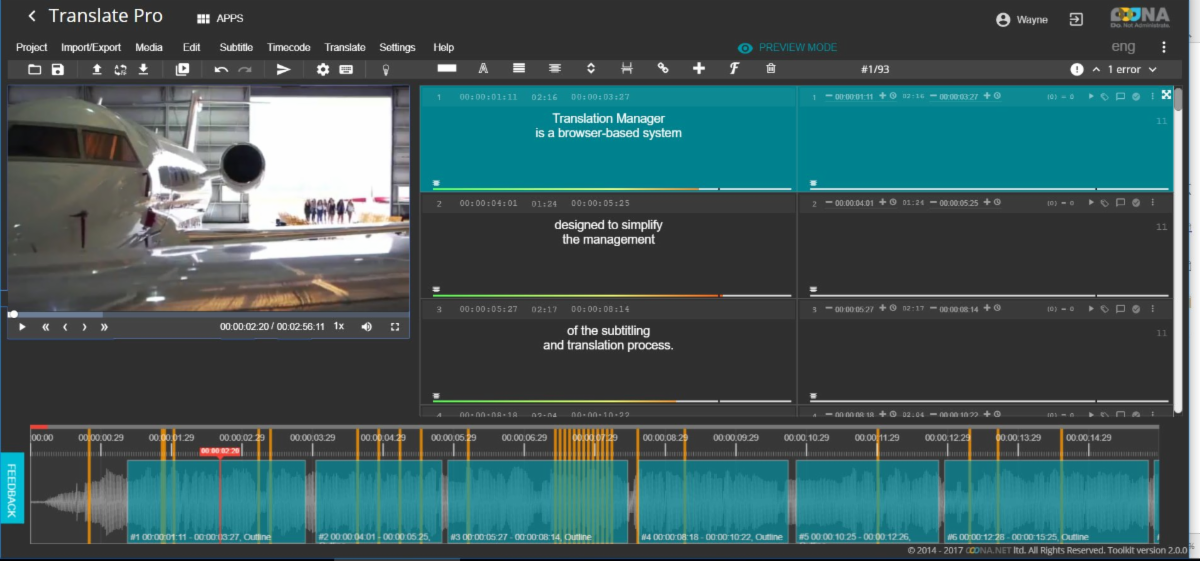
It's worth noting here, though, that if you're working for Netflix, for instance, you'll be translating directly on their online software and won't need anything else. Amara is another great alternative for working directly from the cloud, with two options, Plus and Pro, which are both somewhat cheaper than other paid alternatives. Additionally, Amara has a free, public version in which you can use their powerful editor, but all subtitles you create there are publicly available. This means you can't use this software professionally, but it is an excellent way to start for many translators wanting to take their first steps in AVT. There are other options you can find online, like Subtitle Edit Online and Subtitle Horse, but I would recommend trying either Ooona or Amara, particularly if you're a Mac user, and you find it difficult to get different alternatives for your specific needs. Subtitling with translation memories and termbases... are we there yet? As I said in the introduction, if you're like me and work as a subtitler as well as a technical translator, you might have been wondering why it's so hard to have a subtitling environment tool with translation memories and termbases. Especially considering that two, three, or even more translators might be working at the same time on a whole season of an upcoming TV show. Well, there's a catch: you need a source text, right? While this might seem obvious to you and me, it wasn't for the people at SDL when they introduced the Studio Subtitling app last year. I remember watching Paul Filkin's presentation while he was showing how you can translate from an AVT-specific file and store your translations in a TM, and even add terminology to a termbase with Studio Subtitling, and suddenly one question started looming: what happens if I don't have a source text? Paul seemed baffled at that question, which is not too surprising since subtitlers and technical translators seem to operate in different worlds. And while it seemed clear to SDL or Kilgray with their memoQ Video Preview Tool and Smartcat, among other developers, that we would be translating from files where we could watch the video inside the TEnT while subtitling, they didn't know most of us don't work like that. We work from audio, and if we do have a script, we have it as a plain text on a PDF or Word file. So, it's clear now that going forward we need to find an alternative that, combined with speech recognition technology, allows us to create translation units without having a timed template. This, together with the possibility of sharing termbases between several translators working on the same project within the same subtitling environment tool (we could call them SETs, when they finally arrive), and potentially allowing interaction between translators -- as we are starting to see in some web-based tools -- could drastically change the way we work, as the internet did for many subtitlers who were used to working with physical devices. And in that regard, there might be something cooking between AI, automatic speech recognition, and NMT developer AppTek and Ooona, who appear to have joined forces. We'll just have to wait and see. About the author: Damián Santilli is a Sworn English<>Spanish Translator and a Certified International Spanish Copy Editor and Proofreader. His areas of expertise are subtitling, software localization, information technology, engineering, and mechanics. Since 2009, he has offered more than 100 workshops and lectures on audiovisual translation, translation technology and Spanish proofreading to more than 1,000 students in different cities of Argentine and elsewhere. In 2018, he was part of the team that created the Netflix's Hermes test and was in charge of the Latin-American version of the exam. You can find more information about him and his many accomplishments at damiansantilli.com. [Note from Jost: My friend Damián is also just a super nice guy and I really want to thank him for this rock-star article!] |