A Computer Journal For Translation Professionals |
|
__________________________________
This edition of the Tool Box Journal provided to you by
|
|
_________________________________ |
|
Issue 23-2-34
(the three hundred forty-fourth edition)
|
|
I'm a lucky man, in so many ways. But let me just tell you about the ways that made you subscribe to the Tool Box Journal in the first place -- the professional ones.
I'm a lucky man -- in spite of myself. Years ago, I wrote an article telling about my childhood reading of the German children's book classic Jim Button and Luke the Engine Driver that made me study Chinese. Even when I wrote that 15 years ago, I knew it wasn't completely true -- or at least, only partly true. I studied Chinese because it seemed difficult, and I had the good fortune of having a teacher who kindled in me a passion for language, communication, writing, and translation that has been burning to this present day.
I then stumbled into a world that I had barely heard of, let alone thought I would enter, a world that embraced me and allowed me to grow up alongside it: the translation sector. What an amazing field! At the time I entered it, it had become "fully computerized," meaning that translators had started to use word processing software and typically received and sent their assignments via e-mail or FTP. Translation-specific tools, on the other hand, still had a long way to go before they were widely accepted. And when I say translation-specific tools, I'm certainly not thinking about machine translation, which at that point was not in any shape to occupy a place in the toolbox of most serious translators.
What a great time to explore the existing technology, experiment with it, and share that journey with my colleagues.
I was (and am) a technical translator. That means -- as far as I'm concerned -- that the texts I translate aren't always spellbinding in and of themselves. What does enthuse me, however, is selecting the best possible technology, mixing it with an optimally designed workflow, continuing to improve methods for terminology research, and ultimately improving the outcome -- both as far as the quality of the translation product and the productivity/profitability of each project.
I'm a lucky man. Around the time I turned 50, it hit me on one of my daily beach walks that I should look at ways to take a next step, to combine my academic experience with my professional journey and my Christian faith and dream up something that no one else could -- because no one had traveled the exact same journey as mine. So I came up with the idea of a tool that collects insightful Bible translations from around the world to supply readers with a prism that refracts the original languages of the Bible into hundreds -- and eventually thousands -- of strands of color. I knew it was a project too large to lift on my own, so I looked for a partner who would give me both the finances and the manpower I needed. It took me a couple of years of sometimes frustrating doors shutting in my face. But guess what?
I'm a lucky man. And I eventually found a dream partner in United Bible Societies that I have now been working with for more than five years, first on a very part-time basis and now almost full-time to build Translation Insights & Perspectives, a tool that should make every linguist's heart jump -- Christian or otherwise. Being a curator for this tool is just about as perfect a match for my experience and abilities as it gets. (I hope this might serve as an encouragement to you: doing a lot of different things is valuable; dreaming up crazy ideas is, too; and so is seizing the freedom and the motivation to forge something new and unique from it.)
I'm a lucky man. And it turns out that you're lucky, too. After many conversations and much pondering, I decided last year to turn the steering wheel of the Tool Box Journal over to someone else. I had a lot of requirements, however: I wanted to find someone with a primary interest in continuing to speak to you, the journal's core audience. I also wanted someone who could communicate effectively with our younger generation of translators. And I wanted them to be able to write knowledgably not just about one or two kinds of solutions, but to continue looking at existing and upcoming technologies and workflows with fresh and unbiased eyes -- like I've tried to do for the last 19 years.
I wracked my brain for several months and came up with nothing -- until (on a beach walk, of course!) I thought of Slator.
You're likely familiar with Slator, the most consistent source of news for many stakeholders in the translation world for the last eight years. I say "many" because so far, they've largely missed out on connecting effectively with one important stakeholder, from our perspective the most important stakeholder: translators. Knowing this, Slator is excited to use the Tool Box Journal to foster communication with this important constituency. And rather than integrating it into the rest of its product offering, Slator will continue to build it as a tool to speak specifically to translators. Fortunately for all of us, it looks like Dorothee and Josh will remain as columnists, and I'm sure you'll hear more specifics from them and from Slator in the next few months.
Anyway, it will be time for me to say goodbye next month -- I promised Florian at Slator that I would still author one last edition -- but today my heart is full of you, my readers, and you, my sponsors, and your support over the last nearly 20 years. I feel grateful knowing that I leave the Tool Box Journal in good hands, and . . .
I'm a lucky man.
|
|
Contents
Computer Intelligence
Getting out of a business slump (Column by Dorothee Racette)
Cymo Note: Speech recognition meets automated note-taking (Column by Josh Goldsmith)
How do translators actually use MT?
Ronald Arbuthnott Knox
New password for the Tool Box archive
The last word on the Tool Box Journal
|
|
To facilitate the life of translators, memoQ has developed the backup wizard tool!
With memoQ's latest feature, you can not only manually select and back up your memoQ projects, but you can also schedule regular automated backups -- for example, at the end of each day, so you always have the latest version on hand if something unexpected happens during work.
Be prepared and make sure that all your precious work is safe.
Learn more about memoQ backup wizard here.
|
|
I am certain that many of you feel very much like I do as we read the never-ending articles, social media posts, and numerous other publications about ChatGPT, what an incredible impact this "AI thing" is having on us, and how it will change everything!
Every time I read another article, my inner critic says, "Welcome to the world we translators experienced at the end of 2016."
That, of course, was when Google switched to neural machine translation, followed shortly after by Microsoft and then DeepL. That was when we experienced a massive jump in translation quality from those engines and others that kept popping up like mushrooms on a rainy fall day. When we quickly realized (well, maybe "quickly" is over-exaggerated) -- when we realized that these machines didn't know what they didn't know (i.e., what data they were trained with) but always confidently "sold" us great-looking suggestions -- which either dropped the parts that were unfamiliar to the machine or replaced them with something else entirely.
Sound familiar? Does it also sound familiar when reading those many, many articles about ChatGPT that say, "It was amazing what the tool was able to generate in response to my prompts. Amazing! But then it said something that was completely nonsense!"
I (make that: we) know!
ChatGPT and its competitors use essentially the same kind of neural network technology that neural machine translation uses. Both the chat and translation functions are very good and seem smart, but it's important to remember that neither of them is actually smart. In fact, "smart" is not even on the radar of these engines.
Any program that uses the current kind of technology has no understanding of what it's doing. It's mimicking admirably, but it's just producing sounds -- or letters, as it were -- one in front of another, and the machine doesn't know what any of it means. It just responds to prompts.
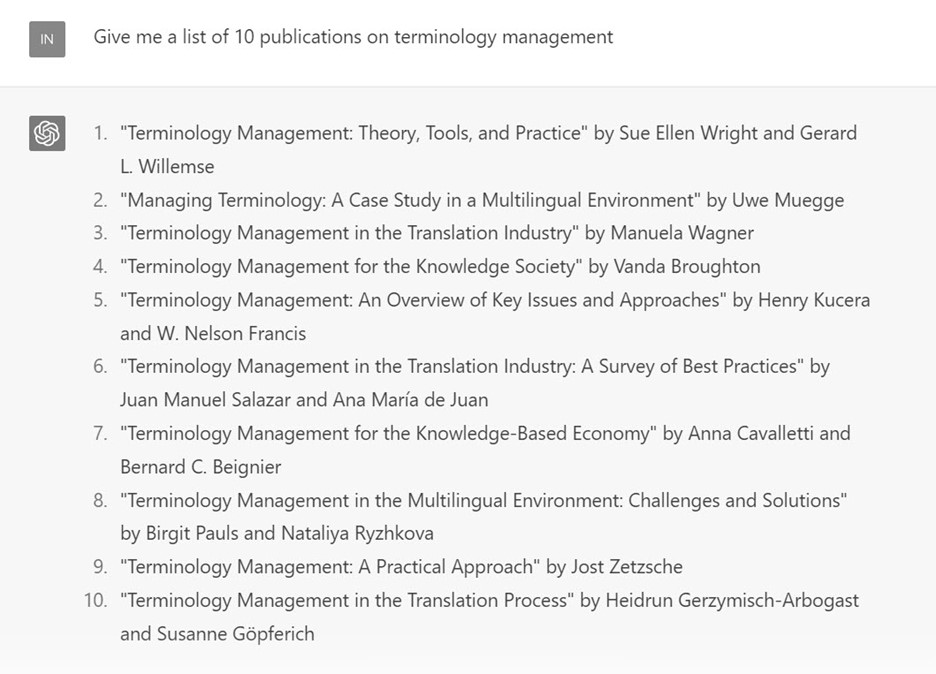
Uwe Muegge, whom many of you know, asked ChatGPT a few weeks ago for ten publications on terminology management. This is what it produced: |
|
Looks amazing, right? You'll recognize some of the authors, all of whom have written something on terminology at some point. It even puts them in an order of importance that seems reasonable. But you know what's not reasonable? None of these publications exist. Not one. The machine was able to pull out good-looking information snippets, and it delivered them in exactly the right kind of format. It's just that none of it was true.
That's neural networks for you.
Really, what we should all be doing right now -- should have been doing since ChatGPT launched late last year -- is go on speaking tours to tell educators, writers, and the many other creative professionals who feel shell-shocked not to worry. The kind of artificial intelligence we're dealing with is powerful -- too powerful for its own and our good sometimes, but a potent tool nevertheless. We know, we've been using its cousin since 2016.
|
|
Getting out of a business slump (Column by Dorothee Racette)
|
|
Fluctuating income is one of the least enjoyable aspects of self-employment. When things are going well, you have current projects and a pipeline of scheduled or anticipated work -- with the associated payments rolling in. Sometimes that flow simply comes to a halt. After a day or two of enjoying the freedom of doing whatever you like outside of your office, fear begins to set in: Will you be able to pay your bills, have your clients decided that machine translation is now sufficient for their purposes, have you been outbid? That fear can intensify when a slump continues for days and even weeks. Here are a few things you can do when your project pipeline has more open space than you would like.
- Stop making up stories. Dry spells have nothing to do with the quality of your work, and the industry has not ceased to exist. It's good to remember that fluctuations occur in every business. The cheerful posts you see on social media also don't mean you are the only person who needs more project work. All freelancers experience business slumps, and the best way to move out of paralyzing worry is to take action.
- Nudge past clients. Getting in touch with existing clients to let them know you are available for new projects is one of the most effective ways to reenergize your freelance business. A friendly message with a little update about you and your business not only reminds your clients of your excellent work, but may also save their project managers valuable time. If necessary, go back to your project data from past years to look for names and contacts. Don't overthink what to say -- an upbeat note that mentions your language pair and specialty is enough.
- Analyze your business data. Chances are, you didn't have much time to really look at your past work when you were busy doing one project after another. There is no need for a flashy CRM system; you can find the information in your hard drive or bank account. The data from past fiscal periods tell interesting stories -- about new special fields, favorite clients, and lucrative projects. This is a good opportunity to check whether your online profiles and business materials are still up to date. Add information about new fields or technology you may be using, and ask a colleague to give you feedback on your CV.
- Network. Networking doesn't mean sending awkward messages to people who have never heard of you. (Pro tip: Don't send messages starting with "Dear Sir" to a female business owner). It simply involves talking to people you already know, such as T&I colleagues, past coworkers in other industries, teachers, or classmates. Look them up online, or invite them for coffee. Posting online (anything that does not sound desperate) is part of networking as well -- your content reminds people of your work and can result in more conversation. Although it is harder to do when work is busy, make sure to keep up the communication in the long term.
Going forward, there is even more you can do to prevent future dry spells.
- Be findable. Amidst all the talk about "marketing," it can be easy to forget that the whole point of telling other people what you do is to make sure they can find you when they need your services. Your work as a linguist solves a problem (needing to understand), and potential clients will search for you when they have that problem. Your outreach, online profiles, and connections come down to one thing -- you need to be easy to contact.
- Don't forget about referrals. Keep in mind that the most interesting and profitable work projects are never posted on gig websites. They are referred based on the recommendation of your peers. To be the recipient of referrals, you need to be part of a group that gets project offers, and be a fair player within that group. That doesn't happen overnight -- it is part of building a sustainable business. Membership in professional organizations not only shows your level of professional commitment, but also gives you access to friendly places for sharing and learning.
Although they are unpleasant and scary, dry spells can provide the necessary incentive to reenergize your outreach efforts and professional learning. Business doesn't just happen; it reflects the energy you invest.
Dorothee Racette, CT has been a full-time freelance GER < > EN translator for over 25 years. She served as ATA President from 2011 to 2013. In 2014, she established her own coaching business, Take Back My Day, to help individuals and organizations solve problems related to workflow and time management. As a certified productivity coach (CPC), she now divides her time between translating and coaching. Her book Complete What You Started (2020) provides a blueprint for carrying big projects across the finish line. You can read her blog at takebackmyday.com/blog.
|
|
In-person T&I conferences are back!
|
|
The Tech-Savvy Interpreter 2.0 - Cymo Note: Speech recognition meets automated note-taking (Column by Josh Goldsmith)
|
|
Is note-taking the bane of every interpreter's existence? For many of us, it sure is. What if there were a way to "automate" the whole thing?
Enter Cymo Note, a tool that combines a running transcription (highlighting key terms and figures) with a virtual notepad.
Speech recognition for interpreters
Many interpreters are adopting tools like Web Captioner to generate real-time transcriptions during simultaneous interpreting assignments.
While some colleagues find a running transcription to be helpful, others are distracted by it. The jury is still out on what the ideal CAI (computer-aided interpreting) tool should look like. For example, the Ergonomics of the Artificial Boothmate project surveyed over 500 interpreters and found a range of preferences.
For years, InterpretBank has offered an experimental speech-recognition tool that extracted key information from a running transcription, displaying only names, numbers, and key terms from your glossary, along with their translations. (Check out this video demo of InterpretBank's speech recognition.)
Some interpreters have also explored a hybrid interpreting model called SightConsec, where you work primarily from a machine-generated transcription in a consecutive setting, and may not take notes at all. (Curious about this technique? Check out this interview with Lilia Pino-Blouin to learn more.)
Cymo Note takes this one step further, building automated note-taking into a computer-assisted interpreting tool.
How Cymo Note works
Released in late 2022, Cymo Note aims to bring automatic speech recognition to the full range of interpreting settings -- including remote, onsite and hybrid meetings -- and modalities -- simultaneous, consecutive, and hybrid approaches.
The tool, which has apps for Windows, Mac, and iPad, is the first interpreting software to adopt a pay-per-minute pricing system: You purchase credits and pay different amounts based on which flavor of speech recognition you use. Available engines include Microsoft ASR (about $10/hr), Tencent Speech-to-text ($4.50/hr), iFlytek Speech-to-text ($6/hr), and the proprietary Cymo Speech Engine ($3.50/hr). Alternatively, a flat-rate subscription will give you unlimited access for $58/month. This pricing model reflects the fact that running speech recognition engines is not cheap; charging users for that processing power makes the service sustainable.
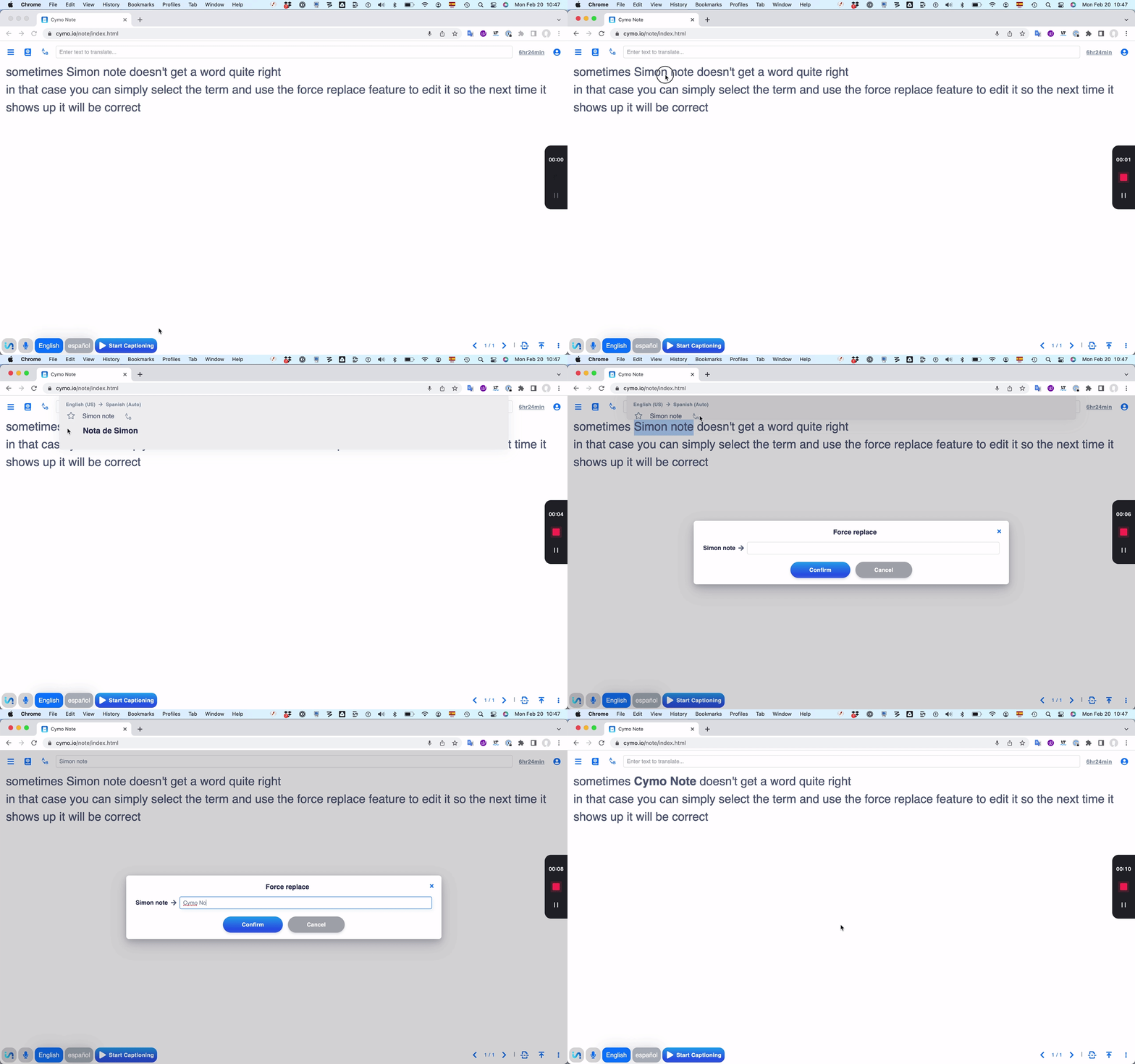
Cymo Note also allows you to add names and terms to the glossary through a feature called "force replace." (These are bolded in the running transcription.)
Building your glossary in Cymo Note
Creating a glossary in Cymo Note is incredibly easy.
First, choose your preferred speech recognition engine and language combination from the 15+ supported languages (including Arabic, Cantonese, Dutch, English, French, German, Italian, Japanese, Korean, Mandarin, Polish, Portuguese, Russian, Spanish, and Swedish).
Lastly, turn on the transcription, and you're up and running. You can also switch the transcription language with a single click without having to interrupt the transcription.
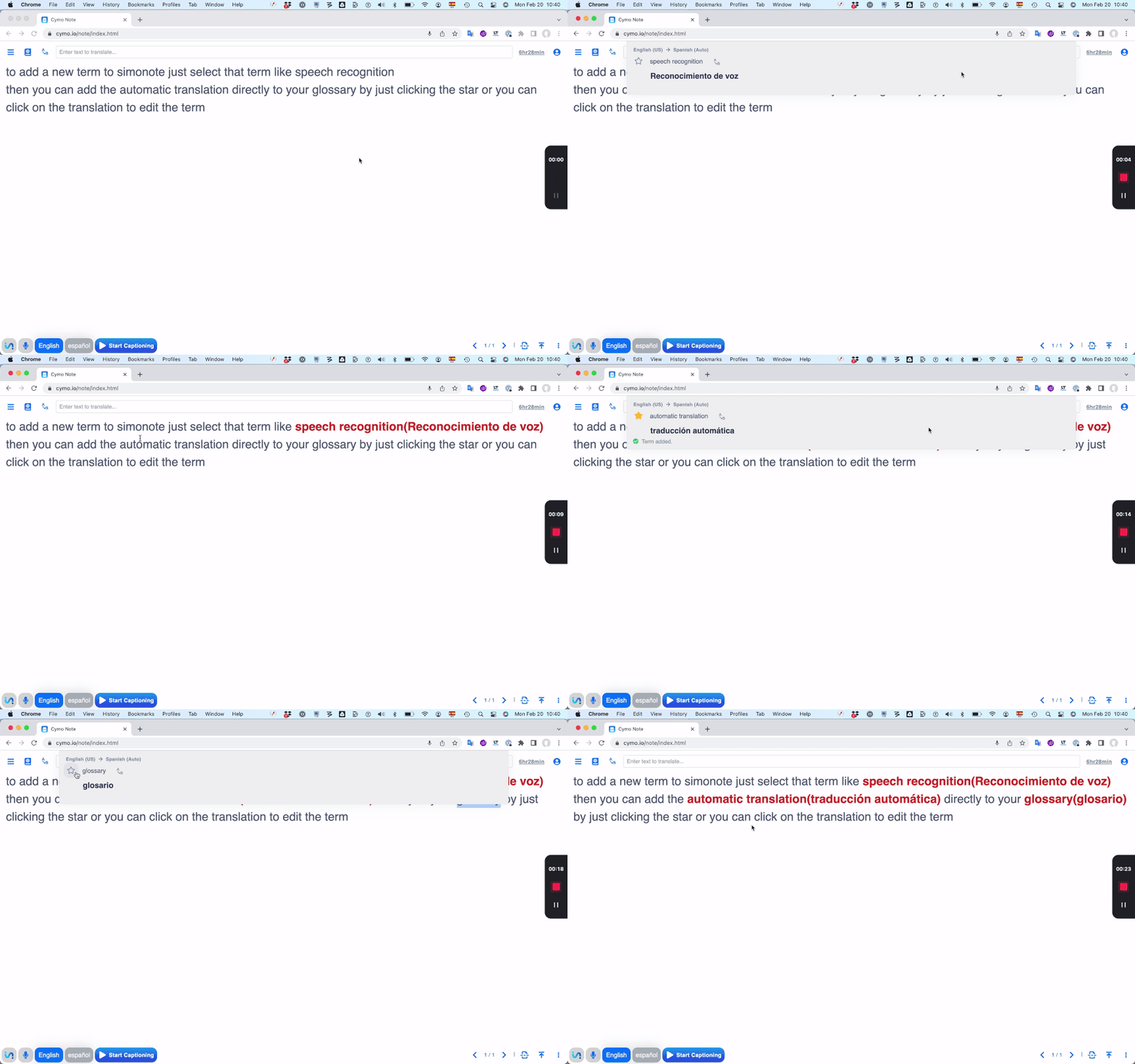
See a term you'd like to add to your glossary? Simply highlight it in the transcription. A machine translation into your second language automatically pops up. Star it to add it to your glossary, or click to edit the translation, then hit Enter to add it to your glossary.
|
|
You can also type a term into the search box at the top of the screen, then follow the same process mentioned above. Cymo Note even lets you copy and paste an entire glossary. To preserve confidentiality, only a single glossary is ever stored on your device, but you can always export a glossary, then import it back into the app, e.g. when working for repeat clients.
I already mentioned Cymo Note's unique "force replacement" feature. Whenever a term has been transcribed incorrectly, select it and click the force transcribe button (an icon including the letters A and B), and type in the correct transcription. From then on, the correct term will be highlighted in bold every time it appears in your text -- perfect for adding in names of speakers, companies, or products and quickly drawing your eye to them while you're interpreting.
|
|
Cymo Note lends itself well to a novel preparation technique. Turn on the speech recognition engine, and read out a speech on a topic that's related to your meeting. After dictating for a few minutes, read through the transcript, highlight potential terms, quickly add equivalents, and use force replace to correct proper names so they will display correctly during your assignment.
Using Cymo Note for consecutive interpreting
Cymo Note's most innovative aspect is its consecutive interpreting feature.
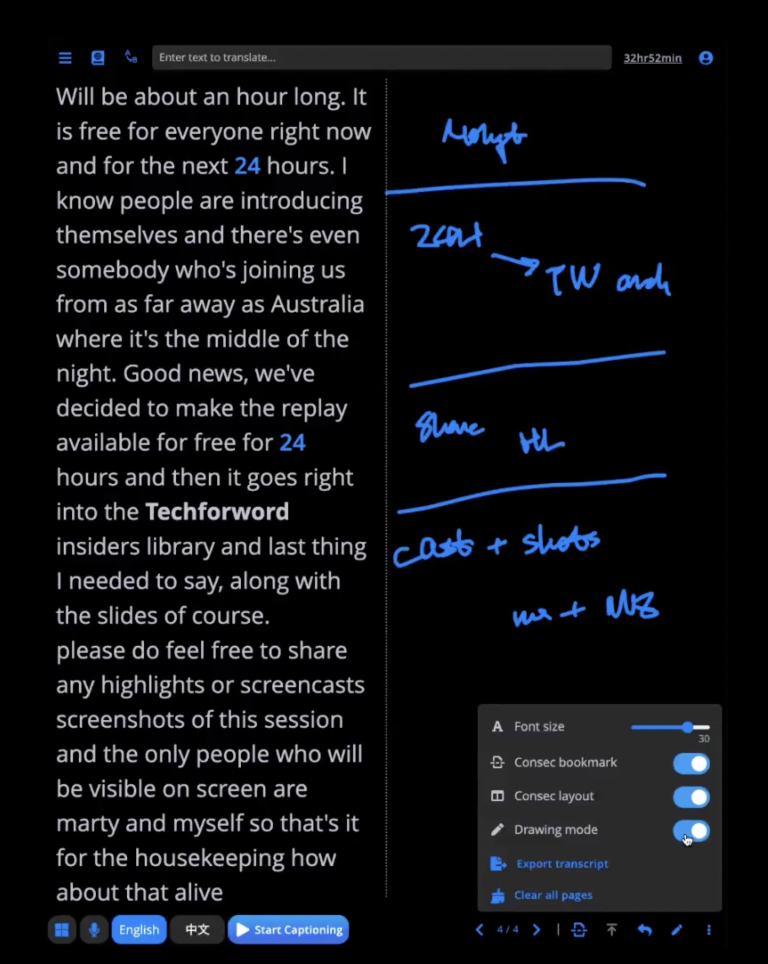
Turn on "Consecutive layout," and the screen will automatically be divided in two, with the transcription on the left and a blank space for taking notes on the right.
Enable "Drawing mode," and start taking notes. (You'll get the best results when you run Cymo Note on your tablet or touchscreen device and use a stylus.) You can also adjust the brush size and color, or change the font size (up to 40 pt) with a simple slider.
Turn on "Consec bookmarks" to quickly add a bookmark at the beginning of a speech (or any place you'd like to jump to), then click the icon (of the line and arrow in the bottom-right corner) to jump straight there.
|
|
Screenshot of Cymo Note in consecutive layout with drawing mode on |
|
With "Drawing mode", you can take notes anywhere on the page -- including on the transcribed text. The possibilities are endless: Draw a line to link notes to a specific term in the text, underline a key concept, or strike through repetitive sections you want to skip during your consecutive rendition. Feeling brave? Why not try to forgo notes entirely and spend your time reading the live transcription, jotting down potential translations, or making minor handwritten corrections to the text for a computer-assisted sight translation?
Check out this video to see how to set up Cymo Note's consecutive interpreting features.
Before you dive in
First, Cymo Note requires practice: Make sure to get familiar with the technology before an actual assignment.
As with all web-based applications, confidentiality is also an issue. The developers address this by not storing your data on their servers, using speech recognition engines with strong encryption, and suggesting that your client sign a non-disclosure agreement permitting you to run the meeting through web-based speech recognition technology. In any case, always exercise caution and speak to your client before using web-based speech recognition tools when confidential information is discussed or likely to come up.
For those unsure about how to properly route audio from an RSI platform into Cymo Note, the team behind the app have provided extensive documentation and video tutorials explaining how to go about it.
To my knowledge, Cymo Note cannot differentiate between a word's root form and variants (i.e. singular and plural, cases, etc.); it will only find a term if the exact equivalent is in your glossary.
Finally, although the pricing model makes sense, some colleagues might find the cost steep. Luckily, Cymo Note offers 20 trial credits, which gets you up to 60 minutes of testing time (depending on the speech recognition engine you use).
Is Cymo Note right for you?
Cymo Note offers a truly novel approach to speech recognition for interpreters, with running live transcription and extensive note-taking possibilities.
If you find a running transcription during simultaneous interpreting useful, Cymo Note provides a turbocharged version that highlights key names, figures and terms.
Where Cymo Note truly shines, however, is in consecutive settings. It offers unique features that are not currently available in any other tool, including the ability to:
- annotate a live transcription
- complement the transcript with full or partial notes
- add bookmarks to easily navigate notes
- highlight numbers
- highlight (and correct) proper names, and
- display terms and their equivalents from your glossary in real-time.
It also streamlines glossary creation through a unique approach combining speech recognition and machine translation, with a human in the loop to review and approve terms.
I find Cymo Note a welcome and unique addition to the computer-assisted interpreting tools currently on the market.
If you're looking for a speech recognition tool designed for interpreters, covering 15+ languages, and offering turbocharged live transcription -- plus unparalleled features for consecutive -- look no further than Cymo Note!
Josh Goldsmith is a UN and EU accredited translator and interpreter working from Spanish, French, Italian, Portuguese and Catalan into English. A passionate educator, Josh splits his time between interpreting, researching and teaching through www.techforword.com, which empowers language professionals to make the most of technology.
|
|
Interpreters! Are you ready to prepare faster, deliver higher-quality interpreting and learn new skills to stay competitive in these rapidly changing times?
Join 20+ experts and thousands of colleagues and get ready to learn useful skills, rethink approaches, and (re)discover the human side of interpreting at the Innovation in Interpreting Summit from March 7-9.
|
|
How do translators actually use MT? |
|
How does this sound:
The author conducted an anonymous online survey between 23 July and 21 October 2022 to gain insight into the proportion of translators that use machine translation (MT) in their translation workflow and the various ways they do. The results show that translators with more experience are less likely to accept MT post-editing (MTPE) assignments than their less experienced colleagues but are equally likely to use MT themselves in their translation work. Translators who deal with lower-resource languages are also less likely to accept MTPE jobs, but there is no such relationship regarding the use of MT in their own workflow. When left to their own devices, only 18.57% of the 69.54% of respondents that declared that they use MT while translating always or usually use it in the way the pioneers of MT envisaged, i.e., MTPE. Most either usually or always prefer to use MT in a whole range of other ways, including enabling MT functions in CAT tools and doing hybrid post-editing; using MT engines as if they were dictionaries; and using MT for inspiration. The vast majority of MT-users see MT as just another tool that their clients do not necessarily need to be informed about.
(By the way, I find this more than "just" interesting. I think the discussion of how we use machine translation today and tomorrow is literally the most important discussion we need to have. The results of this survey give us some important clues.)
|
|
There's a good middle name for your next child (and my sense is that Arbuthnott would work for both sons and daughters).
Ronald Knox was a remarkable guy (more about him down below), and I just found this quote by him from a talk he gave in the early 1950s:
According to a recent paragraph in the newspapers, translators who are members of the Institute of Linguists have decided to increase their charges. The present rate for translating French, German, Italian, and Spanish into English is £1 18s. a thousand words, and the proposed new rate will be two guineas; and so on through the gamut of the languages until you reach the translation of English into Arabic, which will now cost £8 15s. This institute is, I take it, the trade union of those useful people who compose for us the directions on medicine-bottles and the regulations at air-ports Their highest skill is called into play when they act as interpreters at international conferences, for which they propose to charge anything between ten and sixteen guineas a day. All honour to them; but alas, their knell is sounded; a few years now, and they will be redundant. A process which they would be the first to describe as "automation" will have provided us with electronic typewriters which translate as they go along, and head-phones through which we can listen, at first hand, to the political grievances of the world. Parthians, and Medes, and Elamites, and dwellers in Libya about Cyrene, we shall hear them speak in our tongues the wonderful works of Man.
The more things change, the more they stay the same.
Back to Ronald Arbuthnott Knox, a Catholic priest and detective story writer. Because of that intriguing combination of talents, Knox was asked in 1936 by the Catholic Church in England and Wales to translate the Bible. The Douay-Rheims Bible that had been translated in the 16th century in Catholic exile in France (you guessed it, in Douay and in Rheims) was badly in need of an overhaul, and who better to do it than a skilled writer?
Knox finished the New Testament in 1945 and the Old Testament ten years later, and he didn't disappoint the great hopes put in him. The problem was that they should have waited just a few more years to ask him (or someone else). In 1943, the Catholic church changed its policy and asked for translations only from the original languages rather than from the Latin translation, which had been the only source permitted to that point. Unfortunately for Knox, his efforts straddled that time period, and his finished version, though highly praised, was never recognized as an official translation because of the policy change. Oh, well.
I recently stumbled on his translation (again) because his is the only English translation that maintained most of the Hebrew (I know, the irony!) acrostics (poems where each line starts with a successive letter of the alphabet, typically consisting of 22 lines or a multiple of that -- Hebrew has 22 letters). Here is a crazily long example along some other languages (including Züritüütsch!) from the longest poem in the Bible; and here is one where a Spanish translation puts its own stamp of excellence on its translation. |
|
New password for the Tool Box archive |
|
As a subscriber to the Premium version of this journal you have access to an archive of Premium journals going back to 2007.
You can access the archive right here. This month the user name is toolbox and the password is letsgo2023.
New user names and passwords will be announced in future journals.
|
|
The last word on the Tool Box Journal |
|
If you would like to promote this electronic journal by placing a link on your website, I will in turn mention your website in a future edition of the Tool Box Journal. Just paste the code you find here into the HTML code of your webpage, and the little icon that is displayed on that page with a link to my website will be displayed.
If you are subscribed to this journal with more than one email address, it would be great if you could unsubscribe redundant addresses through the links Constant Contact offers below.
If you are interested in reprinting one of the articles in this journal for promotional purposes, please contact me for information about pricing.
© 2023 International Writers' Group
|
|
|
|
|
|
|