THE ASCENTEVMS SOFTWARE GROUP Q2 NEWSLETTER.

Time Flies When You’re Having Fun…


It’s hard to believe we are now closer to 2024 than we are to 2022. Where has 2023 gone? We blinked and the year is more than half over. 2023 has been a year of change for us at AscenteVMS Software Group and the one thing that people seem to hate the most is change. For me, change is an opportunity to grow and learn. Change represents challenges and when we get comfortable with where we are, a challenge is the last thing we want. However, a challenge is sometimes what we need in order to grow and become a new and better version of ourself. All of those things we dislike about change carries over to our businesses as well, except that “hate” increases exponentially. Think about when you’ve tried to get your technicians to implement our mobile products. I can’t think of an implementation, and there are a lot of you using at least one of our mobile products, where all of your technicians were 100% on board. There is always a certain percentage of the technicians that protest, drag their feet, and find every reason why this doesn’t work for them. The sooner that we all accept that change is going to happen, whether we like it or not, the sooner we can figure out how to make it work better for us. I gave up fighting change a long time again and life has been much easier.


In my new role this year, my focus has been on rebuilding (changing) with our top two priorities being:

  • Rebuilding our team
  • Rebuilding client relationships


Interestingly enough, these two items directly affect each other. Over the sixteen months, we have seen a lot of movement in our team. With two retirements and five additions, we are slowly growing our team back to levels we haven’t seen in a long while. During my conversations with clients, one recurring theme seems to be how our service has changed. In 1989, I started out as a member of our support staff answering hotline calls for Compusource. As crazy as it sounds, I loved it. It certainly wasn’t glamorous and while we all have that story of an upset client who yelled at us, some of my best memories are sitting in our hotline room and solving client problems. Today when I talk to clients, I hear stories of clients who really like our software but wish they could get more attentive support. As somebody that still helps out with support when I am needed or when I can, this bothers me. We can and we will do better. With the additional team members, we are now starting to proactively reach out and rebuild those relationships with all our clients. If you haven’t already received one of these calls, you will soon. However, with hundreds of clients, it will take some time to contact you all, but we will. Once we’ve talked to you all, we’ll start all over again, and this will become a regular ongoing process.


As part of this rebuilding process, the following people have joined our teams in different capacities. A number of you have already had interactions with one or more of these team members and they are already making themselves known to you.

  • Dustin Griffie – Product Development
  • Sonja Shaw – Implementation & Support Specialist
  • LaMaur Davis – Technical Support
  • Michael Morales – Product Development
  • Shadi Hamadeh – Implementation & Support Specialist


An important part of client relationships has always been client feedback. Over the last few months, I personally have had the opportunity to chat with a number of you, but I too have a long way to go to reach all of you. During these conversations, I’ve heard the good, the bad, and the ugly; and while the comments have not always been pleasant to hear, these conversations are necessary and are always welcome. For 34 years I have enjoyed talking to our clients and my new role has not changed that. If we haven’t had a chance to talk yet, and you have something you feel I should hear, please reach out to me and we can schedule a call or video meeting. I would also like to announce that we are looking to re-establish a quarterly client roundtable where we will meet virtually with clients from different industries, different sizes, and who utilize the software differently. This program will allow our clients to hear how other companies use the software, often times differently than they use it, and they may learn a thing or two about their software from their peers rather than from somebody on our team. This will also provide a direct line of communication to our team to discuss the future of our products, our company, and the participants will have a voice in the direction of our products.


I look forward to hearing from you, and may the second half of the year be even better than the first.


Q3 Ascente Promo: Additional Users

Although other promotions have been successful, we keep receiving requests for additional users for Ascente, Traverse, and Mobile Pro. Due to this demand, we are offering another 12% off of any additional licensed user for all Ascente customers. This promotion ends Oct. 31st, 2023. Please contact sales for more information.

Email Sales For More Information

Getting to know:

Roxanne Harrod

Coming from experience as an Ascente User, Roxann came on board in 2000. With her experience in the industry, accounting, and as a user, Roxann is a tenured asset that is the lifeblood of support. During down, which is rare, she likes spending time with her family and carpentary/woodworking projects.

Reassigning Techs

How to use the Ascente / Service / Periodic / Reassign Technicians program. 

Many companies want to delete technician when they leave their company. The primary issue was that Ascente will not allow the technician record to be deleted if the record is referenced in other database tables. There are 20 other tables that can reference a technician and there could be hundreds of records in each of these 20 tables that can reference the technician you want to delete. This is a considerable amount of work.

The Reassign Technicians program was created to address this issue. This program will change all the technician references in all the referenced tables and records to a now reference a different technician. Once the references to the technician you want to delete are changed to reference a different technician, you can then delete the technician record.

It is important to understand that the technician code is saved in the ServiceOrderHist table. This is important because you will still have a record of who the technician was that did the work even after the technician record is deleted from the Tech table.


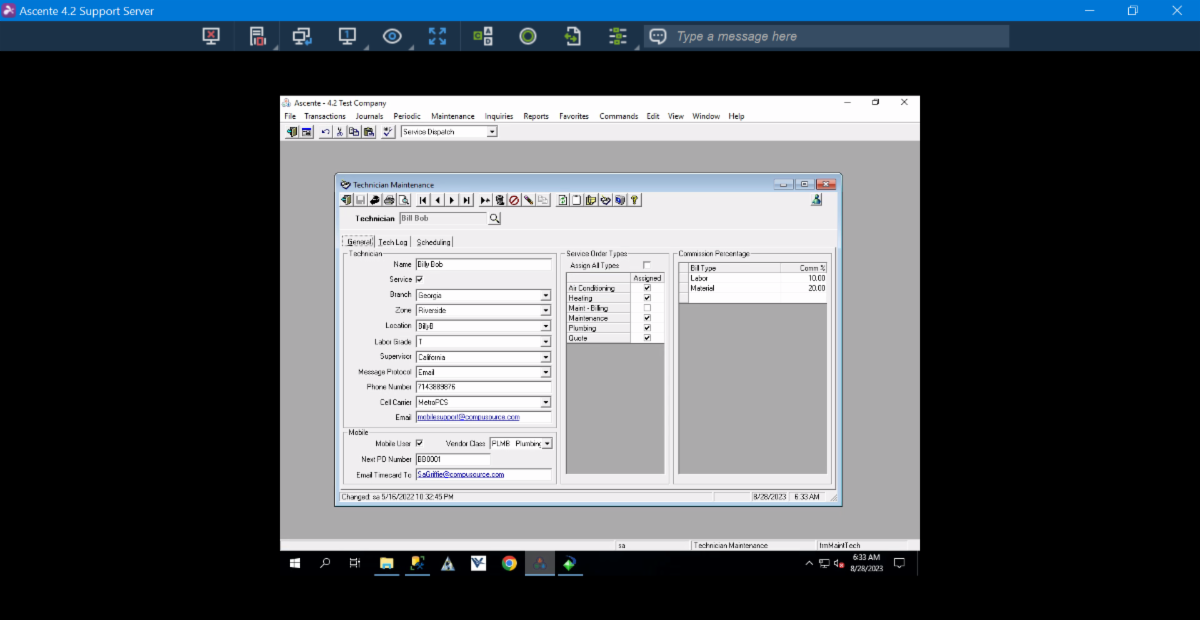
1. Create a new technician record to be used to reassign all the records in the tables too. This is done using the Ascente / Maintenance / Technician program.


Figure 1: This tech is used only for the 'Reassign' function.

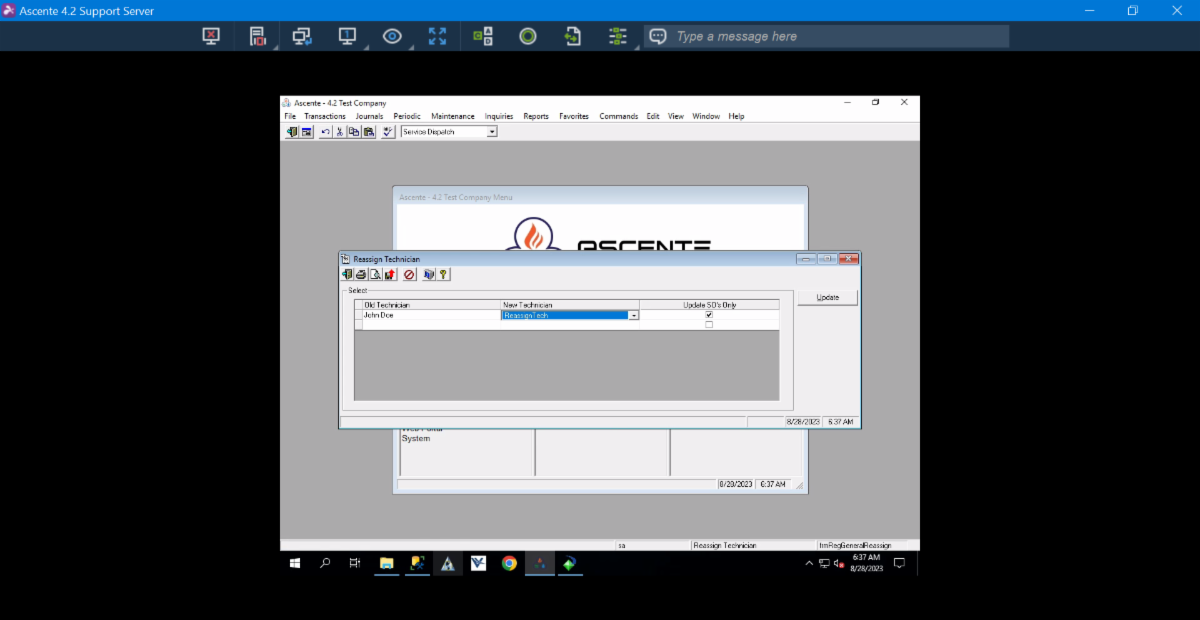
2. Run the Ascente / Service Dispatch / Periodic / Reassign Technician program.

3. Enter the technician to be deleted/reassigned in the ‘Old Technician’ field

4. Enter the technician to be assigned in the ‘Old Technician’ field.

5. Check the ‘Update SO’s Only’ if you only want to reassign the service order records and not all of the references in the other tables.


Figure 2: Reassign Technician Program

6. Click on the [Update] button to reassign the referenced records from the ‘Old Technician’ to now reference the ‘New Technician’.


You should now be able to delete the technician record.

Figure 1:

Figure 2:


Q3 Promo: VMS Mobile Data

VMS Mobile Data has been our most popular and requested application for current and prospective clients. Almost required to keep up with the industry, competition, and even client retention, mobilizing your workforce has never been more critical. Approximately 70% of our client base is using our mobile platform to create efficiencies by reducing overhead time, completing invoices or work tickets, tracking inventory & parts, capturing photos and notes, enabling electronic technician time capture, and much more. In order to get even more of our customer base using the platform, now through October 31st, we will be offering one quarter of free mobile server hosting as well as 18% off of the Mobile Data application license for clients who do not currently have the application. If you are one of the remaining 30% who haven't been able to take advantage of mobilizing your workforce with Mobile Data, please email sales to schedule a Mobile Data demo today!

Email for more information!

Ventus Dispatch Board: Assigning Tickets for Future Dates and Mobile Data


Mobile data tickets are sent out on THE DAY THEY ARE SCHEDULED (not the day they are created/scheduled). This can sometimes be confusing, so we wanted to clarify this functionality.

There are two methods used to dispatch Mobile Data tickets:

1. Ticket is assigned to a Mobile Data technician on the current date, ticket is sent to MD tech automatically as soon as they are assigned

2. Dispatch Board is rescheduled, Mobile Data tickets scheduled for that date are sent

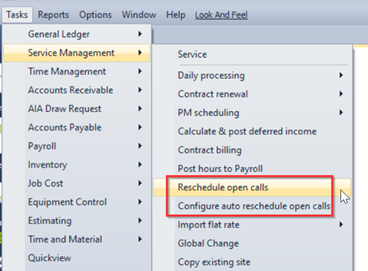
Rescheduling the Dispatch board can be done either manually or automatically. *Contact VMS about configuring the Auto Rescheduling process if desired.


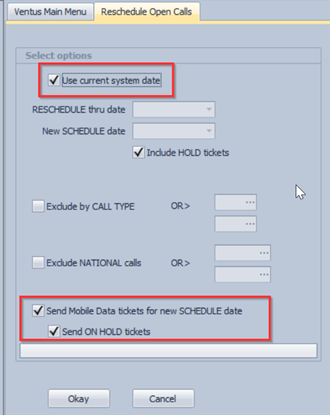
Rescheduling your dispatch board is an important process to keep your dispatch board scheduling up to date and ensure mobile tickets are dispatched as desired. In this process all tickets up to the prior date are moved over to the new date (this does not affect tickets scheduled for future dates).

“Use current system date” will cause the program to look at the current date and always roll the tickets up to the previous date and move those tickets to the current date.

“Send Mobile Data tickets for new SCHEDULE date” should always be selected if using the Mobile Data application.

Example: Mobile Data Ticket is scheduled for August 15 (current date is August 10). The ticket is not dispatched to the MD tech.

August 15, Dispatch board is rescheduled (Manual or Auto), ticket is dispatched to the MD tech.


Please contact VMS support if you have any questions regarding the proper use of the rescheduling process with or without Mobile Data. 

Email Support

Enhancements/Customs

  • Accounts Payable - Checks Printed Report now supports exporting to Excel - Raw format.
  • Estimating - Estimating Entry and Editing has a new menu item to change the Taxable flag for all items in a section.
  • Mobile Data - Allow creating materials list when adding equipment via mobile data.
  • Added the option to provide screen size adaptability to Mobile Data Time Summary. It's controlled by the 3-dot button on the Time Summary list toolbar at the top-right corner.
  • Added support for overhead time to Mobile Data. Time that has not been tied to a ticket is considered overhead.
  • Mobile Data now supports Time Summary view in support of the Time Management Module.
  • Payroll - Payroll 941 Form has been added for 2023.
  • PR Tax Tables added for Head of Household.
  • 2023 Templates for all federal tax tables are now available to simplify the process of updating by clicking the 'Load Values' dropdown from the bottom toolbar and selecting '2023 Publication 15-T.' This will load the current 2023 values to the tax tables instead of needing to manually enter them in.
  • Service Billing - SB Invoice Format Designer will now allow the Message Code as a usable field.
  • Time Management - Added new Time Management module for time validation that supports eTime, Mobile Data and Service Billing.
Email Support for More Info

Getting to know:

Dustin Griffie

We are proud to introduce a new addition to our VMS team, Dustin Griffie. Dustin is now almost a tenured vet as he has been with us for almost two years now. Coming from Nevada, he graduated from the University of Nevada with a degree in Information Systems. In his free time, he is a huge hockey fan, descent fisherman and an avid golfer. He a huge asset to our team and hopefully we won't lose him to the PGA Tour any time soon!


Facebook  Twitter  LinkedIn