Image of title text embedded in futuristic oval shape.

E-IRB System Update on October 8, 2025


The following describes changes implemented with the E-IRB System update on Wednesday, October 8, 2025.  


Researchers Inbox - ORI Contact Added


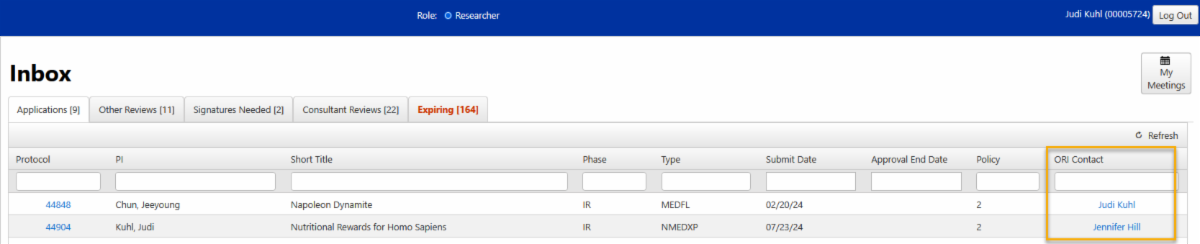
To improve how the researcher identifies who the ORI contact person is for their application, a column has been added to the Researcher’s Inbox with a link to open e-mail for the named ORI Contact.  

Image of the newly added ORI contact column framed in yellow on the researcher's inbox page under the application tab.

Some user’s web browser settings may prevent the email link from opening in a separate web browser tab, so the following tool tip appears when the user hovers their mouse cursor over the “ORI Contact” column title as well as the email link:

Image of the ORI contact tip that says to ensure your email opens in a separate tab right mouse-click on the contact's name and select open link in new tab from the menu.

Researcher Copy Protocol Tool

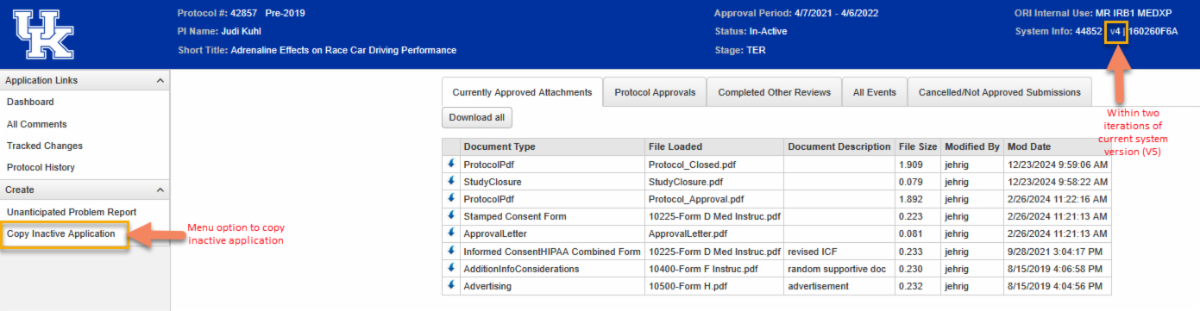
The researcher can now copy an Inactive application as long as it is less than two iterations out from the current version in production. For example, we are on Version 5 (V5) of the E-IRB system presently, so a researcher can make a copy of an Inactive application as old as Version 3 (V3), but not a V2 or V1 application. If the Inactive application is not eligible to be copied, there will be no menu option to create a copy.

Image of the newly added copy inactive application menu option and the application version framed in yellow on the researcher's currently approved attachment page.