|
As of the afternoon of November 9, 2023, the changes described below will go into effect:
| |
Project Information Section | |
|
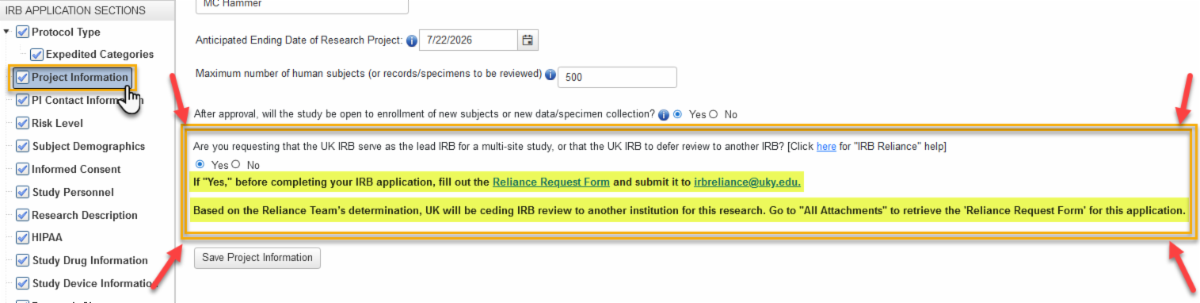
- A new Reliance question has been added to all applications in-progress, no matter where they are in the workflow (e.g., Draft (unsubmitted), submitted, pending IRB review):
| |
- The new question will not be visible on currently approved applications, however, if the researcher has a submission in Draft or in their E-IRB Inbox, and the “Project Information” section of the application is opened, they will be prompted to answer the new question.
- If the application has passed the point at which the researcher can answer the question, ORI/IRB will not return the application to the researcher solely for the purpose of having it answered. The researcher will be prompted to answer the new question the next time a new submission is initiated (MR or CR).
- If the “Project Information” section already has a checkmark as complete and the section is not reopened, the question will remain unanswered until the next submission (e.g., modification, annual, or other review).
- When the researcher answers the new question, the section title will highlight in gold, as will the Yes/No response.
- If ORI’s Reliance Team determines UK will be ceding IRB review, this statement will display in the instructions under the new question: “Based on the Reliance Team’s determination, UK will be ceding IRB review to another institution for this research. Go to “All Attachments” to retrieve the “Reliance Request Form” for this application.”.
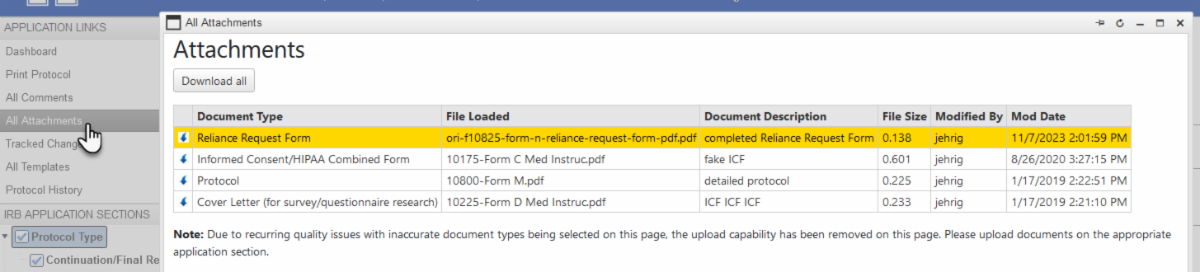
- If the researcher submitted a “Reliance Request Form” and ORI staff uploaded the form to the application, the “RelianceRequestForm” document type will be included in the list under the application’s ‘All Attachments’ folder.
E.g., Listed under “All Attachments”:
| |
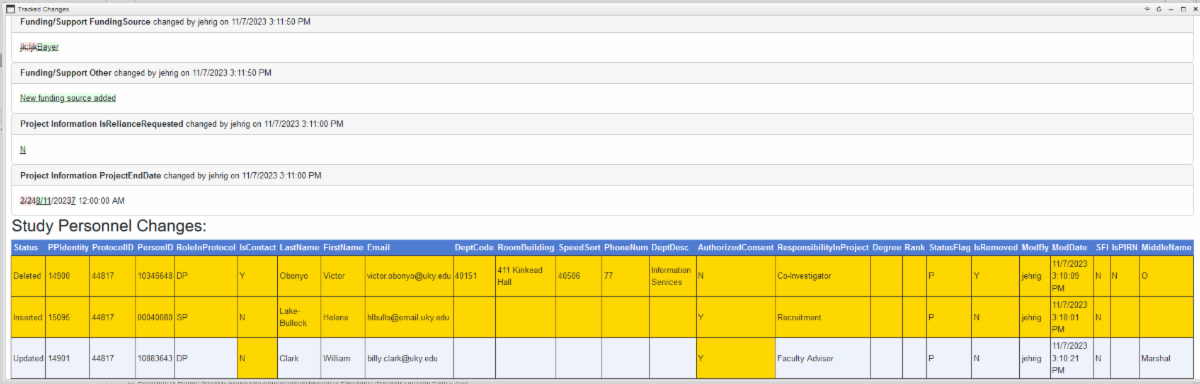
Tracked Changes - Study Personnel Changes | |
|
-
The attribute that changed on the person’s record will be highlighted in gold (denoted by “Updated” in the Status column). Also, the entire row will be gold if new study personnel are added or existing personnel are marked as ‘removed’ (Status “Inserted” or Status “Deleted,” respectively).
- There will be blank cells for most records because of how the record is added in the Study Personnel section. ORI will not return an application to the researcher because of a blank cell in the Study Personnel Changes table.
| |
Non-UK Personnel Not Allowed to Serve as PI | |
|
It is University of Kentucky policy that non-UK personnel cannot serve as Principal Investigator on an IRB application (they can be co-investigator, or other personnel). Therefore, individuals with an “External” status flag in the UK Human Resources personnel database will not be able to be inserted as PI on an application, so their record will not be find-able in the “Change Principal Investigator” search table.
| |
The researcher’s E-IRB Inbox will reflect a few column changes to improve the information provided at a glance. This includes, but is not limited to, the addition of a ‘Submit Date’ column under the “Applications” tab (this reflects the date the current phase of the application was first submitted) and removal of the ‘Edit Status’ column. | |
E-IRB Video Tutorial Library | |
|
Resources previously stored on MS Stream, like the E-IRB Video Tutorial Library, have been (or are being) migrated to SharePoint. For ease of viewing, a web page with a table of contents has been created for the various online video tutorials. If you have an old bookmark for the E-IRB Video Tutorial Library that points to the MS Stream site, please update it to: https://www.research.uky.edu/office-research-integrity/e-irb-video-tutorial-library. Links to the new Library web page throughout E-IRB and on ORI’s web pages will be updated accordingly.
| | | | |