The Storm Report logo

A weekly newsletter to build community through updates, opportunities, and celebrations

August 14, 2025 | Volume 12 | Issue 1

Decorative

Students Can Start the Year Strong with Tech Connect

By Emily Towne


The start of a new school year at Davidson-Davie Community College is an exciting time, but it can also come with challenges, especially for students who are still trying to secure the technology and digital skills they need to succeed.


That’s where Tech Connect comes in!


Tech Connect is designed to help remove barriers by connecting students with affordable technology, reliable internet access, and digital literacy programs, both on campus and in the community! Whether it’s a laptop, Wi-Fi, or simply learning how to use online tools, Tech Connect is here to help students get set up with these resources.


For more information:

  • Visit Tech Connect
  • Email emily_towne@davidsondavie.edu
  • Call (336)249-8186 ext. 6297
Calendar

Professional Development Events

Fall 2025

Starfish Progress Survey Dates


  • Fall 1: 9/8 - 9/19
  • Fall 2: 11/10 - 11/21
  • Full Term: 9/29 - 10/10


Please note: Student concerns may be submitted in Starfish at any point during the semester, regardless of whether progress surveys are open.

Essential Resources for Instructors


YuJa Tools for Faculty, Staff, & Students

YuJa icon is the colors of the rainbow

Let your courses burst with color this Fall with our YuJa Tools. Want to create videos to engage with your students--or let your students create videos for interactive assignments and projects? Check out our updated tutorials on YuJa Video for Instructors and feel free to share our YuJa Video Guides for Students


Additionally, to ensure all of our students can harvest their full potential in your courses, don't forget that we have the YuJa Panorama toolkit. Faculty and staff can use the Panorama DocHub to upload, check, and update files for accessibility. Likewise, pass along YuJa Panorama's Guides for Students so students can learn how to personalize their learning with YuJa's Panorama's alternative formats and widget.  


If you would like further assistance with any of these YuJa tools, don't hesitate to reach out to Trudy Brown or Christina Kirwan. They are ready to guide you through the nuances of YuJa and help your courses glow.  

NC3ADL Call for Proposals

NC3ADL's virtual conference, "Keeping It Real: Practical Tools for Online Teaching and Learning," brings a hands-on focus to the real-world challenges faced in distance education. Sessions will spotlight free and low-cost tools that empower instructors to build inclusive, engaging, and high-quality online courses, all while staying within budget.


Topics will include:


  • Creating accessible content
  • Supporting student success in virtual environments
  • Leveraging innovative, cost-effective technologies (Teachermatic, Assignable)
  • Sharing scalable practices from across the NC Community College System


Presentation proposals will be accepted through September 15th.


The virtual conference will be held on November 5-6, 2025.

Top 5 Moodle Updates for Fall 2025

By Gretchen Benton


Is your Moodle course ready for a new school year? I have shared my top 5 tips and updates to help keep us all on track!  


Import your course content to your new class as soon as possible! 

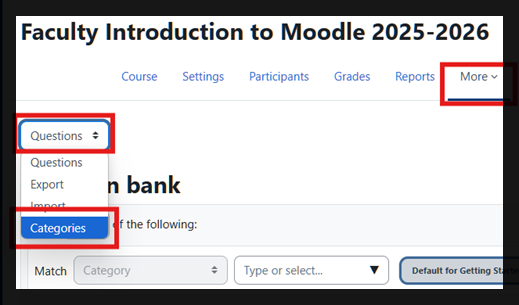
However, first, I recommend checking your question bank categories! If you have an excessive amount of categories that have not been cleared out, you should import your course without the question bank and rebuild all quizzes as needed. You can check your question bank categories by visiting your course menu, ‘More’, ‘Question Bank’, and changing the drop down box from ‘Questions’ to ‘Categories’. 

Moodle question bank

Moodle Training Courses 


New Bookstore Integration in Moodle

Over the summer we onboarded with a new online bookstore. If you are using an Inclusive Access item from the eCampus bookstore, you must add the VitalSource tool to your Moodle course so that students can manage their online textbook subscriptions. 


New Tutoring Integration in Moodle

Add the Tutor.com tool to your course.

Moodle help icon

Get Moodle Help 

Use the new chat widget in the bottom right corner of Moodle anytime to chat with our 24-7 Moodle Support team. The chat will send you tips from some of our help articles and/or get you in touch with a live agent on chat. You can also submit a ticket by emailing edtech@davidsondavie.edu for help during business hours.  

Do You Have a Story to Share?

We want to promote faculty and staff stories! Please contact Amy Holmes (amy_holmes@davidsondavie.edu) with ideas or referrals for stories.

The Storm Report is brought to you by

Looking for a previously published newsletter?

The Storm Report Archives