|
Welcome to our 7th weekly tip for users of The BIS Platform.
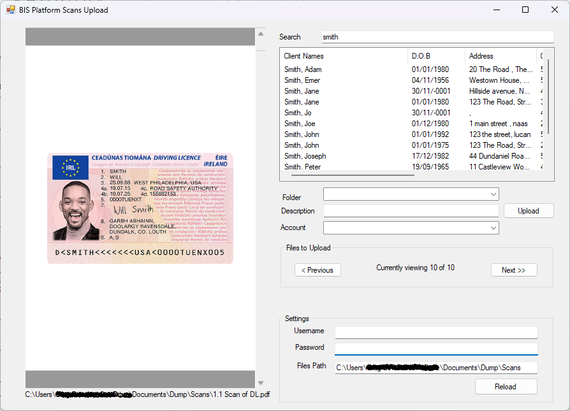
This weeks tip shows you how to upload scans directly to your client files.
Having the BIS Scan Uploader on your desktop makes it quicker and more efficient to upload files and documents to each client within The BIS Platform.
You can download / install the Scan Uploader from the Downloads/Setup page located under the Tools menu.
When you have created the shortcut on your desktop, you will need to input your BIS username and password and the file path of your scanning folder allowing all your scanned documents to be indexed to each client.
A file path typically looks something like this: Z:\Shared Folder\Scans but it will be unique to the folder you scan your files to.
The Scans Uploader gives you a preview of each document to be uploaded and it's not necessary to have The BIS Platform open to index your scans.
Your other documents/Excel files/emails can be saved to the client file using The BIS Platform Addin.
If you would like more information on our Scans Uploader or our Document Management add-on, please do not hesitate to give the BIS team a call on 01-4960006 or email info@brokerinformationservices.ie
|