866-237-5433
PowerPoint® Stress Relief from eSlide – ISSUE 90
Don’t Struggle with PowerPoint!
Get Help from eSlide Today!
5 Presentation StrategiesTo
Win Critical Budgets
One thing that the 2020 pandemic did not stop is the need to present your budget for approval. You must still share your plan in an organized and effective way, but how do you win your budget request during a video meeting?

In our latest blog post, we explore 5 proven presentation strategies using PowerPoint. Click the button below to see these recommendations and
learn how to win your budget.
PowerPoint Quick Tip
Discover the Draw Menu in PowerPoint 365
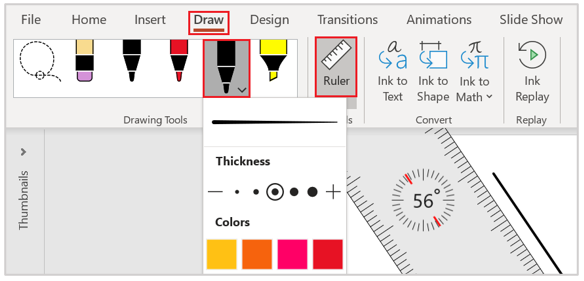
One of the new features of PowerPoint 365 is the Draw Menu in the Ribbon. The Draw Menu includes many new useful features, including Drawing Pens, Pencils, a Highlighter, and a Ruler just to mention a few.
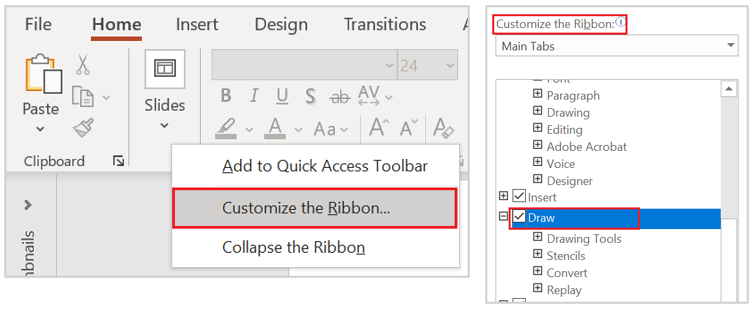
If you don't see the Draw Menu in your PowerPoint 365, right-click on the Ribbon. Under the Customize the Ribbon Main Tabs section, make sure that Draw is checked and click on OK.
Discover all the new Draw Menu tools with a digital touchscreen, a touch pen, or a mouse to draw on your slides. Select the drawing tool you want to use and start drawing. Change thickness, color, textures, and effects and add new pens too. Use the Eraser tool to erase any ink on the slide.

Select the Ruler icon, and the ruler will pop up on your slide. Click on it and hold to move it around and use the wheel on your mouse to adjust the angle. Draw along the edge of the ruler to create lines and shapes. To get out of Drawing mode, simply press Escape on your keyboard.
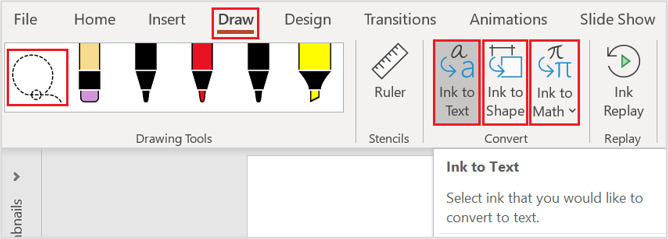
Use the Lasso tool to draw around and select whatever object you would like to edit, to move, resize, or delete objects.

Three other cool features are Ink to Text, Ink to Shape, and Ink to Math. Here’s where you can draw a letter, select it with the Lasso tool, then click on Ink to Text to convert your hand-drawn lines to text.

Same goes with the Ink to Shape. Draw a shape, select it with the Lasso tool, click on Ink to Shape and it will convert your hand-drawn object into a shape.

Draw an equation on your slide, select it with the Lasso tool, click on Ink to Math, and your equation is converted to math text.

If you have questions about PowerPoint, send them to us. We’ll answer one in our next newsletter!
If your presentation deadlines have
you stressed, you need a bottle of our PowerPoint Lifesavers!
If you need help working faster in PowerPoint, get a free copy of our PowerPoint Shortcuts!
www.eSlide.com | 866-237-5433 | Refer A Friend