September 2026

A Message to Our TTG Families


Dear TTG Families,


As we prepare for the upcoming changes to Electronic Visit Verification (EVV), we know that learning a new system can bring questions, uncertainty, and maybe even a little frustration. We want you to know that you are not expected to have everything figured out on day one.


Beginning October 1, 2026, ALL attendants will begin using EVV to record their service time. DMAS has provided October through December as a time for learning, troubleshooting, and technical assistance, giving everyone an opportunity to become more comfortable with the new process before consistent EVV use is expected in January.


At Toddlers To Grandparents, our goal is to make this transition feel a little easier. Your services, your support, and the people who care for you are not changing. EVV is simply a new way of documenting when those services are provided.


Throughout this newsletter, we've included some of the most important information from the recent DMAS EVV Town Hall, along with helpful reminders about clocking in and out, your Plan of Care or Plan for Supports, GPS, correcting mistakes, and where to turn when you need help.


Most importantly, please give yourself and your attendants time to learn. Ask questions. Use the available training. And don't be discouraged if there are a few bumps along the way.


We are grateful to be part of your support team and will continue to be here to help you navigate your waiver services every step of the way.


Same care. Same support. A new way to record it.


Warmly,

The Toddlers To Grandparents Team


What is EVV?

Electronic Visit Verification, or EVV, is a digital way for attendants to record when Medicaid-authorized services are provided.


Think of it as a digital sign-in and sign-out time sheet.


EVV records:

  • The date services are provided
  • The member receiving services
  • The attendant providing services
  • The type of service provided
  • When the shift begins and ends
  • The attendant's location when clocking in and clocking out


🔒 EVV Does NOT Track You Throughout the Day


This is an important one! EVV does not continuously track the member or attendant.


When using the mobile app, location is captured when the attendant clocks in and clocks out. The attendant's location is not tracked throughout the entire shift.


Oops! What if We Make a Mistake?


It's okay. Mistakes happen!


DMAS specifically acknowledged that everyone is learning a new system. If an attendant forgets to clock in or clock out, they should do so as soon as they remember. The shift can then be corrected to reflect the actual time services were provided, and the attendant can select the reason for the adjustment.


An occasional correction or manual entry does not automatically mean the attendant won't be paid. However, EVV is required, so attendants should work toward using it consistently.


❤️ Member Care Comes First


DMAS also gave an important reminder:


  • If something urgent is happening and the attendant has to choose between immediately clocking in and helping the member, take care of the member first.
  • The EVV entry can be corrected afterward.


Your Plan of Care (POC) is Your Guide


Your attendant should record EVV time while providing the services and activities included in your approved Plan of Care or Plan for Supports.


DMAS recommends keeping a copy of your plan in your home so you and your attendant can easily reference the services that have been approved.


Need a copy? Send your request to POC@toddlerstograndparents.com


⏰ You Don't Have to Clock In and Out for Every Task


  • EVV does not mean your attendant has to clock in and out every time they help with a different approved activity.
  • If your attendant is providing several authorized services during one continuous period of care, they can remain clocked in.
  • If services stop for a period of time, such as while the member is at school or a day program, the attendant should clock out. They can clock back in when the member returns and authorized services resume. This is called a split shift, and it's okay!


🏡 Services Don't have to Happen Only at Home!


  • Your life doesn't stop at your front door, and neither does EVV.
  • When using the mobile EVV app, attendants do not have to clock in and out at the member's home.
  • Authorized services may be provided while you're out in the community or traveling. The important thing is that the attendant is providing an authorized service to the member during the time being recorded.


🏡 Record the Time That Was Actually Worked


  • EVV should reflect the services that were actually provided.
  • For example, if a member has 30 authorized hours but the attendant provides 28 hours that week, the attendant should record 28 hours.
  • Time should never be added simply to use all of the member's authorized hours.
  • Likewise, hours worked beyond the member's authorized amount will not be paid.


👤 What about the Employer of Record (EOR)


  • The EOR does not have to be standing beside the attendant when the attendant clocks out.
  • If the EOR is available, some systems allow the shift to be reviewed and approved right away.
  • If the EOR isn't available, that's okay! The attendant can submit the shift, and the EOR can review and approve it later through the appropriate app or web portal.


No Wi-Fi? Don't Panic!


  • Both fiscal agents discussed options for using their EVV apps when internet service is unavailable.
  • The app can record the shift while offline and send the information once the device reconnects to the internet.
  • There are also telephone/landline options (IVR) available for individuals who cannot use the mobile app. Contact your fiscal agent for information about setting this up.


🏥A Quick Hospital Reminder


  • If a member is admitted to the hospital, personal care, respite, and companion services cannot be billed during the hospital admission.
  • EVV time should not be recorded for these services while the member is admitted.


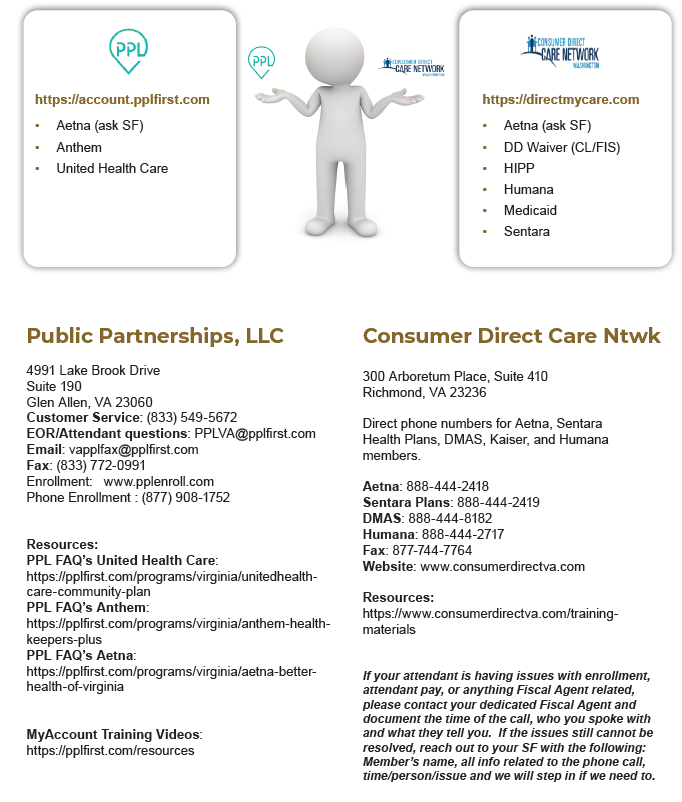
Which App Do I Need?


Your app depends on your fiscal agent:

Consumer Direct Care Network (CDCN)

➡️ CareAttend Link & Training Materials


Public Partnerships (PPL)

➡️ Time4Care Link & Training Materials


Both CDCN and PPL offer training, tutorials, and technical assistance to help attendants learn how to use their systems.


Who Do I Call When I need Help?


Knowing who to contact can help you get answers faster.


Your Toddlers To Grandparents Service Facilitator

Your SF can help you understand:

  • Your Plan of Care or Plan
  • Which services and activities are authorized
  • Questions about your approved services
  • Getting another copy of your plan


Your Fiscal Agent: CDCN or PPL

Your fiscal agent is the best resource for:

  • Downloading or using the EVV app
  • Login or password problems
  • Clock-in or clock-out problems
  • GPS/location settings
  • IVR/telephone EVV
  • Technical problems with the system


💙 Give Yourself Time to Learn


Change can take some getting used to, and that's exactly why DMAS has provided a transition period.


  • October 1 is the beginning, not a deadline to have everything mastered.
  • October, November, and December are an opportunity to learn the system, ask questions, troubleshoot problems, and develop a routine.
  • By January 1, 2027, consistent EVV use is expected.


So ask questions. Use the training resources. Reach out when something isn't working. And remember that you don't have to learn everything on the first day.


We're here to support you through the transition.


Same care. Same support. A new way to record it. ❤️


Toddlers To Grandparents

Supporting our members, families, and attendants every step of the way.


Facebook