Funnware-Logo.jpg

Update for HSW and Mobile Tools

v8.501 is now available for Horse Show for Windows!

To ensure versioning as well as ease of use, the full install now includes the FW Services needed for the mobile tools.

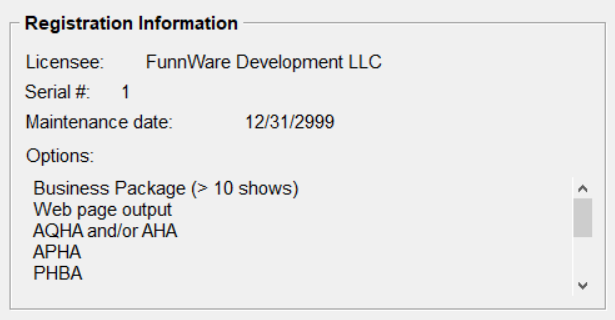
Please make sure you hold a current license by checking the Registration Information in HSW (Utilities -> Maintain System Preferences); your Service Contract Date should expire after 12/01/2022 before installing the most current version.

Capture.PNG

Click here to purchase a new Maintenance Contract.


License information will be sent once payment is received and a new code is created. Remember that registration codes are manually generated in our office usually during regular business hours.

What’s new for v8.501?

  • Sets HSW icon to Run as Administrator
  • To give Horse Show for Windows administrator privileges as needed for new features (click here to check out the FAQ with set instructions for any other HSW icons you may use)
  • Choose Yes when you run HSW to agree those new privileges
  • Adjustments to FW services and mobile tools
  • New Maneuver Scoring option in judging app
  • New fast check-in in gate keeping app
  • Print Trail score sheets with maneuver information from tablet (other disciplines to come)
  • New admin Tracker/Payments screen allows payments of anyone with a balance in HSW (contact FW for admin information)
  • No scratches allowed after a certain date from Tracker online entries
  • Automatically turns off/on services to allow updates and backups and optimization of database (click here to refer to the installation FAQs if any issues with services)
  • AQHA RJ file updates
  • Do not include scratches
  • Include only one entry/result for Grand/Reserve classes
  • Allow creation of master show if needed for Region shows
  • Append to file already created so multiple subsidiaries with same Show ID can all be in one file
  • Use 9999999 (instead of 0 as originally noted) for people without AQHA membership numbers
  • Use results from the highest Go like a finals or a composite
  • Make sure to include a valid judge ID for any composite or all around classes
  • AQHA ranch riding category change
  • Correct set up for AQHA Performance Halter Grand/Reserve classes
  • ABRA new classes
  • Allowance to print score sheets even when no draws (enough for current entry counts in class)
  • Fixes:
  • Self relationship was showing on entry screen but not saving
  • Updating the spelling of a name in the People screen did not update the owner name on the Horse screen or on some reports
  • Search people or horse using @membership or @registration number in People and Horse screen didn't pull up the found person or horse
  • Avoid accidental redraws of a class by clearing all fields after doing or re-printing a draw
  • NRCHA Rein work score sheet not printing the last entry on the page
Purchase Update
Download Update

Introducing Horse Show in a Box

Using the Mobile Tools requires additional hardware - we can help!

Connect with us to put together the equipment you will need to run the judging tablets, gate keeper, FastAnnounce and Horse Show Tracker.


We will work with you to figure out the right equipment for your needs based on the facilities you run your shows in and provide all the pieces and parts and how to connect them together.

image _8_.png