|
ITEEA STEM CTL Monthly Newsletter
August 2026
| | |
Greetings!
Welcome to the August 2026 Back-to-School edition of the STEM CTL Newsletter! As you prepare for a new school year, we've been updating curriculum resources, enhancing instructional tools, and expanding professional learning opportunities. This issue features course updates, educator training, funding opportunities, and classroom-ready technology tools designed to help you start the year strong.
In This Issue:
-
Summer 2026 Curriculum Updates: Elementary refreshes, redesigned courses, and updated learning sequences.
-
Middle School Computer Control Projects: New physical computing and programming projects in Brightspace.
-
Autodesk Fusion Training: Hands-on CAD workshop to build skills and classroom confidence.
-
Project ExCITE (AP Computer Science): Apply for the final NSF-funded AP CSP cohort.
-
Fall Microbadge Savings: Flexible online courses with $10 off through August 31.
-
Tech Tool of the Month: Free Claude premium access for K-12 teachers.
Thanks,
Your STEM Center Team
| | ☀️ Summer 2026 Curriculum Updates: What's New in Engineering byDesign ☀️ | | The STEM CTL made several updates to the Engineering byDesign (EbD) curriculum over the summer, including refreshed slide decks, refined instructional materials, and redesigned courses to keep STEM learning engaging, relevant, and easy to implement. Updates are available in both the Essential Learning Edition (Google Drive) and Interactive Learning Edition (Brightspace LMS). | |
Elementary School (Grades 1 & 5)
-
Refreshed Slide Decks: Updated PowerPoint presentations with improved visuals and usability.
-
Document Clarifications: Revised select materials to address common teacher and student questions.
Middle School: Grade 6 Exploring Technology (Major Redesign)
The 6th Grade Exploring Technology course has been completely redesigned to strengthen student engagement and real-world problem solving.
-
New Hands-On Challenges: Updated engineering, manufacturing, bridge, sustainability, CAD and 3D printing activities.
-
Shop Integration: Incorporated new ideas that connect classroom concepts to hands-on technical skills.
-
Responsible AI Prompts: Introduced opportunities to explore emerging technologies while practicing critical thinking and responsible AI use.
-
Streamlined Resources: Aligned presentations, assessments, and design briefs with a consistent instructional framework.
High School: Freshman Foundations of Technology and Engineering
To create a stronger progression of learning, the course sequence has been reorganized:
-
Unit 1: The Engineering Design Process
-
Unit 2: Computer-Aided Design (CAD)
-
Unit 3: The Designed World
-
Unit 4: Systems Engineering & Technology
-
Unit 5: Computer Science
Beginning with design and CAD gives students skills they can apply throughout later project-based units. Supporting materials have been updated to match the new sequence and standardized formatting, and every lesson now includes shop integration tips to help extend learning beyond the classroom.
| 💻 Expanded Middle School Computer Control Projects 💻 | |
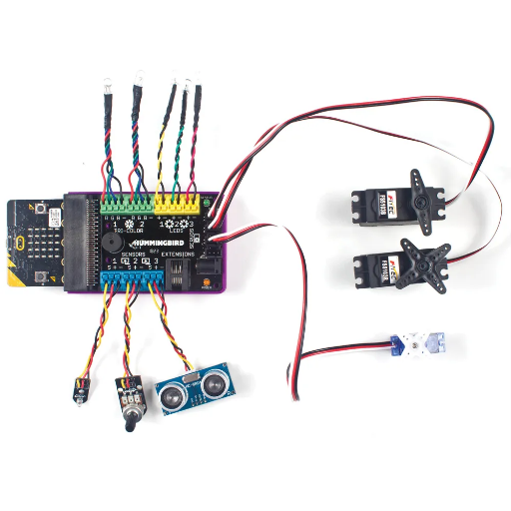
We're expanding computational thinking and physical computing opportunities in our middle school curriculum! Available exclusively through the Interactive Learning Edition (Brightspace LMS), these new embedded computer control units engage students in computer science through engineering design, hands-on programming, and device development.
-
Microcontrollers & Sensors: Students learn basic programming by controlling LEDs, buzzers, and environmental sensors.
-
Automated Systems Design Briefs: Real-world challenges, such as smart traffic signals, greenhouse monitoring, and security systems, guide students through coding, wiring, and testing prototypes.
-
Interactive Inputs & Outputs: Hands-on activities explore switches, sensors, servo motors, and displays to solve technology-based problems.
| |
Featured projects include:
Exploring Technology (6th Grade)
Invention & Innovation (7th Grade)
- Robotic Arm
- Light and Sound
Technological Systems (8th Grade)
- Crosswalk Control System
- Rollercoaster
- Robot Maze
This work is funded by the National Science Foundation (NSF) through the Computer Science Through Engineering Design (CSED) in New York initiative.
| 🧑🏻💻 Autodesk Fusion Fundamentals for Educators 👩🏾💻 | |
Presented by CADclass in partnership with ITEEA.
Format: 12 Total Hours (6 Hours Live Online + 6 Hours On-Demand)
Live Sessions: September 15, 17, and 21, 6:00pm-8:00pm EDT
Credential: Autodesk Certificate of Completion (80% completion required)
Gain the skills and confidence to bring professional CAD into your classroom. Designed specifically for educators, this hands-on workshop provides a practical foundation in Autodesk Fusion along with strategies for effective classroom implementation.
🛠️ What You'll Learn
- CAD fundamentals, including sketching, constraints, and parametric modeling.
- Assembly design and management for multi-component projects.
- Teaching strategies, curriculum sequencing, troubleshooting tips, and student support techniques.
🎁 Bonus
🎒Requirements
- No prior Fusion or CAD experience required.
- Participants should have a laptop and, ideally, an external mouse.
Register Now
(closes Monday, September 14 at 11:59pm EDT)
| |
🧑🏼💻 Bring AP Computer Science to Your High School with Project ExCITE! 👩🏾💻 | |
ITEEA is recruiting high school technology and engineering educators for the final cohort of Project ExCITE (Exploring Computation Integrated into Technology and Engineering), an NSF-funded initiative that prepares teachers to deliver the College Board's AP Computer Science Principles (AP CSP) course.
Participants receive professional development, curriculum resources, and ongoing support to confidently teach AP CSP byDesign, expanding access to computer science and computational thinking for diverse student populations.
This is a valuable opportunity to strengthen your school's STEM offerings while gaining specialized training and support. Learn more and apply at the ITEEA ExCITE page.
| 🚀 Kick Off the School Year Powered Up and Ready to Lead! 🍎 | |
Keep your professional growth going this school year with ITEEA's self-paced microbadge courses. Designed to fit busy schedules, these 10-hour asynchronous courses, including Lab Safety byDesign, STEM Teaching Methods byDesign, Learning byEvaluating, and Cultural Competency byDesign, provide practical strategies you can apply immediately in your classroom.
Whether you're looking to strengthen safety practices, explore new teaching methods, or enhance assessment skills, you can learn anytime, anywhere.
👉 Ready to level up your teaching this year? Visit the ITEEA Asynchronous Training Courses page to explore course options and register today!
Save $10 with code SkillUp10 at checkout. Offer expires August 31, 2026.
| | 💻 Tech Tool of the Month 💻 | | |
Claude for K-12 Teachers helps educators spend less time on paperwork and more time supporting students. U.S. K-12 teachers receive free access to premium Claude features, including teaching tools, state standards-aligned resources, and connections to evidence-based curricula.
Click the Claude logo to learn more.
| | As always, the STEM CTL team is here to support you. If you have any questions or need assistance, please don't hesitate to reach out to us at ebd@iteea.org. | | The STEM Center for Teaching and Learning™ strengthens professional development and advances technological literacy. Center initiatives are directed toward four goals: development of standards-based curricula; teacher enhancement; research concerning teaching and learning; and curriculum implementation and diffusion. | | | | |