|
Use your Apple Devices for Playing Music -
It's Easier Than You Think!
by Judy Smutek and ARS Member Contributors
| | |
Earlier this year, ARS NOVA featured a pair of articles about digitizing and playing music from Windows or Android Devices.
The Digital Approach 1: Digital Alternatives
The Digital Approach 2: Organizing Music on Android/Windows Devices
This month we’re covering the same topic for Apple users, and the content comes directly from seven ARS members who kindly offered to share tips and tech details with you. The contributors range from one who took the plunge recently to another who's been reading music from an iPad for thirteen years. If you haven’t yet made the move to using a digital device, or if you’re put off by the cost or learning curve involved, read on for their ideas on tackling those challenges.
You Don't Need the Latest Devices
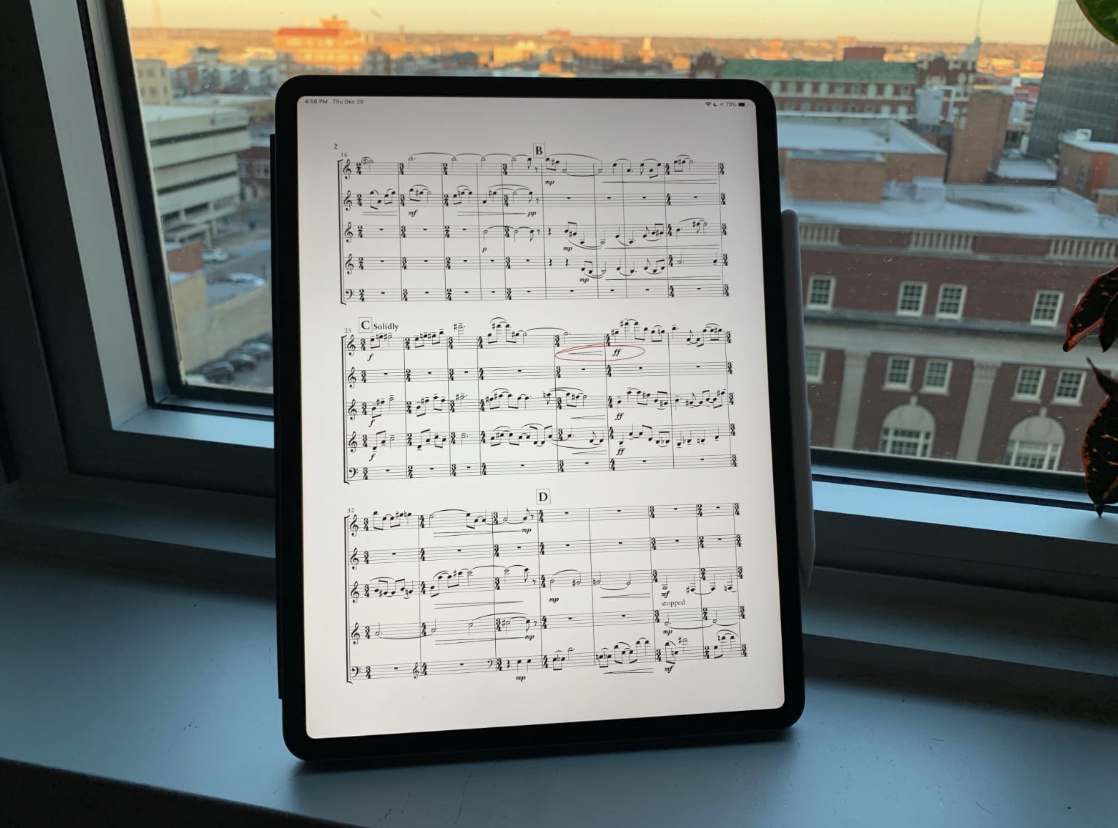
If you can afford it, it’s great to be able to invest in new hardware when you decide to go digital, but most contributors to this article use the Apple devices they already owned. Here’s a quick rundown of the devices used by our small sample:
- Five iPad Pro models, with 13 or 14-inch screens, some of them six or seven years old. Note that a 13-inch screen is about equivalent to an 8.5” X 11” sheet of paper.
- Two iPads of standard smaller screen size, one of them six years old. One user states emphatically that the convenience of reading from a screen with excellent backlighting more than makes up for the smaller size (6” X 8”) of the display.
In addition to iPads for reading and performing music, most folks rely on desktop or laptop computers for filing and organizing their collections, editing and arranging, or taking backups of their music. These computers include Mac desktop, Mac Mini, MacBook Pro, and MacBook Air models and even a Windows PC.
| | |
Transfer Music to Apple Devices in Various Ways
Apple users have many options for loading music onto the iPads that they use for reading music. The contributors to this article upload music in PDF format to their iPads, and the PDFs reach their iPads in any of the following ways:
- In an email attachment
- Via Internet download using Safari or another browser
- By using Apple AirDrop from a Mac computer
- By importing the PDF into the ForScore music app on iPad
- By opening a music file from email or an internet browser, then ‘sharing’ the file to ForScore
- By importing music from cloud storage such as Dropbox, Microsoft OneDrive, or iCloud.
- By scanning or photographing paper music using the iPad’s camera. (Scans or photo images lack the quality of most music PDFs, but one user of Photoshop Elements improves the readability and clarity of a photo or scanned image before saving it as a PDF.)
- By scanning with a flatbed scanner or printer/scanner and then transferring the PDF to iPad.
Storing, Marking Up, and Organizing Music Files: ForScore
For practice or performance when reading music on their iPads, everyone in our sample group uses ForScore, which syncs its files with other devices via iCloud storage. ForScore enables users to mark up the score or parts, add notation symbols, and take notes with an Apple pencil or other stylus.
Within ForScore, users can file their music by composer, title, number of parts, genre, etc., and most adopt a naming convention according to their preference. One can use labels or tags for additional details such as the context or performing group in which the music is played.
ForScore maintains a comprehensive sorted list of all music files, has search capabilities, and makes it easy to organize music for a chapter meeting, rehearsal or performance through the use of folders and playlists. Each PDF is stored only once but can be found in multiple playlists or folders. Changing the order of pieces in a playlist is straightforward.
Arrange, Edit and Compose Music on Desktop or Laptop
The ForScore Desktop App is compatible with both Windows and macOS. Those who want to write, arrange or edit music files generally rely on desktop or laptop computers and additional software. Software applications mentioned by those in our sample group are:
- Dorico, for music notation and composition
- Finale, for music notation and composition. Finale was discontinued in 2024, supplanted by Dorico, but is still available to those who purchased it.
- MuseScore Studio, for music notation and composition as well as creation of MP3 sound files
- PlayScore2, for scanning and reading sheet music and playing along to the score.
Both MuseScore and PlayScore can be used for practice, and PlayScore allows you to mute one or more parts while you play along.
| | |
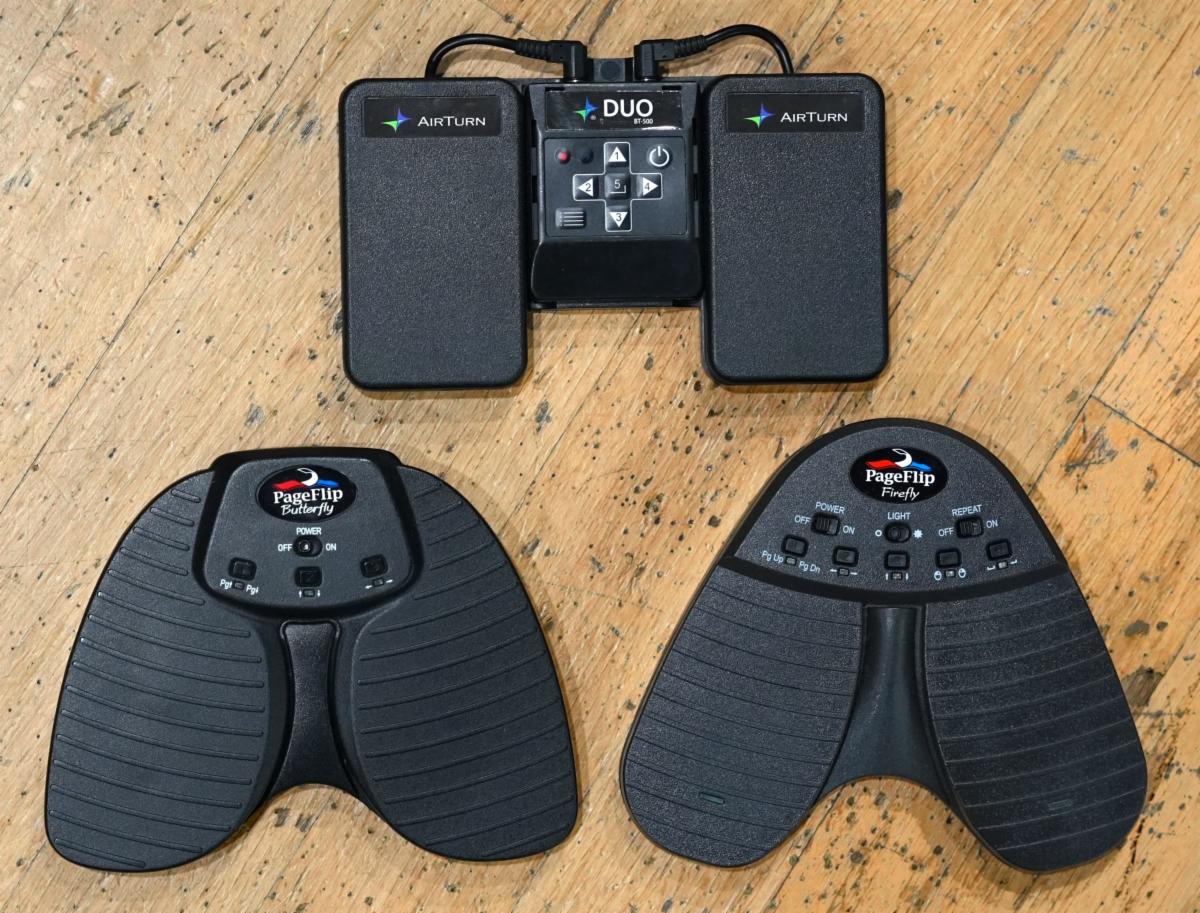
Turn Pages with a Foot Pedal and Occasionally a Finger Swipe
Foot pedal page turners are widely available, and our contributors all use them. Some have experience with several and even recommend investing in more than one. Five of seven users in our sample use the Page-Flip Butterfly Bluetooth device. One uses the Airturn BT-106 DUO, and another has two, the Yueinpu and Starfavor. It seems that foot pedals are easy to forget when you’re packing up your gear after a playing session or performance, especially in rooms that are poorly lit. If you have more than one foot pedal, you can be prepared for the next playing session even if you don’t recover the page turner you left behind.
Several folks commented on how easily one can flip two pages accidentally when using a foot pedal, but remember that the same sort of double page flip can happen with paper music. Some commented on the need to practice with the foot pedal to get confident about locating and using it smoothly in a playing/performance situation. It’s also helpful to be familiar with using your finger for tapping or swiping to turn the page when the music allows it.
Avoid and Prepare for Technical Failure
The contributors to this article employ one or more methods to reduce the risk of technical failure, and some bring paper copies of the music as a last resort. Their common practices are:
- Fully charge the iPad
- Charge or use fresh batteries in the foot pedal
- Back up music files to the cloud, another computer, or to an external storage device
One person noted that he’s never experienced a technical failure in thirteen years, and then he recounted an incident involving a professional musician who frantically used one hand to tap on his iPad in the middle of a performance! (His foot pedal had lost its bluetooth connection to the iPad.) Another observed that forgetfulness is also a form of failure, so take measures to avoid forgetting a charger, batteries or other equipment.
Additional Tips from the More Experienced
- iPads are expensive. Sure, you can replace it if it’s damaged, but a protective case may save it from damage if it’s dropped. A sturdy music stand and a clamp for securing the iPad to the stand are good investments.
- An Apple pencil is great for making notes in your music on the fly. Other styluses don’t interface with the iPad quite as well, and the Apple pencil may be worth the extra expense.
- ForScore has many features which make it easy to annotate music with pencil or fingers, including colors, and quick erasing capability. You can also import an MP3 file into ForScore for play-along and then adjust pitch or tempo as needed.
- When using MuseScore, you may want to adjust the music layout for each instrument in a multi-part piece to get accurate pitch output. ARS has published suggestions for correct notation that works well with MuseScore.
- As a newcomer to playing and performing from an iPad, you’ll have questions and hurdles to overcome. Keep trying, get help from others, and don’t give up.
- The process of going digital has a learning curve, but it’s well worth it.
| | |
Thanks to the Contributors
Sincere thanks to the people who took the time to respond to my questions about playing and performing from Apple devices. They offered considerable detail and added interesting comments from their own experience: David Barnert, Thomas Granvold, Debera Parker, David Podeschi, Harald Poelchau, Tom Todd, and Susy Wilcox. Any errors or omissions in this piece are mine.
| | |
Judy Smutek, an avid amateur recorder player from Ann Arbor, MI, is an outgoing ARS board member who has served for 8 years. She has been the editor of this ARS NOVA series that we have all enjoyed reading as part of her role as head of the Communications Committee.
| |
|
Do you enjoy our ARS NOVA emails?
Click here for our archives, with articles on many topics ranging from how to care for your recorders, to useful apps, to scholarship and grant opportunities though ARS. If you've received this from a friend, sign up for your own monthly subscription using this link.
| | |
How to Join the ARS
Take advantage of our 1/2 price rate for first-time members! Get immediate access to all the information available on our website, as well as other member benefits including the quarterly American Recorder magazine.
Click here for info
| | |
P.O. Box 480054 Charlotte
NC 28269-5300
Phone: 1-704-509-1422
Toll Free: 1-844-509-1422
Fax: 1-866-773-1538
| | | | | |