What's Your APP-titude?

There is so much we can do with mobile phones, we barely need computers. However, I find myself wondering about downloading apps to my mobile device. Is it possible to determine if an app is legitimate or a Trojan horse for malware?


We've all been reminded never to download an email attachment from a stranger; why then are we so willing to download an app without considering the possible consequences?


Some apps are malicious, containing viruses, worms, malware, or some other way of harming your device. Apps can be programmed to access things like your personal information, your contacts, or passwords.


Many apps are free. Remember, if an app is free, then you are the product, meaning the product is paid for by selling your personal information. Additionally, many ad-based games use your location information for the advertiser.


Read on about how to avoid downloading a malicious app and make sure you are app-lying the same caution with your smartphone as you are about your financial or medical identity.


Beth

SCAM ALERT

This is a current scam happening throughout Colorado. Scammers call victims and pose as bank employees by spoofing their caller ID. Because the call appears to be from the person's bank, the victim is easily tricked into providing personal banking account information. Some victims are told that something is wrong with their debit and credit cards and tell the victim to place their bank card in the mailbox to be retrieved by a bank employee. Then the scammer goes to the victims' homes and steals the cards. Read about the scam here.

Installing Apps


Pay attention whenever installing an app - they could be harmful. Companies like Google and Apple have checks in place to catch nefarious apps, but occasionally issues slip through. Here are some things to look for when deciding whether to download an app or not.


  1. Before downloading the app, do a web search by entering the name of the app plus the word "problems."
  2. Look for information such as the upload date and the number of downloads. Avoid any apps that do not have many downloads or if the app is new.
  3. Don't sideload. Sideloading is downloading from a source other than the manufacturer's official app store. Sideloading allows you to install apps that are unavailable in official app stores like Apple, Google, and Android. To sideload on an Android, you have to first allow "Apps from Unknown Sources" to be installed, which is risky, at best.


How will you know if you are a victim of a malicious app? Just as your computer slows down when infected with malware, a smartphone will do the same. Problems with slow operation and decreased functionality or overheating can mean that malware is present.


Downloading an app?

Have you read the terms of service?


Let's be honest, most of us don't read the terms and conditions before we download an app.


"BY USING THIS SITE YOU ARE AGREE TO THESE TERMS OF USE: IF YOU DO NOT AGREE, DO NOT USE THIS SITE."


"WE MAY MODIFY THESE TERMS FOR ANY REASON - AT ANY TIME- ..."


In 2012, Instagram tweaked its terms of service to let itself sell your photos to advertising companies. Your face could have been plastered on an ad somewhere without your permission. That policy has since been revised. This is just one example of potential terms that you may agree to by installing an app. Without reading the terms and conditions first, you have no idea what permissions you are allowing.


Some potential risks that sideloaded apps bring to the table include:

  • They may not be checked for malware or malicious code.
  • They may not follow best practices created by the device manufacturer.
  • It may be more difficult to keep these apps up to date.
  • They might appear like legitimate apps but contain spyware or other malicious code.
  • They may collect and/or disclose personal information without letting the user know.
  • They may collect location data.


If you have no other choice but to sideload, make sure you download the app directly from the official website.


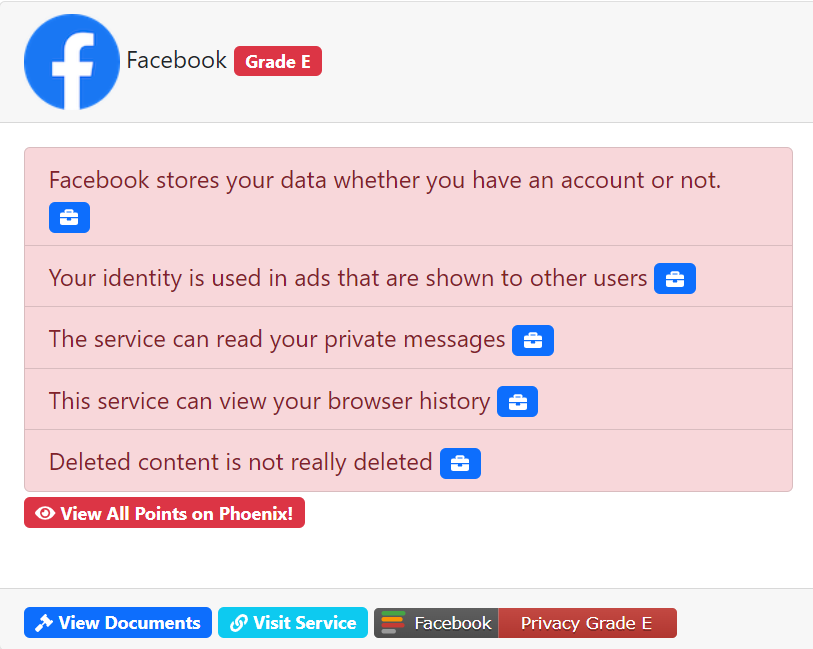
If you don't have the time or desire to read the full terms and conditions, use TOSDR. The name is inspired by an internet acronym TL;DR which stands for "Too Long; Didn't Read" -- that's most of us. TOSDR rates apps from A to E based on privacy levels within a particular app.

Need more convincing that you should read the terms and conditions or use TOSDR before you download an app? Here's an example from TOSDR about Facebook's privacy. The app receives a Grade E.

GIFT CARDS ARE FOR GIFTS


Gift cards are for gifts and gifts only. If someone requests payment in the form of a gift card for ANYTHING, the caller is a SCAMMER.


You cannot pay the IRS with a gift card, or get a warrant cleared, get your grandson out of jail, or keep your computer from being hacked with a gift card.

Gift cards ONLY buy gifts.

Remember two red flags of a scam:

  1. A caller professing to help directs you to buy a gift card to get you out of whatever situation the caller professes you are in.
  2. FEAR - If the information provided by the caller puts you in a state of fear that something bad has or will happen, that's a sure sign of a scam.


Watch this video produced by the FTC about gift card scams.


Do you suspect you've been scammed or exploited?

Report it to us by calling our Fraud Hotline.


Contact

The Denver DA's

FRAUD HOTLINE

720.913.9179

Denver District Attorney's Office | 303-913-9000 | 201 W. Colfax Ave. | DenverDA.org
Facebook  X  LinkedIn