|
Welcome these new members of the Kennel Connection family!
The Dog House Salon
The Kitty Hotel
Ruff Country Dog Resort LLC
CCC Canine LLC Canine Country Club
Benoni Kennels and Cattery
Missy's Doggy Day Spa
The Paw Spot Pet Resort
Dominion Farm B & B
Biscuits
Pet Castle
Sinburg Kennels
PoshPaws Animal Care
Cindy's Critter Camp
The Lodge Luxury Boarding Retreat
All users are welcome to join our new
Facebook User Forum
page! It's a great place to connect with our KC users, ask questions, get tips on how to use the program and even learn about features you didn't know were available.
"LIKE" Kennel Connection on Facebook!
www.facebook.com/kennelconnection |
|
Remember to backup your database!
You are responsible for backing up your database. If you ever suffer a computer crash and are unable to pull any data from the machine, you will need to start from scratch unless you have a backup of the database.
We suggest you backup every day to an external hard drive. It is important that you unplug the external drive once the backup is complete so that it is not infected if your computer gets a virus.
If you attach pictures or documents to pet/client records, or have clients sign the signature pad for receipts, you must also backup these folders.
We also offer an automatic backup service for SQL users for their database, pictures and documents folders. Access users can sign up to backup their pictures and documents folders. Click
here to check out all the options.
|
|
Protect your computer from ransomware!
Attacks from ransomware are on the rise these days. It is vitally important that you protect your computer and Kennel Connection from such attacks. Make sure to backup your database everyday to an external hard drive. Copy your Pix, KCDocs, Receipts folders to your external drive, if you use those. Unplug the external drive when you are done so that it is not infected if your computer should get a virus. Click
here
for full instructions.
|
|
Free Training Videos!
Our
training videos are free to access 24/7 with no logins required. This is a great way to familiarize yourself with the program, brush up on your skills and even learn about features you didn't know were available.
|
Additional Paid Training
Need additional hand-on training for you, your managers, or your employees? We offer additional paid training services for one-on-one or group instruction on setup and usage of Kennel Connection. These training sessions can be performed over the internet, or our instructor can visit your facility. For additional scheduling and pricing information about our paid Online and Onsite training services, contact the training department at Training@BlueCrystalSoftware.com or 1-888-486-4343 x 506.
|
Support Videos!
Users with a current support plan are able to access our online Support Videos. Topics include Installing KC, Installing the latest update, Setting the DSN for printing errors just to name a few.
Log into the
support website and click on Support Videos on the left hand menu under the Extended Services section.
If you would like to renew your support plan to get access to technical support, updates, and the support videos, please contact Kevin at Kevin@BlueCrystalSoftware.com or 1-888-486-4343 x 302.
|
|
We're still hard at work on Kennel Connection 7!
Check out the newest features added!
Accounting, Receipts
All modules
- Right click, confirm appointment, have option to confirm all pets of the family
- Ability to add pet warnings through the appointment screen
- Right click, Cancel, have option to cancel all family pet's appointments at once
- Have option to not track cancelled appointments
- Add a note to the popup about future appointments to indicate whether they are waitlist appointments
- Ability to set what time M A E is for Feeds/Meds/Exercises
- Ability to see the pet type when on Schedule, Add, choosing New
- Add a note on the pet card for Cancellations like it does for No Shows
Boarding
- Added a Get Last option for runs
- Added columns for Pet/Client boarding packages on the schedule
- Added ability to see how many boarding package days there are on the appointment screen
- Ability to print belongings for pets at any point during their stay
- Ability to give multipet rates based on weight classes
- Ability to type in additional email addresses to send Estimates to without having to store the email on file
Calendar
- Added a Closed option
- Added option to mark one module(s) closed, or the entire business
Daycare
- Tie half day daycare to half day package definition
- Ability to add different departures services for multipet bookings
- Added a popup if the pet is not approved for daycare when adding appointments
Daycare, Grooming, Special Services
- Option to add more than one recurring appointment without overwriting the previous one
- Option to add non-recurring appointments
Discount/Loyalty setup
- Added an Access Rights to this screen
Email
- Option to send a Welcome email after adding a new client
- Ability to email by appointments
- Ability to email based on memberships
- Ability to email by city/zip code
- Confirmations/Automatic reminders - Option to Text
- Boarding confirmations - Added departure services
- Boarding confirmations - Added boarding package count
- Daycare confirmations - Added daycare package count
- Training confirmations - Added option to include In Times
Employees
- Option to view Active, Inactive or both
Feeds/Meds/Exercises
Grooming
- Have In/Out Time show on the schedule at the same time
- Ability to set different services, BGNO, for multipet bookings
Inventory
- Added option for multiple vendors for inventory items
Invoices/Receipts
- Option on client card to email to both addresses on file
Pet Card
- Boarding tab - Ability to assign a default run
- Added a place to store the license #
- Added module specific warnings
Petsitting, Training, Special Services, Grooming
- Added ability to change all appointments for the day from one employee to another
Refunds
- Ability to refund a deposit/prepayment without needing an invoice
Training
- Added training packages
- Increased the field for classes so the name isn't cut off
Schedule, Month Glance/Vacancies
Weekly Schedule
- Add a color code for confirmed
Call us now to reserve your copy!
Sales@BlueCrystalSoftware.com or 1-888-486-4343 x 302
|
|
Latest revision of Kennel Connection 6
As of the posting of this newsletter, the latest revision of Kennel Connection is
6.05.25.
You can check your version by clicking on Help, About Kennel Connection
You can download the latest update by logging into our support website and clicking on Updates on the left hand menu.
Please note that KC must be closed on all computers and you must backup your database before proceeding. Click here for directions on backing up.
If you're not sure, please do not attempt the update yourself. Contact Support at Support@BlueCrystalSoftware.com or 1-888-486-4343 x 504 to set up an appointment. |
|
Tips from Training
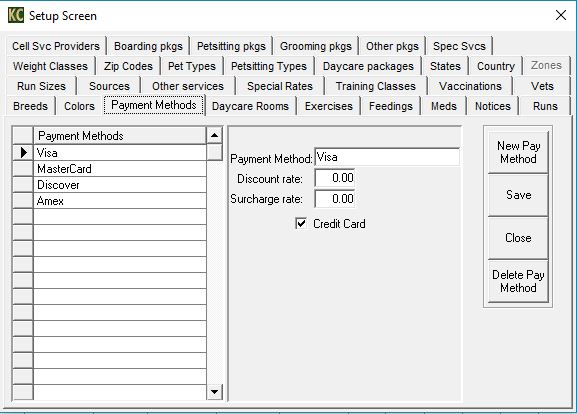
If you notice the Receipts report is listing Cash or Check twice, check in File, Lists, Payment Methods. Cash and Check are defaults in the program. If you add them to this list, it will double on the report. Delete them and your report should be good.
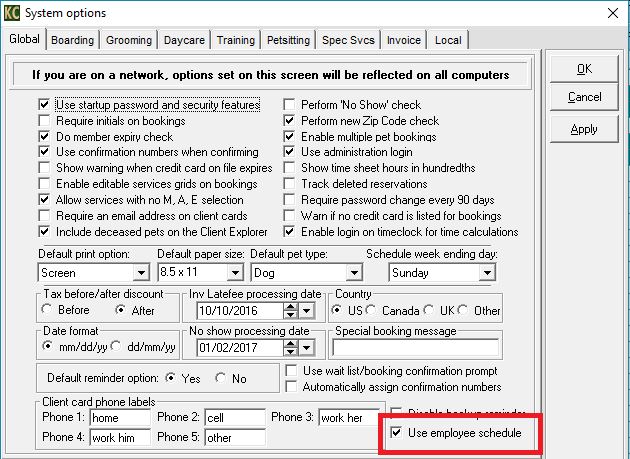
 If you notice that since the last update, KC is prompting about groomer's schedules and you don't use schedules, you can disable this by clicking on File, System Options, Global tab. Uncheck the the box that says "Use employee schedule".
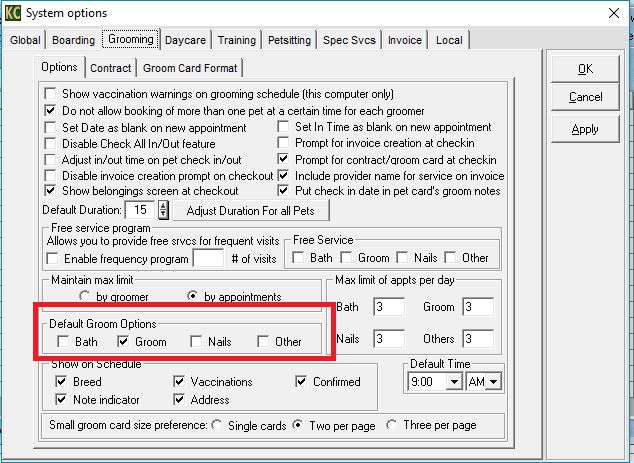
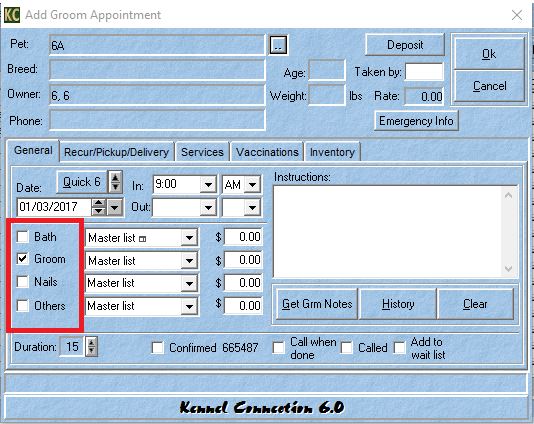
You can set up default groom services under File, System Options, Global tab. These options are automatically chosen on the appointment screen.
|
|
|
|
|
|
|
|