Issue 70

October 22, 2026

Time to Read: 6 minutes


-Hot Take-

Not every customer is worth keeping, especially when their constant emergencies are costing you your best employees.

Joke of the Week

An engineer, a machinist and a salesman are stranded on an island. The engineer designs a boat, and the machinist builds it. The salesman already promised the customer it’d be there Friday.

Ask a CAM Pro

Real shop problems. Answers from people who have been there.

How do I decide when a 2D toolpath is better than a 3D strategy?


Just because a part comes in as a solid model doesn't mean every feature needs a 3D toolpath. Defaulting to 3D on everything can leave you with longer cycle times, heavier code, and walls that are harder to hold to size. Force 2D onto sculpted geometry and you get stair steps and hand finishing. The right call comes down to the geometry, the tolerance, and what you want the machine and the operator to deal with.


Look at the geometry, not the file type.

Ask what the feature actually is. Flat floors, vertical walls, constant-depth pockets, profiles, slots, and holes are prismatic features, and they are 2D work no matter how the model was built. If a wall or floor changes in Z as you move along it, like blends, drafts, variable-depth floors, or sculpted surfaces, that is where 3D strategies earn their keep.


Use 2D when you need to hold wall size.

A 2D contour can be posted with cutter compensation, so the operator can adjust a wall with a wear offset instead of sending the program back to you. That is a big deal on tight-tolerance bores, pockets, and outside profiles. 3D finishing paths are usually posted as tool-center moves, so any size change means a trip back to CAM.


Think about the code and the machine motion.

2D toolpaths with G2/G3 arcs and straight lines mean compact code and smooth motion, even on older controls. 3D paths often rely on many short segments that lean harder on the control's look-ahead. Arc fitting and smoothing help a lot, but if the feature is truly prismatic, 2D gives you lean code without extra effort.


Save 3D for shapes that really change.

Blended transitions, organic surfaces, variable floors, and compound angles all need 3D to follow the shape with a consistent scallop height. Trying to step those out with stacked 2D passes leaves witness lines and stair steps that increase manual surface smoothing and polishing time. When the shape changes continuously, let the toolpath change with it.


Let tooling turn 3D features into 2D ops.

A lot of features look 3D but are really a tool shape problem. A drafted wall can often be finished with a tapered end mill on a 2D contour instead of a ball mill stepping down a waterline. A bottom fillet can be cut with a bull-nose that matches the radius instead of a 3D pass along the corner. Matching the tool to the feature can save serious cycle time and give you a better finish.


Mix them on the same part.

The best programs often use both. Rough the whole part with a 3D adaptive or high-efficiency strategy that sees the full model and the changing stock. Then finish the flat floors, vertical walls, and holes with 2D ops, and use 3D finishing only on the sculpted areas, contained with boundaries so it doesn't waste time re-cutting flat faces.


Watch what the toolpath can see.

A 3D strategy can account for the full model and neighboring surfaces, depending on how the operation is defined. A 2D toolpath follows the geometry you selected, so check depths, clearances, and adjacent features before you post. Simulation against the full part model catches anything a 2D chain might not account for.


Factor in programming and edit time.

2D ops are quick to program, easy to read at the control, and simple for an operator to tweak. For simple repeat parts, that keeps everyone moving. 3D takes a bit more setup and verification, which is well worth it on complex surfaces but overkill on a plate with pockets and holes.


Bottom line:

If a feature is defined by flat floors and vertical walls, 2D is faster, leaner, and easier to adjust at the machine. Use 3D where the geometry truly changes in Z, and don't be afraid to combine both on the same part to get the best of each.


Have a programming question?


Send it in for the next edition of Ask a CAM Pro!

Shop Floor Debate

Which problem gets ignored the longest?

Last week's debate: One problem pulled ahead of the rest when we asked what would break first if shops doubled their machine capacity. Can you guess which one?

From the IMTS Floor

From CAD to Quote to CAM with up2parts


Quoting faster sounds great. But what happens when you win a job you can't make money on?


At IMTS 2026, we caught up with Marco Bauer of up2parts to talk about a challenge nearly every machine shop faces: getting accurate quotes out quickly while keeping costs, programming, and production connected.


Marco started developing the software to solve problems in his own machine shop in Germany. Today, up2parts connects CAD analysis, cost estimation, cycle time calculations, and CAM programming in one workflow.


But the most interesting part of our conversation? How shops can calibrate their quoting systems to reflect what actually happens on their machines.


If your shop is spending too much time quoting, struggling with disconnected systems, or wondering how AI fits into the manufacturing process, this one's worth a watch. See what's possible when quoting and programming work together.

Video of the Week (Powered by GibbsCAM)

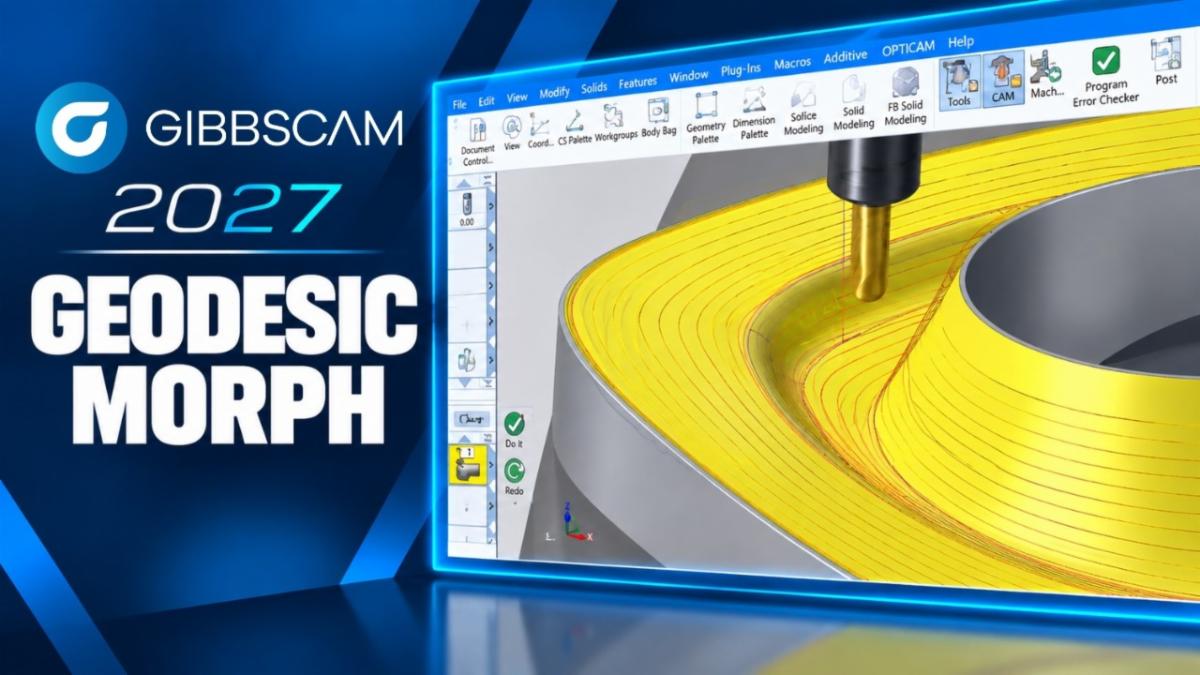
Geodesic Morph | GibbsCAM 2027 Highlights

See how GibbsCAM 2027’s Geodesic Morph finishing strategy gives programmers greater control over toolpath motion and surface finishing on complex 3D parts.

CAMedy Central

Industry Intel

Mitsubishi Electric Develops Industry’s First Machining System in Which Humanoid Robots Collaborate with CNC Machine Tools

Mitsubishi Electric has built a physical AI system that lets a general-purpose humanoid robot work alongside a CNC machine tool on operator tasks like setup, cleaning, part removal, inspection, and troubleshooting, all directed by plain-language instructions and without custom integration for each robot. A demo is set for JIMTOF 2026 in Tokyo starting October 26.


August 2026 US Cutting Tool Shipments Totaled $278.6M, Up 32.2% From August 2025

U.S. cutting tool shipments hit $278.6 million in August 2026, down 0.8% from July but up 32.2% from a year earlier, bringing year-to-date shipments to $2.03 billion (up 22.4%), with industry leaders noting that rising raw material costs explain much of the gain but that real demand is still up 12.5% after adjusting for inflation.


DEED Awards More Than $2.5 Million in Grants to Minnesota Colleges and Universities for Employer Workforce Development Projects

Minnesota DEED awarded 14 Minnesota Job Skills Partnership grants totaling more than $2.5 million to eight colleges and universities partnering with employers such as Seagate, Boston Scientific, and Medtronic to deliver customized training (much of it focused on AI, automation, and leadership skills) to more than 2,000 workers.

Industry Growth (Open Jobs)

A few hot openings across the industry this week:


CNC Machinist/Programmer - Mach10 Solutions - Plymouth, MN


Manufacturing Solutions Sales Rep - Midwest CAM Solutions - Minneapolis, MN


CNC Machinist - Primary Automation Systems, Inc. - Andover, MN


CNC Machinist - Motion Raceworks - DeWitt, IA


Tool & Die Maker - Quality Tool - Brookings, SD


CNC Machinist/Programmer - CP Machine Inc - Williston, ND


CNC Machinist (2nd Shift) - Pen Steel Manufacturing - Omaha, NE


CNC Programmer - MB Steel - St. Louis, MO


Applications Engineer - Haas Factory Outlet - Wichita, KS

Trade Show & Event Radar

Date

Event

Location

Oct 28-29

MD&M Midwest

Minneapolis, MN

Nov 11-13

Titans of CNC Boombastic Show

Flower Mound, TX

Feb 9-11

MD&M West

Anaheim, CA

April 19-22

Machining Summit

Mammoth Lakes, CA

May 10-13

Automate

Las Vegas, NV

Did someone forward you this newsletter?

Subscribe to get your own copy every week.