|
March 6, 2024
Workday Upgrade Downtime
plus New Benefits and Pay Hub
Coworkers,
Franciscan Alliance will soon perform its regularly scheduled upgrade of the Workday business solution software, during which time Workday will be unavailable.
Workday downtime:
Saturday, March 9
2-6 a.m. ET / 1-5 a.m. CT
New! Benefits and Pay Hub
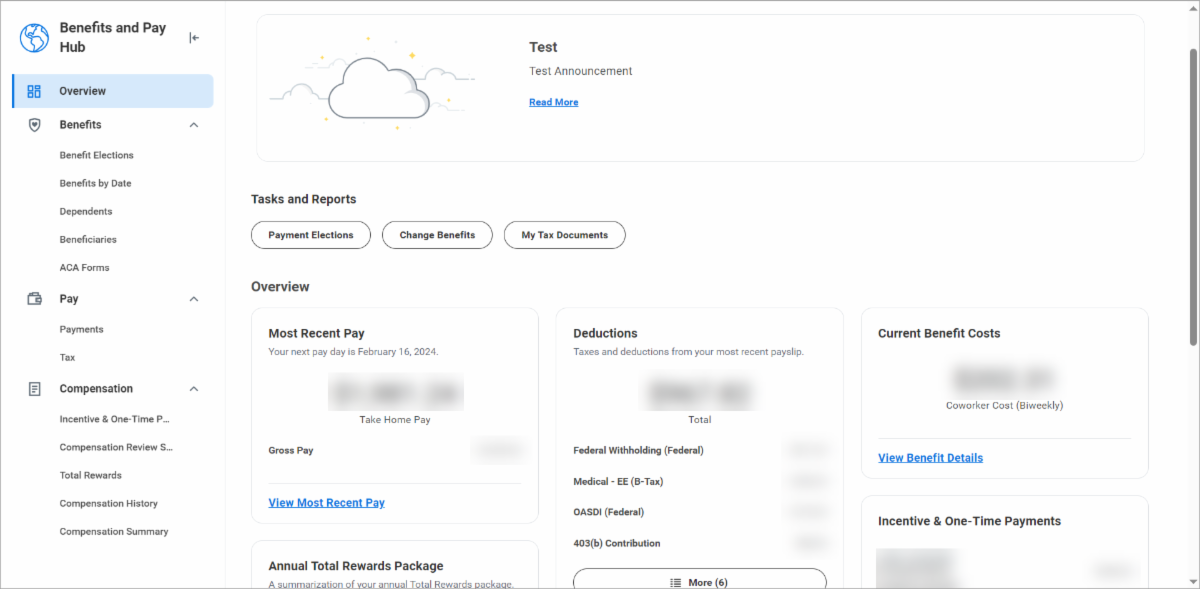
With this upgrade, there will be a new place where coworkers will view their paychecks, tax documents, benefits information and more.
Workday is retiring the individual apps for Benefits and Pay and combining those into a new Benefits and Pay Hub.
The Benefits and Pay Hub compiles information shown across different areas of Workday in one simple screen. The hub has tiles showing most recent paycheck, deductions, current benefit costs, compensation history, total rewards (i.e., pay, value of time off and benefits), and incentives and one-time payments (e.g., referral bonus).
From the hub, you can still access and do all the things you could before, using:
- The tiles on the page.
- The options on the left-side navigation list, such as viewing your benefit elections, dependents, and beneficiaries.
- The Tasks and Reports section, such as viewing tax documents, viewing/updating payment elections (e.g., direct deposit), or changing benefits.
|