| |
| |
| |
| |
|
|
Greetings Worldox Users!
In this month's newsletter we will revisit the process of updating your Worldox system by giving you a step-by-step guide on how to keep your Worldox system up-to-date.
Also, for those of you out West or anyone looking for some dry weather, we have our next Worldox Bootcamp coming up in Arizona next month - see details below.
|
|
Introducing Worldox GX4! Webinar Overview
For those of you that have not had a chance to check out what's new on
GX4, please join our webinar later this month with Affinity's Senior Consultant for Document Management Services and
Worldox
Expert, Gregory Bray, who will present a 30-minute overview of the new
Worldox GX4
!
He will introduce you to the many new features and functions of
GX4, and examine the revolutionary new layout of the user interface. At the conclusion of the presentation, he will open up the webinar for your questions about upgrading to
GX4
.
Click the link below to register to attend the last session!
Additionally, a recording of August's GX4 Webinar is available
HERE!
|
|
Worldox Professional features an annual maintenance plan (current cost - $97 per Worldox user license per year) that provides your firm with a method of updating your Worldox code at any time.
Keeping your Worldox code current is important because you will receive the latest enhancements added to the product by the Worldox Development Team. For instance, on April 6, 2015, the Adobe Corporation released new versions of its Acrobat PDF software product line. On April 8th, World Software released an update to their GX3 version to support the new Acrobat DC versions.
We do not advocate that firms update their Worldox system every month, but rather you update your Worldox system at least once per year, or when notified by either WSC Support or Affinity Consulting (as suggested in this newsletter).
As new code is released, the Worldox Development Team publishes a list of the actual fixes or enhancements for each update called "Release Notes." Links to the current release notes for GX3 and GX4 are below.
Note that updating Worldox is not
the same as UPGRADING Worldox (i.e. moving from GX3 to GX4), which is a process best handled by an experienced Worldox consultant or support technician.
What is My Worldox Code Date?
The simplest and easiest way to determine the release of Worldox code you are running is by the date associated to the program files within the product. To
determine the code date of Worldox you are running, you should do the following:
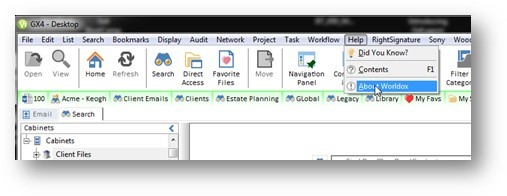
- From your Worldox client program, click on the HELP>ABOUT menu:
-
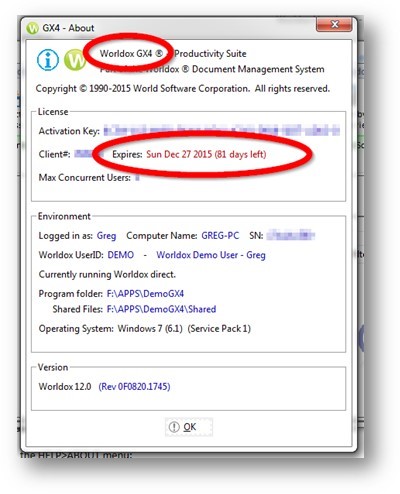
The next screen window will tell you whether you are running GX2, GX3 or GX4 and how long you have until you need to renew your maintenance subscription (you must have a current maintenance subscription to update your software):
-
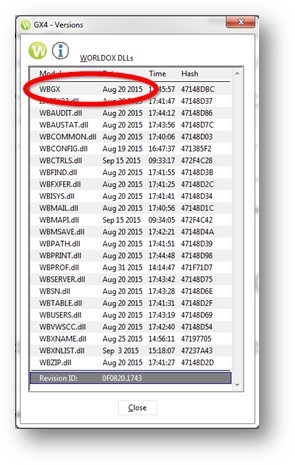
While still on the "About" window, hold down the CTRL key on your keyboard and press the R key (CTRL+R). This will open a release version window that will show the dates for all the central code files to Worldox. Locate the date associated to the module called WBGX (or WDA for Worldox Gx2 customers).
-
This is the release date of your code. You can now CLOSE this window.
Suggested Code Dates for Worldox
Current suggested versions for Worldox are:
Worldox GX4
Your GX4 Professional system should be running August 20th code or later
Worldox GX3
Your GX3 Professional system should be running April 9th 2015 code or later
We recommend GX3 customers contact us to schedule their upgrade service and training for GX4 over the coming months
Worldox GX2
You should no longer be running GX2 code.
Please
contact us to upgrade your code to a newer version.
Updating Worldox
Worldox GX3 and GX4 contain an update utility called WDUPDATE - it is located within your central Worldox Code folder (ie.
\\server_path>\Worldox\wdupdate
.exe
).
In order to use the utility, you must have a current maintenance agreement with World Software, and you must have activated your WDUPDATE utility (contact WSC or Affinity Support if your need assistance with this ).
We also recommend that firms running the Worldox Enterprise remote access module consult with WSC or Affinity Support prior to running the WDUPDATE utility.
All DIRECT ACCESS users of Worldox (i.e. those running Worldox via a network shortcut - usually RDP and Citrix clients) must close their Worldox program during the WDUPDATE process. Also, make sure that all Worldox Indexer programs are closed during the WDUPDATE process. This will avoid file locking issues during the update.
We typically recommend that updating Worldox is done after hours to avoid user disruption.
- Close all Worldox DIRECT clients (see above) and all other Worldox linked programs (i.e. Worldox Indexers, Worldox Administrator, Worldox Web, Symphony OCR/Profiler)
- Run the WDUPDATE utillity for your central Worldox Code folder: \\server_path>\Worldox\wdupdate.exe
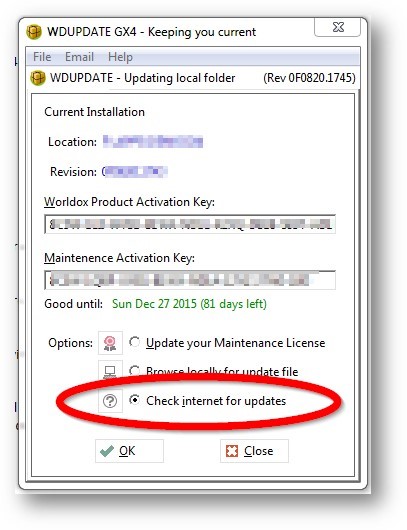
- Select the option to "Check Internet for Updates" and click OK:
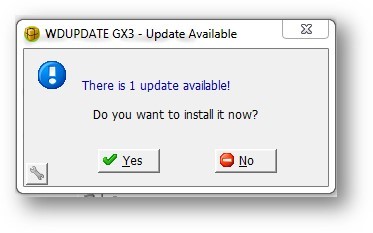
- The utility will check to see if there is a latest code release that it can apply to your system, and then ask you whether you want to apply it:
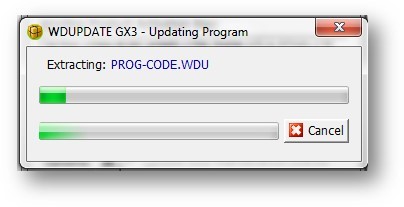
- When you chose to install the update (click YES), WDUPDATE will download and extract the code. You will then see it back-up your files (in case there is a problem during the update, it will restore them automatically).
Note that if a file is locked in use due to direct access clients or from other Worldox programs you will be forced to abort the update. Your next option would be to have ALL users close Worldox, and try WDUPDATE again. If it still fails, we would suggest rebooting your file server.
- At the completion of the update, check to see the release date of your new code (see What is My Worldox Code Date above), restart the Indexer and all Worldox linked programs and have your Worldox end users log back in. Regular Worldox users (MIRRORED users) will need to restart their computers in order to have the updated code applied to their local Worldox client program.
|
|
LAST Worldox Bootcamp in 2015 - PHOENIX!
Join us in Phoenix for our
LAST Worldox Bootcamp in 2015!
Worldox Bootcamps deliver intense training that enables you to leverage the full power of your Worldox Document Management System.
Your instructors will detail everything from saving a simple document to creating security profiles and document retention plans.
The course is specifically designed for new users, existing users in need of a refresher course, or to "Train your Trainer." Accompanied by meticulous materials, you will go back to the office excited to unleash the full power of
Worldox.
Last Bootcamp Date
November 2-3, Phoenix, AZ
Gordon Biersch Glendale
Design your Curriculum!
You can register for Day One, Day Two --
or Both Days FOR
EXTRA SAVINGS!
Day One - End User Training - $600
Day Two - Administrator Training - $600
Both Days - $999
|
Affinity and Workshare Partner to Offer Discounts

Affinity Consulting Group and
Workshare are partnering
to
o
ffer increased productivity solutions.
Affinity has chosen Workshare's industry leading comparison, protection and collaboration products that integrate tightly with Worldox as a differentiator to their customers and prospects. To learn more about how Workshare can increase your team's productivity, please contact Katie Kennedy.
Take two minutes to see Workshare's integration with Worldox in action.
With one-click, you can access the gold standard document comparison features that remove over 80 pointless clicks that users experience every time they draft and review documents.
In honor of our new partnership, Affinity is offering 10% off of Workshare list pricing for any new license purchase of Workshare Professional completed by December 25, 2015.
|
|
|
|
|
| |
|