Provider News & Info


May 2025

Phase 3 migration coming in July 2025

On July 1, a large part of our membership will transition to our new claims payment system. Members moving to the new system will receive a new PEHP ID card and member number to begin using for all services on that date. These members will also receive a letter from PEHP with their new ID number.


After this migration, approximately 90% of our total membership will be in the new system! The remainder will transition on September 1, 2025.


Key Reminders

  • Always Ask for Current ID Card: To ensure accurate claims processing, verify that members are using the correct ID card at every visit.
  • Verify Patient ID Numbers: Use the Member ID Lookup Tool in the Classic Portal to verify your patient’s ID number. Enter the subscriber ID number with no extensions or hyphens.
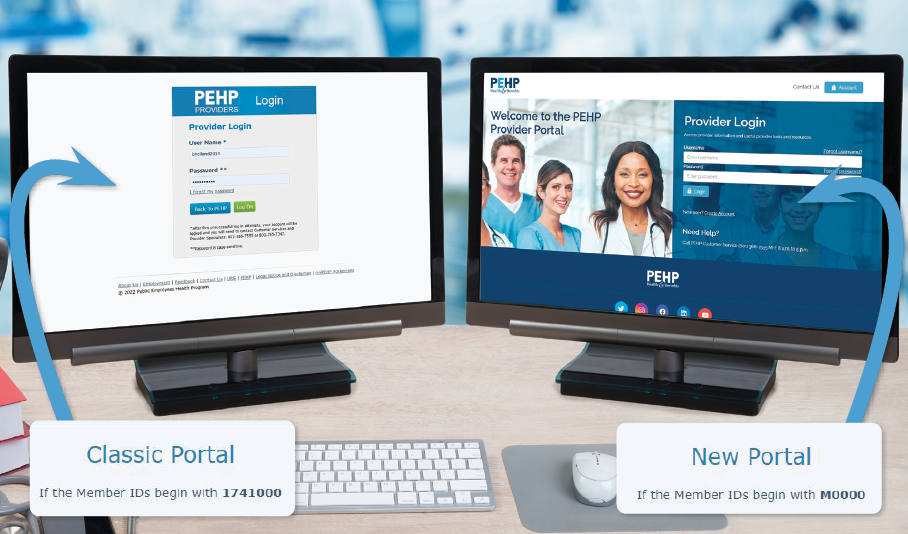
  • Submitting Claims: Until the migration is completed, you will need to use two different provider portals to check eligibility, submit claims, and other tasks.
  • Classic Portal: For members with an ID beginning with "174100"
  • New Portal: For members with an ID beginning with "M0000"
  • If you submit claims through UHIN or another clearinghouse, you need the correct member ID number (as shown on the PEHP ID card) for the claim to process. If your system requires 13 characters to submit claims, add "00" at the end.
  • If your claim is rejected, it’s most likely due to an incorrect ID number. To find out why your claim was rejected, use the EDI Claim Acknowledgement Tool in the Classic Portal. Note: Rejection code 33 indicates an incorrect ID number. To verify your patient’s ID, use the Member ID Lookup TooI in the Classic Portal or contact the patient for the correct ID number.

Important for July Migration


  • Use the “174100” ID for services through June 30, 2025.
  • Use the “M0000” ID for services on or after July 1, 2025.
  • Claims submitted with the wrong ID number will be denied and must be resubmitted using the correct number and portal.
Learn More

Need a Copy of an EOP?


To obtain a copy of an Explanation of Payment (EOP), please log in to your Provider Portal, where you can view, download, or print EOP documents.


Please note: We do NOT accept EOP requests over the phone. Be sure your staff and billing team are aware of this policy.


We’ve recently seen a rise in AI-generated bot calls requesting this information. These calls not only contribute to longer hold times for providers, but also are unhelpful because EOPs must be accessed from the Provider Portal. Training your staff and billing teams to use the Provider Portal helps reduce delays and improves efficiency for everyone.


Troubleshooting Tips

If the EOP document isn’t available in the Classic or New Portal:


Step 1: Verify the claim has been received. If the claim shows as received, check the current status:

  • Pending claims: Please allow additional time for processing.
  • Rejected claims: You must resubmit with all required and valid information. 


(Important: When resubmitting a rejected claim, do not reference the rejected claim number. A new claim number will be assigned.)


Not showing a claim received: Any claims that are not showing received after 30 days from the sent date will need to be resubmitted.


Step 2: If the claim has been received and processed, but no EOP is available:

  • Submit a request through the Message Center to the “Request for Missing EOP/835” mailbox.
  • Include the Transaction Number of the draft you need.
  • If you don’t have the transaction number, include the claim number, patient’s full name, date of service, and billed amount.


Step 3: Please allow 48–72 hours for a response.


Note for providers using a clearinghouse or UHIN: You may also obtain an 835 report directly from your clearinghouse.


Reminder!

Following these steps helps reduce call hold times and allows our Service Center agents to assist you and other providers more efficiently.

How to contact us


Claims, provider portal, and other customer service items

If you need to report a new issue or have any concerns, the best way to reach us is via the secure Message Center in the New Portal. When calling us (801-366-7555), please select the correct queue within the provider phone tree to avoid longer wait times.


Important! If you need to send us documents, please use the Message Center.


PEHP Provider Contracts

If you have questions about your contract with PEHP, please contact the following:


Todd Sprouse, Director of Provider Contracting

801-803-0143

todd.sprouse@pehp.org


Mike Corrigan, Senior Provider Contracting Manager

801-597-5682

mike.corrigan@pehp.org


Cammie Keim, Provider Contracting Manager

801-419-3699

cammie.keim@pehp.org

Facebook  Twitter  Instagram  YouTube