March 26, 2020
Dear Friend,
First, my apologies for a haitus of more than two weeks since my last "weekly" update. Needless to say, we've been busy!!!
I hope you were able to experience our concert on March 13 by the Vera Quartet and pianist Meng-Chieh Liu, presented as a live webcast from the Curtis Institute of Music. It was an unusual event for an unusual time, but it was viewed by well over
3,000 people
worldwide. In case you missed it, Curtis will soon make the video available again on their YouTube channel. I'll share a link with you as soon as they do. (See our tech support below.)
Since that performance, we have been busy designing the Chamber Music Society's approach to music-making during the COVID-19 crisis, and this week we are launching our new effort in this rapidly-evolving online space.
|
|
"Musica da camera" (the Italian term for "chamber music") has taken on a whole new meaning now, as musicians everywhere find themselves isolated and unable to perform for live audiences. The loss of performance opportunities and income is devastating; both they and their listeners are hungry for the connection that only great live music can provide.
The Chamber Music Society of Detroit’s "CameraMusic" is our answer to this, as we invite artists to perform
live
for CMSD listeners over the Internet from wherever they are, for an artist fee paid by the CMSD from our CameraMusic fund. This special fund is comprised of ticket donations from our cancelled concerts, and new contributions from music lovers here in Metro Detroit and around the world. The concerts are presented for free, but the musicians are not asked to play for free. They, too, have homes and families to support in this difficult time. Please join us for their concerts, and support them, too!
|
|
Every dollar contributed to the CMSD’s CameraMusic Fund helps us to pay musicians for their live CameraMusic performances.
|
|
|
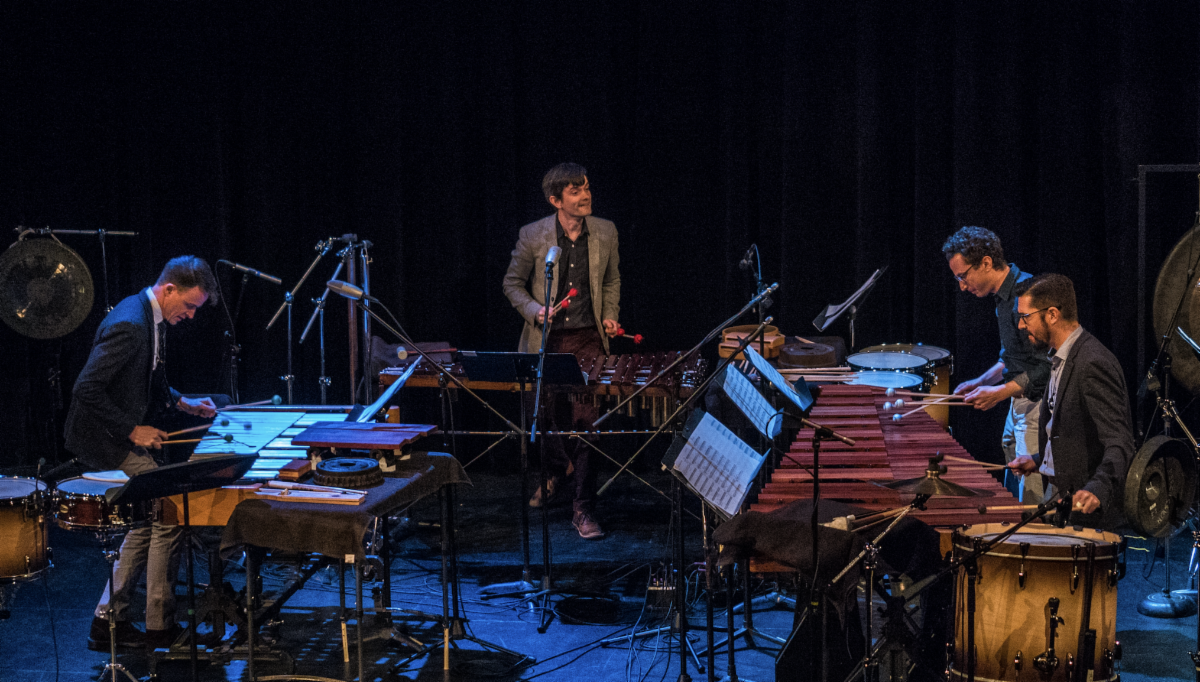
Next up on the CameraMusic schedule: the GRAMMY Award-winning
Third Coast Percussion
ensemble, performing live Saturday night at 8 PM eastern time from their rehearsal studio in Chicago. The "doors open" at 7:30 PM, allowing listeners time to get their tablets, computers, smart TVs or other devices all set and ready to go before the music starts.
(Tech support below.)
|
|
We're excited that this concert is presented jointly by the 92nd Street Y, the University of Chicago Presents, and the Chamber Music Society of Detroit; with music by Philip Glass, Peter Martin, Devonté Hynes, Jlin, and more.
CLICK HERE
for more information about the program.
|
|
Now for some technical support:
(skip below if you already "got" this)
Never watched a webcast before? It's actually pretty easy. Most of our webcasts will use YouTube Live, which is Google's really robust channel for the sharing of live streamed videos. The YouTube website can be a bit daunting, because of the vast amount of content on it, and because the format makes it about as easy to sort out as the signage in Times Square.
The YouTube Link:
No matter what kind of device you use, the easiest way to access any webcast concert is to follow a URL link that has been placed for you in an email or on a web page - including the link below. In theory, you can also go to the YouTube website and do a search for this webcast, but that might be harder than saving this email or going to our web site for the link. This is the direct URL link to Saturday's concert:
Please note that
every
detail in the URL link has to be perfect if you want to write it down and type it into your web browser, instead of clicking the link.
Playing the Video:
Once you click the link (or type it in), your device will direct you to the exact YouTube page where the concert will be broadcast. You will see a rectagular "screen" with some written information below it, as well as URL links for other videos either beneath it or in a column on the right. Ignore all that extra stuff.
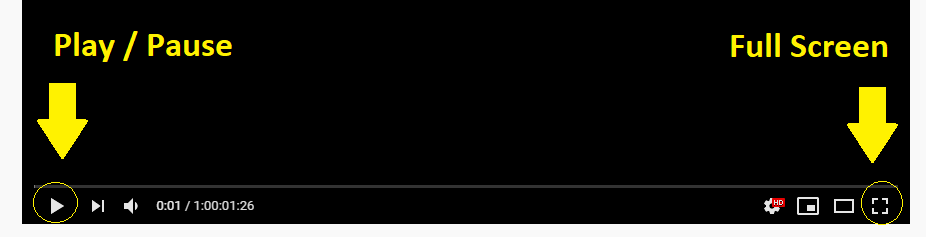
If we're "live," the video should start playing immediately. If it doesn't, look for a little triangular arrow icon in the lower left-hand corner of the "screen." Push it, and the video will start. Once it starts playing, look on the lower right-hand corner of the "screen" for another little icon that will enlarge the video to fill up the full screen of your device.
|
|
Testing it First:
The broadcast signal will "go live" 30 minutes before the actual concert, so I suggest testing it then to make sure everything is working for you when the music starts. (Before the "doors open" or "go live" time, all you will see on Saturday's concert page is a big picture of the composers, without any of the controls described above. Check back in at the "doors open" time.)
|
|
Now here are some tips watching and listening on different kinds of devices:
A computer (PC or Mac)
- before you do anything, make sure that the sound is turned up on your computer. Otherwise, you will be watching a lovely silent movie of guys hitting things with mallets. If your computer sound quality is not very good, see if you can find some headphones to use instead. (Just make sure the volume is set at a level that won't break your eardrums.)
An iPad or other tablet
- if you use an iPad, check to make sure you can find the email or a web page that has the concert URL link on it. (We'll have a big button on our web site at
https://www.cmsdetroit.org/thirdcoastpercussion
.) If you're watching alone, headphones may make the audio experience better.
An iPhone or other smart phone
- same as an iPad, practice getting to the link on your email or our website before Saturday, and test it at the "doors open" time. Especially with a smart phone, you will enjoy it more with headphones.
A Smart TV, by itself
- this is probably the trickiest option, because it will require first finding YouTube among all the apps on your Smart TV, and then using the remote to painstakingly type the entire URL (without any mistakes) into the search field in the app. But the audio-video quality will be glorious!
A Smart TV, connected to another device
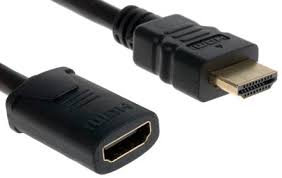
- most smart TVs have the ability to connect to other devices (like cell phones, iPads or computers). One way is over a Wifi network using AirPlay for Apple devices, or GooglePlay for android devices - both devices using the same WiFi network! It may be easier is to use a connecting cable called an HDMI. In either case, make sure the Smart TV input setting (the input button on your TV's remote control) is pointing to the specific input method you plan to use (like "HDMI-1" or "HDMI-2" or "AirPlay" or "GooglePlay").
|
|
Here's what the HDMI connections look like. The image on the right is what both ends of the cable look like. The hole on the image on the left is what the shape of the port looks like on your computer and Smart TV. Most HDMI cords have the image on the right at both ends of the cord; use that to connect your laptop to your smart TV. Then the TV will function like an external computer monitor.
|
|
|
Some Don'ts
- Here are some devices that generally will
not
work for a webcast (or if they do it's way above my paygrade):
- Traditional stereo or radio
- Television not connected to the Internet
- VCR or DVD player
- Flip phone or other cell phone without Internet access
- Computer with no sound capability (rare)
|
|
HELP!!!!!
- If you still have trouble finding or getting onto the webcast, don't dispair! We will be monitoring our phone at (313) 335-3300 starting at 7:30 on Saturday. Call us and we'll try to help you get things going over the phone.
|
|
Finally, let me say how much we
miss
you.
Nothing matters more to us at the Chamber Music Society of Detroit than protecting the health and safety of our audience members and visiting artists. But getting together to experience great live chamber music is a part of our lives we don't like living without.
We can't wait until it's safe again to do that, and even though we're cancelling live concerts for the time being, we are already making plans for at least one more special live concert before our 77th season officially starts in September.
For now though, please stay safe and well, and enjoy these webcast concerts when you can. To all of us at the Chamber Music Society of Detroit, you're
family
,
and nothing matters more to us than
you
.
Fondly,
|
|
Steve Wogaman, President
Chamber Music Society of Detroit
Tickets: 313-335-3300 or
|
|
|
|
|
|
|