Learn21's Weekly EdTech Update
August 8, 2024
| |
Educational Change Agents: Pioneering a New Path in Professional Development at Learn21 | |
|
At Learn21, we are pioneering a transformative approach to professional learning—one that goes beyond traditional models and emphasizes a sustained, individualized change process. As educators, we recognize that for educators to truly integrate new technologies or instructional models into their practice, support must extend beyond initial training sessions.
We recently made a significant shift to embody our philosophy and changed the job titles of our instructional team members from "Instructional Technology Coaches" to "Educational Change Agents." Why "Educational Change Agents"? Because at Learn21, we believe that the effectiveness of professional development is measured not by compliance or hours spent in training, but by the successful implementation and integration of new practices by educators in their daily teaching. Our team is dedicated to ensuring that every professional learning encounter is a catalyst for meaningful change, tailored to meet the unique needs and challenges of each educator with which we work.
Central to our ethos at Learn21 is what our Chief Academic Officer, Stacy Hawthorne Ed.D., calls the "hash brown casserole theory." This metaphor encapsulates the importance of thoughtful support. Just as neighbors might overwhelm a family with casseroles after a tragedy—ultimately becoming a burden—so too can an overload of new tools and methods become overwhelming for educators. Our approach emphasizes listening to teachers to understand their needs and providing them with the right tools and strategies at the right time, ensuring that our support is both meaningful and manageable.
Our approach is rooted in a profound respect for the individual change process. We understand that every educator is on a unique journey, and our role is to guide and support them through this journey, ensuring they have the tools, understanding, and confidence to transform their educational environment.
As Educational Change Agents, our team is equipped with the skills and strategies necessary to support educators through the complexities of adopting new methodologies. From technology integration to innovative instructional models, we are here to assist educators until they feel proficient and empowered to use these tools to enhance their teaching and impact student learning.
At Learn21, we are committed to making educational change a reality, not just a promise. We invite you to join us in this journey of continuous improvement and innovation, where every step forward is a step towards a more effective, responsive, and engaging learning experience for all students. If you would like to know more about how our Educational Change Agents are revolutionizing professional development please reach out to us at engagements@learn21.org.
| |
The Excitement of a New School Year | |
The start of a new school year always brings a mix of excitement and anticipation. The fresh beginnings, the scent of new notebooks, and the chance to innovate in teaching methods are invigorating. For K-12 teachers, this period is an opportunity to embrace new technologies, refine their classroom setups, and get everything in place to create a welcoming learning environment. It's a time filled with potential, and something other professions don’t get to experience.
Organizing Files and Folders
First and foremost, organizing files and folders is a crucial step. Digital clutter can be as distracting as physical clutter, so it's essential to create a structured digital filing system. This includes categorizing lesson plans, student records, and resource materials into clearly labeled folders. Utilizing cloud storage options such as Google Drive or Dropbox ensures that these files are accessible from anywhere, providing flexibility and ease of use. Regularly updating and backing up these files can prevent the headache of lost or outdated documents.
Bookmarks for Services, Resources, and Other Sites
In addition to organizing files, it's important to set up bookmarks for frequently used services and resources. Having quick access to educational websites, online tools, and curriculum resources can save time and enhance productivity. Bookmarking sites like Khan Academy for supplemental teaching materials, Edutopia for professional development articles, and various EdTech tools can streamline your daily tasks. This digital shortcutting ensures that everything you need is just a click away, reducing the time spent searching and allowing more time for impactful teaching.
Getting Your Learning Management System Ready
Another key preparation step is getting your Learning Management System (LMS) ready. Whether it's Google Classroom, Canvas, or Schoology, setting up your LMS before students arrive can make the first few weeks smoother. This includes uploading course materials, setting up grade books, and creating assignment templates. A well-organized LMS can facilitate communication with students and parents, streamline assignment submissions, and provide a centralized location for all class-related information. By taking the time to set up your LMS, you create a structured and efficient online learning environment.
Mental Health Break Before the Start of the Year
Finally, don't underestimate the importance of taking a mental health break before the school year kicks off. The demands of teaching can be intense, and starting the year refreshed is crucial. Take some time for self-care, whether that means going on a short vacation, indulging in hobbies, or simply spending time with loved ones. Recharging your mental and emotional batteries can help you approach the new school year with energy, enthusiasm, and resilience. Balancing preparation with relaxation ensures that you're not only ready to teach but also to inspire and connect with your students effectively.
| |
Organizing Your Documents
There are many ways to organize your home folder (whether it's in Google Drive, Microsoft OneDrive, or locally on your computer). One way is by school year. This is the way I prefer: I start each school year on July 1st by creating a folder for the upcoming school year, which means this year is named 24-25.
Creating a New School Year Folder
Inside of my new school year folder, I create a 24-25 Documents, 24-25 Pictures, 24-25 Downloads, and 24-25 Movies. You can also create additional folders for each class you teach. As the year progresses, anything I reuse from a previous year is copied and placed into the current year folder. This systematic approach ensures that all my materials are easily accessible and categorized based on their type and relevance to the current school year.
Each folder contains the current school year to help make searching easier. If you leave them named simply Documents, after a few years you’ll do a search and see a bunch of Documents folders with no idea which folder goes with what year.
Bonus: Setting Your Downloads Folder in Google Chrome
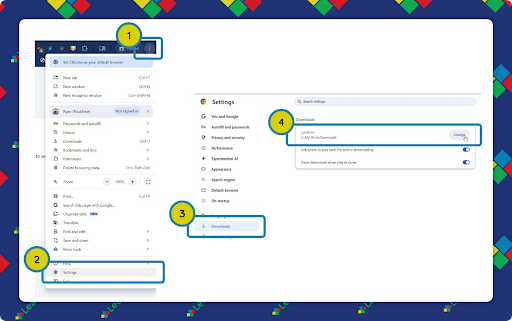
I also set my 24-25 Downloads folder as my download location in Google Chrome. Anything I download will automatically be in my Google Drive and accessible from any of my devices. For this to work on your macOS or Windows laptop you will need to install the Google Drive App and log in to it. If you aren't using Google Drive, replace Google Drive with whatever service you use for your online file storage.
To set your default downloads folder to your folder in Google Drive:
- Open Google Chrome and click the three vertical dots (⋮) in the upper right corner.
- Select Settings.
- On the left side, select Downloads
- Click Change next to the Location field.
Navigate to your 24-25 Downloads folder and select it.
| |
|
By setting your download destination, you ensure that all files downloaded throughout the year are automatically saved in the appropriate folder, reducing the need for manual organization and minimizing clutter.
Benefits of Starting Each Year Fresh
I get to start every year clean. Things I no longer use aren't copied to my current folders, and I can freely modify my other creations knowing that the originals are safe. This method ensures that my digital workspace stays organized and clutter-free. Plus, it helps in locating documents quickly, reduces stress, and improves efficiency.
Adding Quick Access to Your Most Used Folders
It seems like we spend a lot of our day searching for the folder we want, however, it doesn't have to be that way. Here are the ways you can create shortcuts to your most used files and folders so you can get to them faster.
macOS: Sidebar and dock
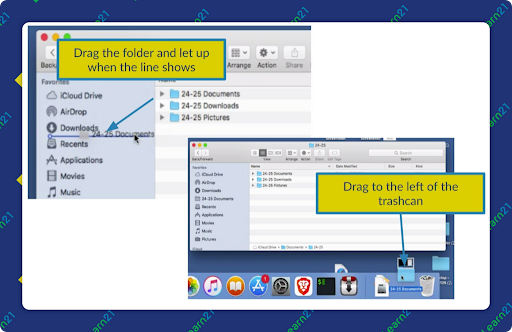
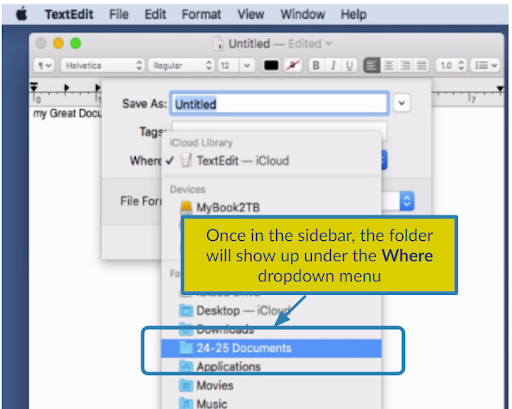
On macOS, files and folders can be dragged to the sidebar in a finder window and/or to your dock.
| |
Once they are there, you can click on them to open the folder. Folders in the sidebar show up under any file open or save window, giving you quick access. |
Windows: Pin to Quick Access
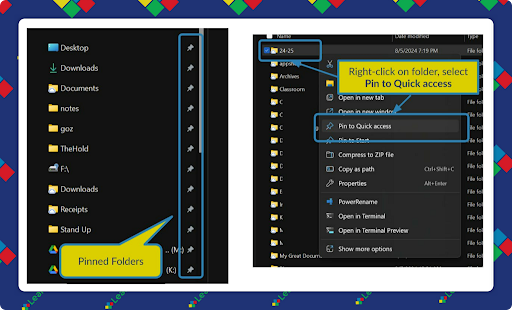
You can pin folders to quick access, which will save them in the quick access area on the left of the screen. To pin a folder or file, right click on it and select Pin to Quick access.
| |
|
To unpin a file or folder, right click on it in the quick access area and select Unpin from Quick access.
Google Drive Web App: Links in the Bookmarks Bar
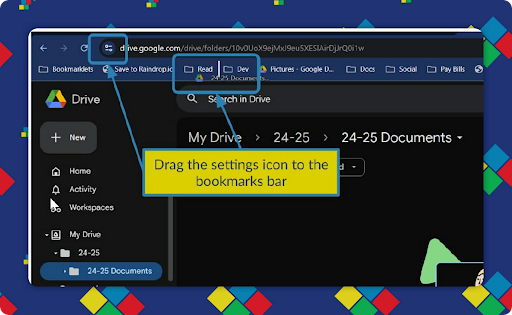
Any file or folder in Google Drive can have its link dragged to the bookmarks bar.
| |
|
While technology might sometimes make our attention span as short as a goldfish's, it turns out that a mix of focus and a little "messing around" can aid in creativity. Artists and researchers agree: a dash of constructive daydreaming, like taking walks or checking out digital pinboards, helps replenish our attention. Social media can either suck us into a procrastination vortex or help build fabulous creative connections—so it’s all about setting boundaries and using it wisely. Ultimately, finding that "middle way" between frantic scrolling and focused work is key.
Lifelong learning extends beyond book learning. Michael Gaskill’s fitness epiphany led him to the bigger win of promoting lifelong learning, which he believes keeps our brains sharp and our leadership game strong. By pushing our brains we can become resilient, learning machines who can inspire our students to grow.
Chromebook Plus devices are about to get “smarter” with some AI-powered magic thanks to Gemini. These cool new features, rolling out just for Chromebook Plus devices, include AI-generated wallpapers and Google Meet backgrounds, a "Help Me Write" tool, and even a personal Gemini assistant to summarize articles and answer burning questions. There is also a snazzy Magic Editor for photos. If your district has Chromebook Plus devices you can check out these new features as they’re released.
| |
|
🙋♂️ Bytes and Insights is co-authored by Eduk8me’s Ryan Collins who writes about education and educational technology. He is also the Director of Technology for Kenton City Schools in Ohio. Sign up for his Of Bits and Bytes newsletter at https://eduk8.me!
If you'd like to take a hiatus from Bytes & Insights, please use the Update Profile link below. This will allow you control over which emails you receive from Learn21.
| | | | |