ā€Š

One Cool Tip Newsletter

May 23, 2026

Your daily dose of tech-savvy brilliance!

šŸ˜€Greetings! Happy Saturday, Cool Tipper!


Get ready to streamline your digital life with simple, actionable tips delivered straight to your inbox.


Cool Tip Theme: ChatGPT Trusted Contact


New here? Subscribe to the One Cool Tip Newsletter for daily updates. It's FREE!

3ļøāƒ£

If you enjoy the One Cool Tip newsletter, please forward this newsletter to THREE friends or colleagues or share it on social media using the links below.


Leave a $$$ Tip!


Share this One Cool Tip Newsletter!

X Share This Email
LinkedIn Share This Email
Pinterest Share This Email

🚨Watch Out for Business Coaching Scams🚨


Scammers are pushing flashy ā€œbusiness coachingā€ and ā€œinvestment trainingā€ programs that promise quick profits in ecommerce, crypto, forex, or real estate.


These offers often hide high‑pressure sales tactics, fake testimonials, and impossible income guarantees.


What to watch for:


  • Guaranteed income claims: No one can promise big returns with little effort. Anyone who does is selling a fantasy.
  • High‑pressure pitches: Scammers insist you must ā€œact nowā€ or miss out. Real opportunities don’t rush you.
  • Suspicious success stories: Glowing reviews may be fabricated or paid for. Treat them with skepticism.
  • Lack of transparency: Before paying, check for complaints with your state attorney general and search for independent reviews.


How to protect yourself:


  • Slow down and talk to someone you trust before signing up.
  • Research the company thoroughly.
  • Report suspected scams at ReportFraud.ftc.gov.


And in Other News...


  • Google Search Bar Confusion Over ā€œDisregardā€


A strange glitch is sending Google users down a rabbit hole: typing the word ā€œdisregardā€ into the search bar is triggering odd AI‑generated summaries and broken results.


The issue appears tied to Google’s AI‑powered Search features, which sometimes misinterpret the word as an instruction rather than a query.


What’s happening:


  • Google’s AI occasionally treats ā€œdisregardā€ as a command to ignore previous context, causing nonsensical or empty results.
  • Users searching for the definition of ā€œdisregardā€ are instead seeing broken AI summaries or irrelevant answers.
  • Google says it’s working on improvements as AI‑powered Search continues to evolve.


What you should do:


  • If you see a confusing AI answer, scroll past the AI box to view traditional search results.
  • Use more specific queries like ā€œdefine disregardā€ or ā€œmeaning of disregardā€.

Cool Deals of the Day

Help support One Cool Tip. Use this Amazon link when you shop online.


Check out these Cool Deals:


šŸ–„ļø Amazon Basics Privacy Screen Filter: Helps reduce shoulder-surfing when using ChatGPT or other private apps in public. $31.49 Check it out on Amazon!


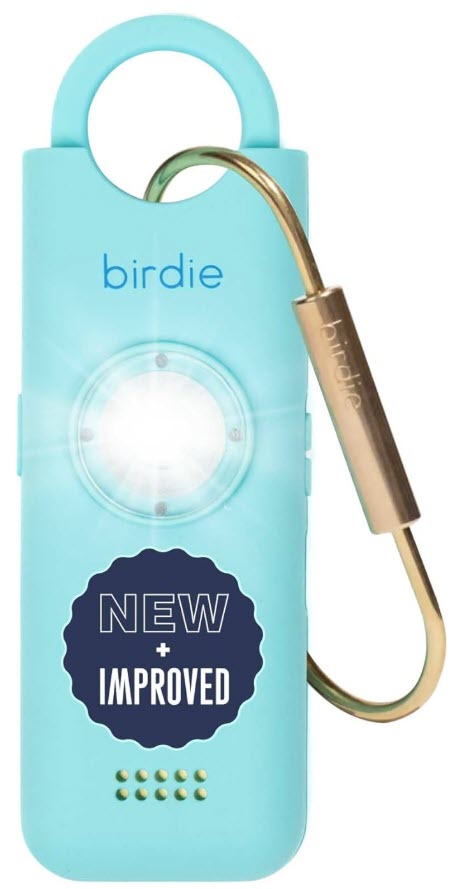
šŸŽ’ Birdie Personal Safety Alarm: A practical companion item for travelers, students, and anyone who wants a simple real-world alert device. Save 14% $29.94 Check it out on Amazon!


šŸ’» Logitech Pebble 2 Mouse and Keyboard Combo: Streamline your desktop navigation when adjusting account security configurations. Save 17% Now $49.99 Check it out on Amazon!


*Prices accurate when originally published.

One Cool Tip may earn a commission from qualifying purchases.

Fuel Your Adventure

Try Big Mike's Jerky!


bigmikesjerky.com


Now on TikTok!


Today's Cool Tip

Add a Trusted Contact in ChatGPT Before You Need One


ChatGPT’s Trusted Contact feature lets eligible adult users name one person who may be notified if serious self-harm concerns are detected. It is optional, privacy-limited, and worth setting up before a difficult moment happens.


Most safety settings are easy to ignore until the moment they matter. 


That includes AI.


Here’s a Cool Tip: Add Your Trusted Contact to ChatGPT Before You Need Support.


ChatGPT’s new Trusted Contact feature is one of those quiet additions that deserves a few minutes of attention, especially for people who use AI as a place to think through personal stress, family issues, school pressure, or difficult life moments.


Feature Explanation


Trusted Contact is a safety setting inside ChatGPT that allows an eligible adult user to name one trusted person, such as a close friend, family member, caregiver, or partner. 


If automated systems and trained reviewers detect that the enrolled user may be discussing suicide in a way that signals a serious safety concern, ChatGPT may notify that trusted person and encourage them to check in.


The feature is not designed to replace emergency services, crisis hotlines, therapy, medical care, or human judgment. 


It is an added layer of support that can help connect someone to a real person they already know.


This feature is most useful for adults who already use ChatGPT for reflection, journaling, personal planning, school pressure, career stress, or difficult family situations. 


It is also practical for older adults, students over 18, caregivers, travelers, and anyone who wants a human safety net connected to their digital routines.


What You’ll Gain


  • Add a backup connection before a crisis moment.
  • Keep control over who is named as your trusted person.
  • Limit what gets shared if a serious concern is reviewed.
  • Give a trusted friend or family member a clearer reason to check in.


Step-by-Step Instructions


Here's how to do it.


Web/Desktop:


  1. Navigate to www.ChatGPT.com and sign in to your personal account.
  2. Select your profile or account menu.
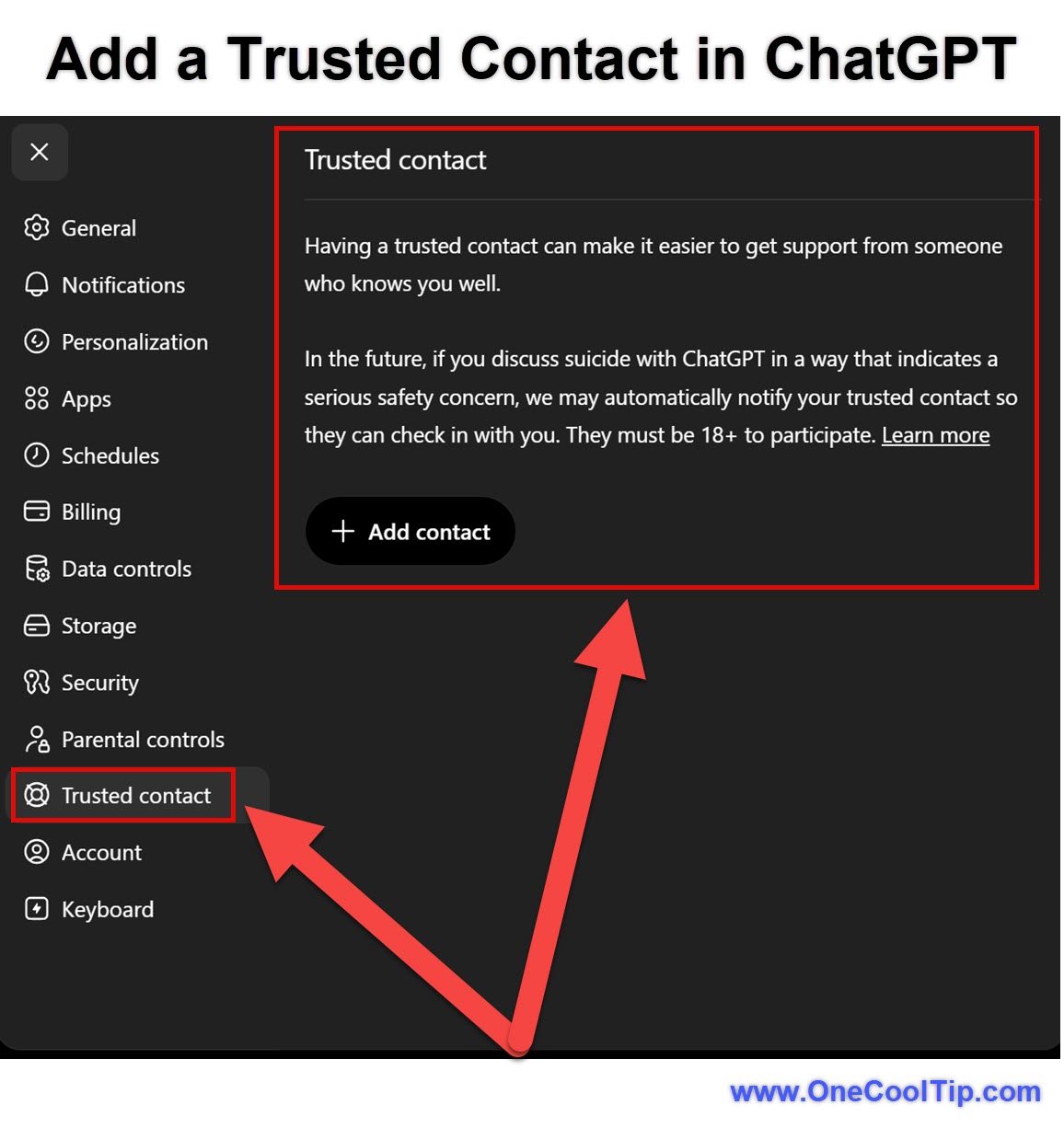
  3. Go to Settings > Trusted contact.
  4. Select Add contact.
  5. Enter the person’s Name and Email. Add a phone number if available.
  6. Confirm the person is an adult and select the consent checkbox.
  7. Select Save changes.
  8. Your contact should receive an invitation. The feature becomes active only after they accept within one week.


fig. 1 - Add a Trusted Contact in ChatGPT

iPhone/iPad:


  1. Open the ChatGPT app.
  2. Open your account or settings menu.
  3. Look for Settings > Trusted contact.
  4. Select Add contact.
  5. Enter the required contact details and save the invitation.


Android:


  1. Open the ChatGPT app.
  2. Open your account or settings menu.
  3. Look for Settings > Trusted contact.
  4. Select Add contact.
  5. Enter the required contact details and save the invitation.


Pros and Cons


Pros:


  • Gives users a human backup plan before they are in distress.
  • Limits the alert instead of sharing full chat details.
  • Requires the trusted person to accept before becoming active.
  • Lets users remove or edit the trusted contact from settings.
  • Helps families, caregivers, and close friends respond faster when serious risk appears.


Cons:


  • Only one trusted contact can be added per eligible account.
  • The feature is for personal ChatGPT accounts, not ChatGPT Business, Enterprise, or Edu shared workspaces.
  • Availability may vary by country, account, and age requirement.
  • A notification may not perfectly reflect what the user is experiencing, even with trained review. OpenAI says no system is perfect.


Feature Access


  • Who gets it: Eligible adults using personal ChatGPT accounts.
  • Age requirement: 18 or older in most countries and territories, with 19 or older noted for South Korea.
  • Supported account type: Personal ChatGPT accounts.
  • Not supported: ChatGPT Business, Enterprise, or Edu shared workspaces.
  • Number of contacts: One trusted contact per eligible account.
  • Activation: The trusted contact must accept within one week.
  • Availability note: Availability may vary by account, region, workspace type, device, or app version.


Score

Criterion | Score (0–10) - Justification
Value | 8
It addresses a serious edge case with a practical human support path. The value is high for users who use ChatGPT for personal reflection or stressful life moments.
Usability | 7
The setting path is simple, but activation depends on the other person accepting the invitation within one week. Editing also requires removing and re-adding the contact.
Wow Factor | 6
The idea is thoughtful rather than flashy. Its strongest feature is the privacy-limited alert design, not visual novelty.
Total: 21/30 šŸ‘ Good
Trusted Contact is a useful safety setting worth configuring, especially because it takes only a few minutes and may matter later.


Key Takeaways


Trusted Contact gives eligible ChatGPT users a simple way to connect serious safety signals to one real person they trust. 


It is optional, limited, and not a replacement for emergency help, but it adds a practical backup layer for moments when human connection matters most.


Cool Tip Snapshot


  • Feature Name: ChatGPT Trusted Contact
  • Platform(s): ChatGPT personal accounts
  • Quick Benefit: Notify one trusted person during serious safety concerns
  • Best For: Adults, families, students over 18, travelers, caregivers
  • Access Type: Rolling Out
  • Difficulty: Easy


Try It Yourself


Open ChatGPT, go to Settings > Trusted contact, and add one person you trust. 


Then share this article with family, friends, and coworkers, leave a comment with your experience, and subscribe to the One Cool Tip newsletter for more practical tech tips.


READ MORE


Read the Cool Tip on OneCoolTip.com.

Check out these Cool Tips & Tricks.


  • Pick Carefully: Choose someone who knows you well and would respond calmly. Go to Settings > Trusted contact and invite one trusted adult.


  • Ask First: Tell the person before sending the invitation. Send a quick message explaining what the role means.


  • Use Email: Enter the correct email address so the invitation reaches the right person. Double-check spelling before saving.


  • Add Phone: Include a phone number when possible. Add it during setup if you want more contact options available.


  • Check Acceptance: The feature is not active until the contact accepts. Ask them to look for the invitation within one week.


  • Review Yearly: Your best trusted contact may change over time. Revisit the setting once a year or after major life changes.


  • Remove Anytime: You stay in control of the setting. Go to Settings > Trusted contact and select Remove.


  • Use Personal ChatGPT: Trusted Contact is for personal accounts, not shared workspaces. Switch to your personal account if the setting does not appear.


  • Protect Privacy: The alert does not share full chat transcripts, based on OpenAI’s current description. Read the help page before enabling it.


  • Pair With Security: Protect your ChatGPT account with strong login habits. Use a strong password and multi-factor authentication where available.

ICYMI - In Case You Missed It ...

Take Your Meetings on the Road with Google Meet for Apple CarPlay


Drive safely while staying connected to your team using the new Google Meet integration for Apple CarPlay.


Read the Full Cool Tip.


Read the Newsletter Version.

Looking for your next adventure?


Call Denise at Travel For You.

314.660.3039


Sign Up for the Monthly Newsletter


http://www.travelforyouvacations.com/


https://www.facebook.com/TRAVEL.FOR.U/


See You Tomorrow

Tomorrow's Cool Tip is waiting to amaze you.


Until then, go forth and conquer the tech world with your newfound knowledge!


Be sure to visit www.OneCoolTip.com for Cool Tech Tips for a Cooler Life!


And if you Like One Cool Tip, please support with TipJar!


Enjoy!


Rodger

Chief Cool Tipper

onecooltip.com@gmail.com


What Do You Think?

What do you think of today's OneCoolTip newsletter?
Positive        Neutral        Negative
X Share This Email
LinkedIn Share This Email

Connect with One Cool Tip!!

Facebook  X  Instagram  Web  Pinterest  YouTube  LinkedIn
ā€Š

As an Amazon Associate, One Cool Tip may earn a small commission from qualifying purchases.


Our media content is intended solely for informational purposes only. Please do not construe anything here as legal, tax, investment, financial, marital or other advice.


Copyright Ā© 2026 | www.OneCoolTip.com | All Rights Reserved


ā€Š