Welcome to ITS Cybersecurity eNews | August 2022 | Issue 5
Protecting Yourself When Internet Browsing
The problem: You're experiencing issues with bringing up websites, and question how private your information is. How do you protect yourself when browsing the Internet?

One solution: Clearing out your browser history, cache, and cookies regularly.

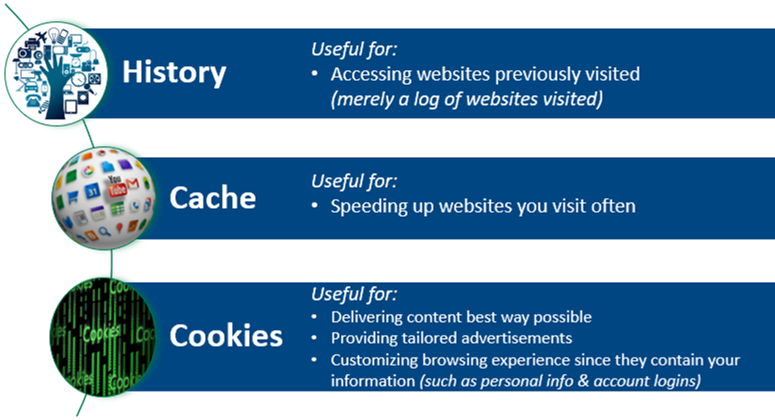
What's the difference between browser history, cache, and cookies?
Why do I need to clear out my browser history, cache, and cookies?

Because it:
  • prevents you from using old forms
  • protects your personal information
  • helps various applications run better on your computer
  • reduces websites' ability to track you across different sites

When you update an application, your browser may still use old files. These old files can also cause display or access problems when browsing online.


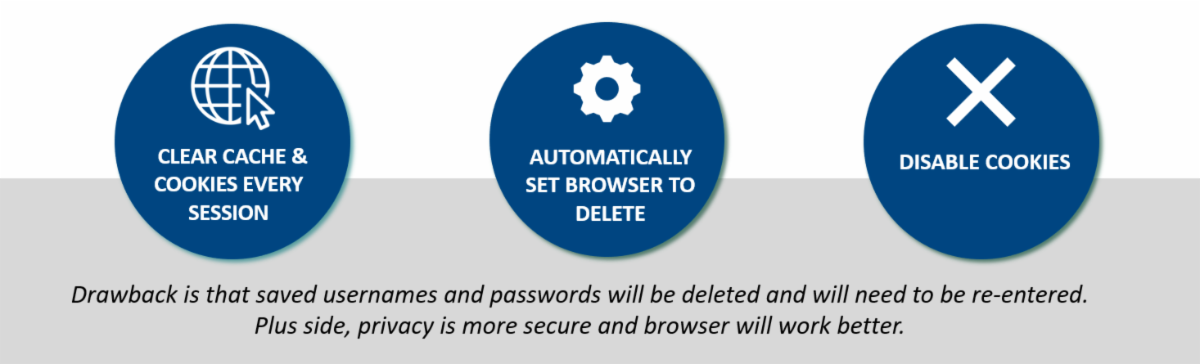
How often should I clear browser cache and cookies?

Depending on your privacy preference, you have options:
It's that time of year already. The annual Cybersecurity training is here.

Keep an eye on your Inbox for more.

Training coming to:
Faculty - August '22
OPS - September '22
Staff - February '23
For added security & privacy protection consider:

1) A password manager such as LastPass or 1Password, to help store, generate, and manage passwords for local applications and online services.

2) A browser that prevents tracking, such as Brave instead of Chrome, to block ads and website trackers for a private browsing experience.

3) A browser plugin that prevents tracking such as Privacy Badger, for Chrome, Firefox, Edge, and Opera to block ads and website trackers.

Bottom line: When it comes to protecting yourself while browsing the Internet, it's always safe to lean on the side of extra caution. Clearing out your cache and cookies regularly will help increase your privacy. Always install the latest browser.
Like to see a specific cybersecurity topic covered?
Send your suggestion to: itschange@fgcu.edu
Need to Report an Issue or Have a Question?
Contact the University Help Desk:

helpdesk@fgcu.edu or 239.590.1188