July 2024

The California Incident Data and Statistics (CalStats) Program is a statewide emergency incident data collection program that analyzes and distributes statistical information reported by fire departments throughout the state. This includes collecting National Fire Incident Reporting System (NFIRS) data from each fire department in California on behalf of the United States Fire Administration (USFA-FEMA).


CalStats also manages the CAL FIRE Incident Reporting System (CALFIRS). This system captures NFIRS data for CAL FIRE’s 808 fire stations statewide. These emergencies include fires, medical incidents, rescues, floods, hazardous material release, earthquakes, and other disasters. With the CALFIRS system, CAL FIRE is able to track all incidents they respond to.

NERIS is coming!


The National Fire Incident Reporting System (NFIRS) is going away. The system that started in 1972 and has not been updated in over 20 years is on the way out. By December 31, 2025, NFIRS will be shut down and no longer used by Fire Departments nationwide.


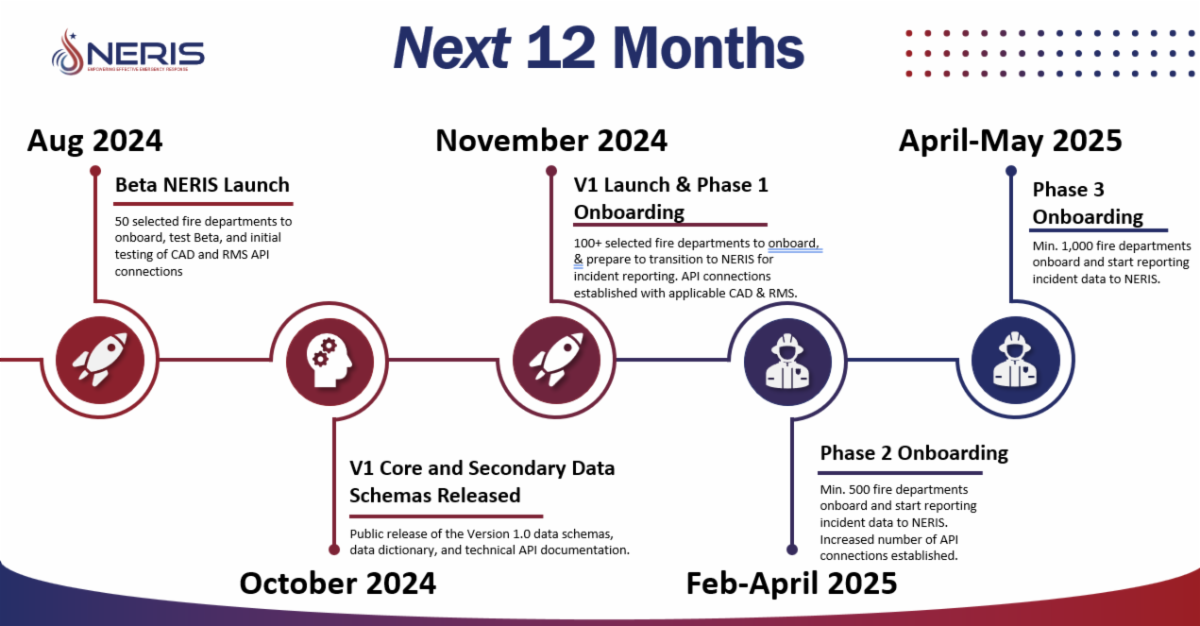
The new National Emergency Response Information System (NERIS) is being developed and is already being tested by select departments. The goal of NERIS is to empower local fire agencies and the emergency services community by equipping them with near real-time information and analytic tools that support data-informed decision-making for enhanced preparedness and response to incidents involving all hazards.


It's time that ALL fire departments in California get NERIS ready!

USFA - NERIS
FSRI - NERIS

NERIS Information


Get #NERISReady! 


Watch the introductory webinar


  • Tackling America’s Fire Problem: Embrace the full potential of data and pave the way for a more data-driven future.


https://www.usfa.fema.gov/blog/tackling-americas-fire-problem/


  • Nearing the Horizon: Improved Incident Reporting, Better Incident Data: Prepare your department for the new national emergency response information system.


https://www.usfa.fema.gov/blog/improved-incident-reporting-and-better-incident-data/


  • Welcome to National Fire Data Week (focus on NERIS)
  • Why is Data Important?
  • Who Will Benefit from NERIS?
  • What Will NERIS Do?
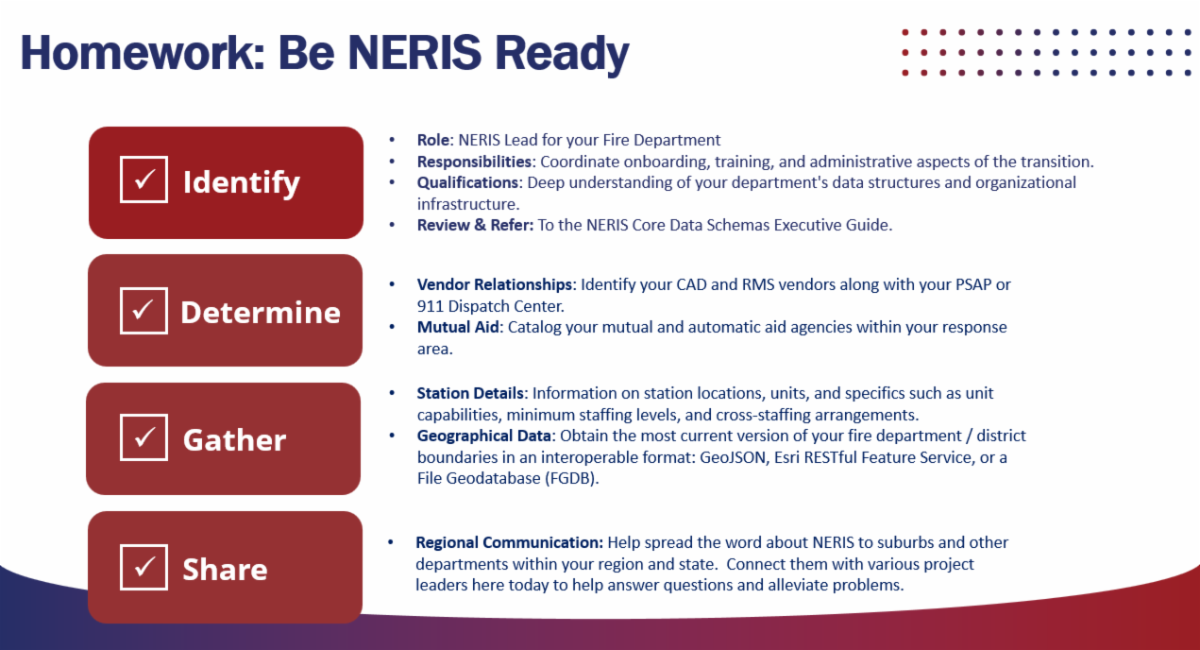
  • How Can We Get NERIS Ready?

Entity Specification

  • Must have, essential information for the entity, common terms, and definitions.
  • Fire department/emergency service agency profile data as a basis for node.

Dispatch (CAD) and Incident Schemas

  • Serves as a base for the NERIS Incident Data Collection App.
  • Primary data elements, standard data model.
  • API interface, standard formats, and configuration for CADs/RMSs to feed NERIS.
NERIS Core Data Schemas Released in Beta

Coming Up - August 1st, 2024


Join us for the next National Emergency Response Information System (NERIS) webinar, hosted by the Fire Safety Research Institute (FSRI), part of UL Research Institutes, in collaboration with the Department of Homeland Security Science and Technology Directorate (DHS S&T) and the United States Fire Administration (USFA).


This live-streamed session will cover the latest in NERIS development, including:


  • NERIS Beta Launch: Overview of the onboarding of the next 50 test departments nationwide.
  • API Development: Highlights of the Core Schema API development efforts.
  • Secondary Schema Release: Preview of three new draft data schemas (Incident Analysis, Community Risk Reduction, and Health and Safety) for a 30-day national engagement period.


Webinar: August 1st, 2024

10:00 A.M. - 11:00 A.M. PT


Register by Tuesday, July 30th

Sign Up: NERIS Webinar #4

Tips for Resetting Your eNFIRS Password


  1. Manually enter your security code and passwords rather than using copy/paste or autofill.
  2. When the system asks for your current password and new password, the temporary password is your current password.
  3. If you do not receive a temporary password and it has been a while, try requesting a new temporary password. Sometimes the system encounters an error and will not recognize the temporary password.
  4. Sometimes users accidentally click Resend Code instead of Submit, which generates and emails a new security code. If the user enters the first automatically generated code in its place, the multifactor authorization will not work. Do not repeatedly request a new code in rapid succession. This rapid request prevents new codes from being sent, as the system is unsure if the requestor is a bad actor.
  5. When all else fails, give the system at least 30 minutes to reset and clear your computer's cache.

NFIRS Data Submission


Monthly NFIRS data files are due by the 15th of the following month.

eNFIRS Import and Validation Instructions