Computer/ Internet News & Tips
March 2022

  • Why you should probably wait to upgrade your existing computer to Windows 11
  • What to do if your computer is "blocked" by a scare screen
  • When NOT to unsubscribe to email
  • The latest scams to avoid
  • We can help with more than just computers...
  • ICYMI: Previous articles you may have missed or want to read again are available on our website and newsletter archives
Reno's PC & Technology Help Experts since 2003 

Affordable PC Repair - Experienced IT Consultants 
In-Home Service & Remote Support

No Geek Speak: Local techs that speak 
a language you can understand
Support for Windows - macOS - iOS - Android
Why you should probably wait to upgrade your existing computer to Windows 11
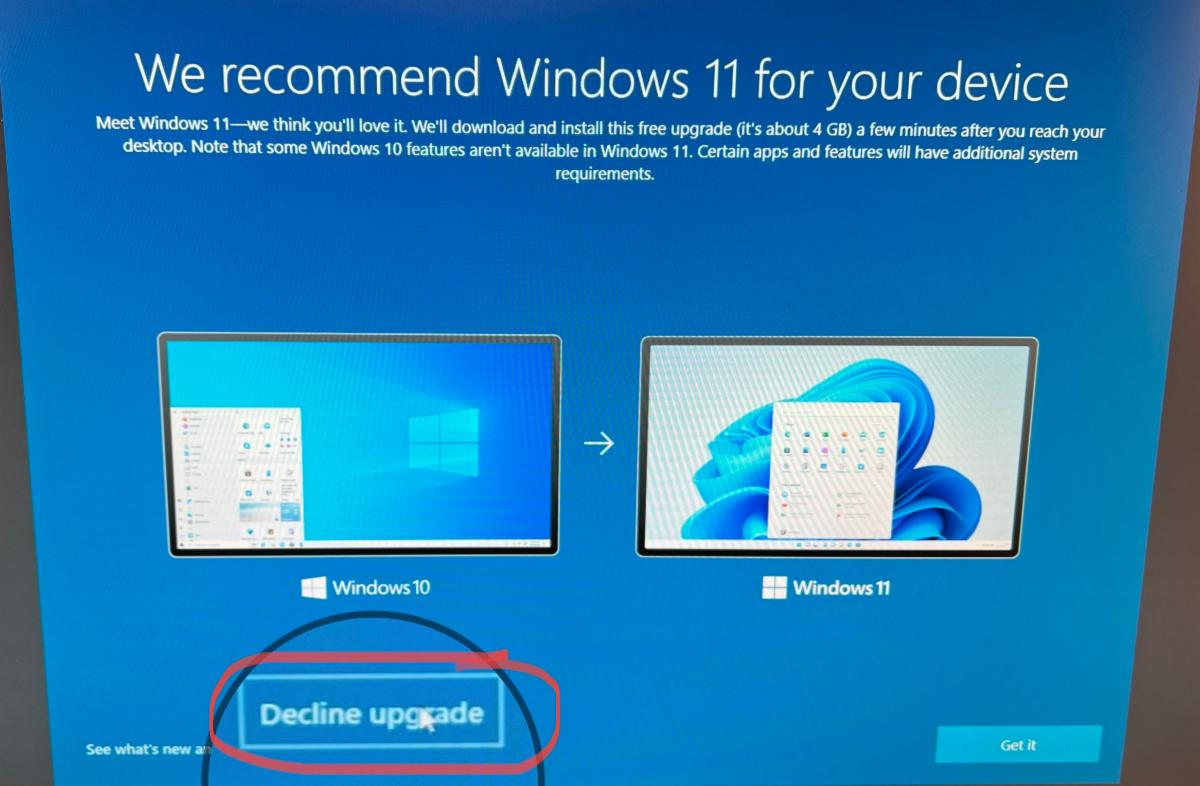
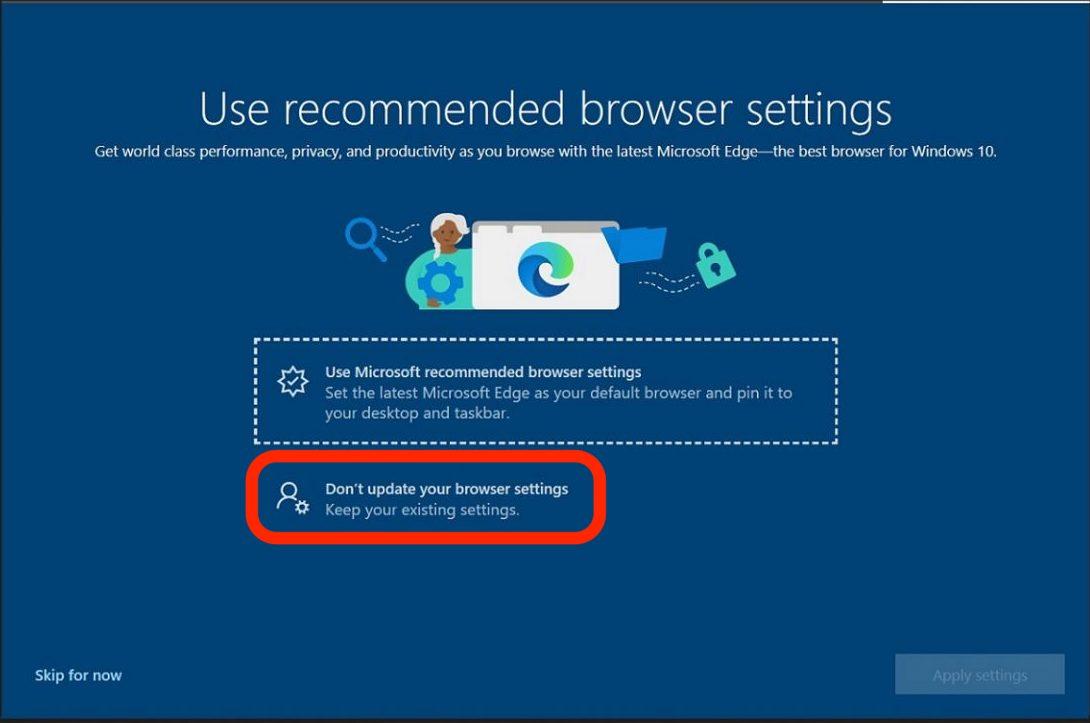
In the past few months Microsoft has been pushing suggested updates to Windows 11, recommended setting Microsoft Edge as your default web browser, and suggesting that you sign in to your computer with a Microsoft account if you don't do so already. But it's you computer - and you can just say NO to their recommendations.

Our advice is not to update to Windows 11 on your existing computer at this time. Also, when Microsoft wants to change your default browser to Microsoft Edge, you can decline their recommendation as well. Furthermore if you're prompted to create or sign in to your computer using a Microsoft account - you can skip that too.

If you get prompted by Microsoft, the screenshots below show where to click to decline the Windows 11 upgrade and Microsoft Edge browser settings update.
If you've already upgraded to Windows 11 and change your mind, you have 10 days to downgrade back to Windows 10. See Microsoft's instructions here. If you've made other suggested changes and want to go back to the way things were before, contact Computer Techs for help.
What to do if your computer is "blocked" by a scare screen
Malicious advertisements on a webpage can redirect you to another webpage designed to look like an official warning from Microsoft. The fake warnings often have the following characteristics:

  • Tell you that there’s a problem with your computer and you need to call the number presented immediately to prevent harm
  • Tell you NOT to turn off your computer
  • The warnings are often accompanied by scary alert sounds or spoken messages.
  • Your mouse and/or keyboard may become unresponsive.

What to do if you get a fake scare screen that appears to "block" your computer

NEVER call the number presented on the screen – you’ll be connected to a scammer who will try to gain access to your computer and convince you that you have security problems that you need to pay to have fixed.

When NOT to unsubscribe to email
email_icon.jpg
If you think the way to get less spam email is to click the “unsubscribe” link – not so fast. While legitimate email senders often will remove your email address from their list, spammers use unsubscribe links in emails to track people that take the time to open email and click the link. They then target you for even more junk email.

Some methods that you can use to help identify legitimately sent emails include:

How you can avoid the latest scams
If you've read our information about scams before, it's worth taking a few minutes to review this important money-saving information and catch up on how to avoid falling victim to the latest scams.
Every month we help people who have been scammed. But had they read our newsletters and printed our website articles, they wouldn't have been scammed out of hundreds or thousands of dollars. Scammers are becoming increasingly clever. By using technology - automated email and phone dialing - hackers and scammers take advantage of the anonymity of the internet to reach millions of potential victims in attempt to trick them into giving up their money. With a little bit of knowledge of scams and how they work, you won't become a victim yourself.

In the past few months common types of scams that we've been hearing about include:

  • An email invoice or phone call claiming there will be a charge for a product or service - such as computer security protection that you don't recall ordering - unless you contact the sender immediately
  • A scary computer pop-up window telling you to call to fix a problem with your computer
  • Email scams appearing to come from someone that you know asking for a favor by purchasing a gift card for a relative

We can help with more than just computers...
Did you know that Computer Techs can help with more than just computers? Check out some of our services that you may have not known about:

  • New computer or mobile device (smartphone/tablet) buying advice
  • New computer or mobile device set-up & transfer settings and apps from an old device
  • Help with recovery of forgotten passwords or hacked accounts
  • Printer troubleshooting or setup
  • TV streaming media device setup
  • Smart speaker / voice assistant device setup
  • Wireless camera and security device setup
  • Software installation
  • Microsoft Office help
  • Email setup/customization
  • Wireless router & Internet set-up
  • Wi-Fi optimization and troubleshooting
  • Computer data back-up solutions
  • Diagnose misc. software or hardware problems
  • Telecom bill audit/review to help you save money on your phone/internet/TV services
  • & much more

Breaking news posted to our social media webpages
ICYMI: In Case You Missed It
Click the video above to view our Computer Techs YouTube playlist featuring helpful tips and information about your devices and the internet.
You can also view the playlist by typing youtube.CTreno.com in your browser address bar.
You can easily access tips and news from previous newsletters on our newsletter archives webpage. Articles you may have missed or wish to read again include:

  • Should you drop your cable/satellite service? 
  • Why you probably don’t need a VPN
  • Search Gmail like a pro
  • Understanding 3G vs 5G vs 5 GHz
  • Change these Facebook settings now
  • How to save money on your internet service
  • How to recognize fraudulent emails
  • Google isn’t evil, why we like Google
  • Protect your mobile number from hackers
  • Two new iPhone features you should turn on now
  • Google requiring 2-Step Verification to sign-in
  • Chip shortage likely to cause lower supply, higher prices
  • Top 5 password tips that you need to know
  • Reveal the passwords stored in your browser - and check for the logins exposed in a data breach
  • Verizon sells off Yahoo and AOL
  • How to make it easier to read articles in your web browser - use Reader Mode
  • FTC Identity Theft website guides victims through the recovery process
  • How to spot emails, texts and pop-ups that "phish" for your private information
  • Your old cellphone may stop working soon
  • We can help with more than just computers and smartphones
  • How to fix most printer problems
  • Watch the world from home
  • How to send a message or email from your phone correctly
  • Ad blockers becoming less effective
  • Why you don't need to buy AntiVirus for your device
  • Is it time to replace or optimize your Wi-Fi?
  • Be proactive about computer maintenance
  • Why you should keep your computer ON when you're not using it
  • How ads follow you around the internet
  • Are you prepared if you lost your data?
  • Check to see if your email address was exposed in a data breach
  • Are you fed up with your internet provider's email "service"?
  • The one spec your next computer must have

Please consider recommending us on Nextdoor
If you use the neighborhood social network Nextdoor, please consider recommending Mark Cobb @ Computer Techs Reno to your neighbors. We get lots of referrals from neighbors looking for a good "computer tech".


For more information about benefiting from our referral program click more...
Get regular computing device maintenance and priority support
It's time to be proactive about maintaining your computing devices - rather than calling after problems get out-of-control. With reports of websites and databases getting hacked occurring on a daily basis, and the increasing chance of your personal information being compromised, it’s more important than ever to keep your computing devices secure, up-to-date and maintained.

Thanks to the peace-of-mind that our Computer Maintenance Plan provides, clients that sign-up for the plan don't have to worry about the seemingly constant barrage of updates, security patches and computer hackers. They also get priority callbacks and messaging replies.

With our Computer Maintenance Plan we will maintain, update and check the security on your computer - and other devices (when performed on-site) - on a convenient regularly scheduled basis.

For more information read more...


Thank you!

Mark Cobb
Owner/Technician/IT Consultant