March 2025

GASB 68 & GASB 75 Audits


The June 30, 2024 GASB 68 (defined benefit plans) and GASB 75 (group life insurance) audit reports and schedules are now available on our website.

FY26 Employer Contribution Rates


Employer and member contribution rates for the upcoming fiscal year, which begins July 1, 2025 and ends June 30, 2026, are now available on the Employer Rates and Rate Setting webpage where you may select plan specific information.


Grant funded teacher rate information is included in the Teacher section. The grant funded teacher costs do not include the additional amount due for teacher retiree health. This is established by and paid directly to State Employee Health and Benefits. You will receive a separate notification from Employee Health and Benefits for the amount due to fund retiree health coverage.

New Instructional Video for Employers Completing a Membership Application


A new instructional video is now available for employers on how to complete a MainePERS Membership Application. The video covers the What, When, Where, Why and How of completing a membership application for employees joining MainePERS.


In easy to follow instructions insights are shared on the importance of filing a timely and accurate form, as well as helpful hints, resources, and tools to aid in the completion.


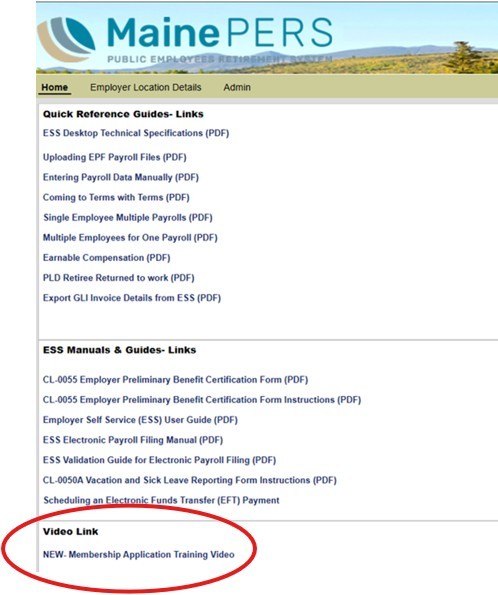
This video can be accessed whenever needed by employer staff who onboard new personnel or those who report new employees to MainePERS. The Membership Application Training Video is available on the MainePERS website and on the homepage of ESS for easy access. 

National Board Certification Salary Supplements for Teachers Reporting Stipends and Creditable Service


To accurately reflect creditable service calculations, stipends for National Board Certification Supplement payments for teachers are reported differently. These stipend payments should NOT be included in the employee’s normal contract earnings. Please report these stipend payments on a second row, separate from the normal contract wages. Use the same POS code, Pay rate CD and FTE amount as the contracted wages, but change the PSC to 17.


Should you have any questions about this change, please contact your Employer Reporting account associate for assistance. 

Reminder: The 5% Unfunded Liability Rate for RRTW's in the PLD Consolidated Plan


A current provision in the PLD Consolidated Plan requires employers to remit contributions equal to 5% of earnable compensation for retirees who have returned to work in what would be an otherwise covered position. These employees are referred to as “retire-rehire” members, or RRTW employees. Please review your payroll records and ensure that any employee who meets this definition and is currently working in an otherwise covered position under the PLD Plan is included in your monthly payroll reporting.


Please contact us if you have any questions about this requirement.

Group Life Insurance Premium Changes

July 2025


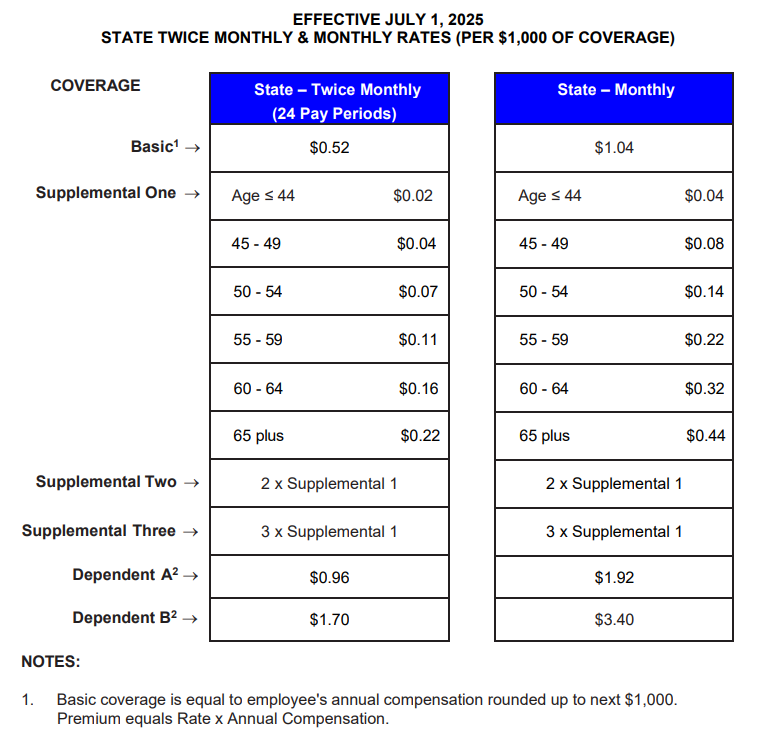
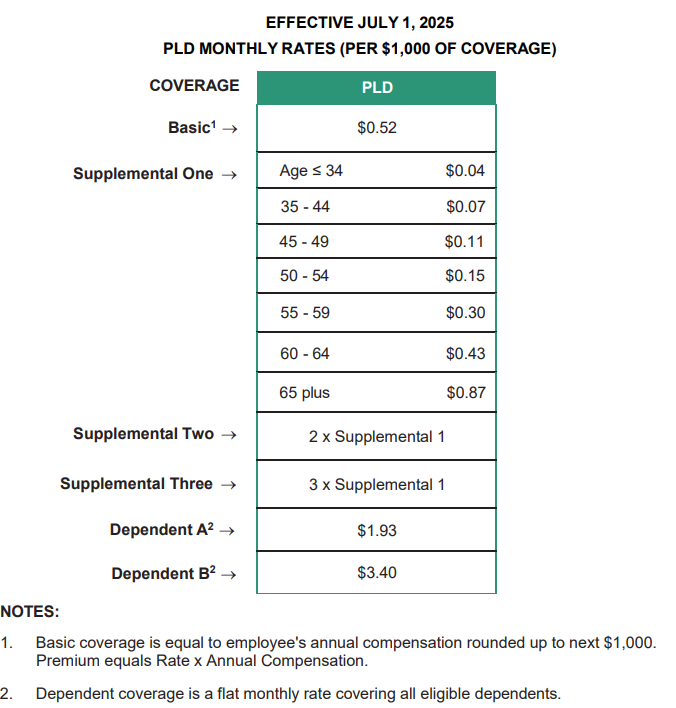
The Board of Trustees adopted new premium rates for State and PLD Group Life Insurance effective July 1, 2025. The premium rates for Teacher participants remain the same. 


The Basic premium for State participants will increase. State employer entities for Maine State Government include: Judicial, Legislative and State Agencies; Maine Community College System, MECDHH Governor Baxter School for the Deaf, Maine Developmental Disabilities Council, Northern NE Passenger Rail Authority, Wild Blueberry Commission, Maine Potato Board and Maine Dairy & Nutrition Council.


The Basic premium for Participating Local Districts will increase. 


The new rates effective July 1, 2025 are available on the Group Life Insurance webpage, and also provided in the tables below. Please begin working with your vendors and IT support to implement these changes to ensure the premiums are calculated using the new rates beginning July 1. Please contact your Employer Reporting Account Associate with any questions.

Group Life Insurance Level Changes are due in April


Now is the time to update your Group Life Insurance (GLI) coverage levels for your employees participating in the program. GLI coverage levels are updated every April based on the prior years’ earnings. You do not need to wait until April; you can submit this information as soon as you have the data available. You can upload the file through the Employer Self Service portal using the Upload File function. 


To do this, you will need to create a file that meets the requirements of the “Simple Format (CSV) - GLI Level” import.


  • Create a new Excel file or open your existing file, click file>save as>file type must be .csv. The file will be 4 columns with no header row. The columns should contain Year, Employer location code, SSN and Level in that order. Format the SSN and Level columns as General with no punctuation. Please save the file with the name of your employer code and year (P0999 2024). Here is an example file:

2024

P0999

6100101

59000

2024

P0999

123456789

49000

2024

P0999

987654321

43000

  • To upload your file: log into ESS
  • Navigate to the Account tab
  • Click Upload File
  • Select GLI Level
  • Click browse - find your file
  • Enter an import description of your location code and year (P0999 2024)
  • Validate
  • Validates with exceptions - OK, the file will process
  • Validates with errors - STOP and contact MainePERS for assistance
  • Process - Processes the file
  • Step-by-step guidelines are in our ESS User Guide beginning on page 39.


How is the level defined? This will typically be your employee's 2024 annual gross wages from their W-2 (these amounts will automatically round up to the next $1,000).


How do I verify my import? The GLI Level Report will be in your Employer Self Service (ESS) Report/Generate Report/select ESS GLI Level Report/Employer Code and Location Code, and leave the Start Date as is.


What is my responsibility once I receive the new level report?  Review the report carefully and contact your Employer Reporting Account Associate if an employee is missing or you believe something is incorrect.

Online Employer Training


MainePERS offers a half day Employer Training Session each month via Zoom. The training can provide the basics to new staff or is an excellent refresher or opportunity to fine-tune your understanding of Employer Self-Service (ESS). Topics include Accessing ESS, Understanding Eligibility and Enrollment, Navigating ESS, and Survivor Services and Group Life Insurance (GLI) Highlights. 


You may also request training on specific topics or group training for multiple members of your payroll and human resources staff. To request training on a specific topic, please contact Employer Reporting at 1-800-451-9800 or by email at employer@mainepers.org. 

Update to Electronic Payroll File Format


MainePERS has made a security change in the Employer Portal to prevent certain types of files from being uploaded in error. Your electronic payroll file format is not changing and will continue to be an ASCII text file, but the file name must end in “.txt” or you will see an error message indicating that only text files can be uploaded.


If you see this error, check the extension on the end of your file name. If it is .asc or some other extension, please save the file and rename it so that it has the .txt extension. You should be able to open your payroll file provided by your vendor and then do a “file, save as” and add the extension .txt to the end of the file name. You can also right click on the file name and select “rename” to change the extension from .asc to .txt and then you should be able to upload the file without error.


Please note: If you upload a GLI level update file or a MaineSTART payroll file, these will remain CSV files (.csv).


If you are having trouble submitting your monthly payroll file, please contact your Employer Reporting Account Associate for assistance.

MaineSTART Deferred Compensation Plan


The MaineSTART 457 Deferred Compensation Plan is available to public school teachers. By joining this program, employers can provide their teachers with an opportunity to participate in another MainePERS offered retirement savings plan. MaineSTART offers both Traditional (pre-tax) and Roth (after-tax) accounts. These voluntary programs can help your employees save money to fund their retirement and help secure their financial future.


Our MaineSTART 457b plans use low cost Vanguard funds; so even if you already have a defined contribution plan, MaineSTART may offer lower administrative fees for your employees.


Please contact Gary Emery at (207)512-3116 or via email at gary.emery@mainepers.org to explore adding the MaineSTART program to your employee benefit program, or to compare administrative fees. Additional information is available at www.mainestart.org.