Microsoft New Promotions
There are going to be MANY promotions coming, so these have been moved to their own home page.
| |
The Support Cliff
Directions on Microsoft has published a VERY important article (link below) on a cost that many customers may not be modelling properly in their Microsoft agreements:
Microsoft Unified Support.
The obvious cliff is the increase in licensing prices.
As Microsoft licensing and Azure spend rise, the Appraised Product Spend baseline used for Unified Support can rise at the next calculation point. That means the support cost can increase even where the estate, user count and support experience have not materially changed
Same environment. Same people. Bigger support bill.
That is a difficult outcome to defend commercially.
The key point is that the EA renewal and the Unified Support renewal should not be treated as separate conversations.
Directions notes that Microsoft’s November 2025 pricing changes created a visible “financial cliff”, but also a hidden and compounding “Unified Support Cliff”.
Azure capacity pressure adds another problem, because Azure cost increases can also flow into the same support calculation.
The old playbook was simple enough: renew the EA, argue a bit about support, accept that Microsoft support is expensive, and move on.
That playbook is now out of date. Directions recommends a living support strategy, integrated negotiation across EA and MACC, and a proper evaluation of alternatives - not as a bluff, but as a real commercial exercise.
That includes staying with Microsoft and negotiating harder, using a hybrid model, using CSP-led support, moving selected workloads to third-party support, or using a concierge model to manage the existing Microsoft support agreement better.
The First Technology Group & Directions on Microsoft Partnership
This is where the FTG/Directions partnership becomes particularly relevant.
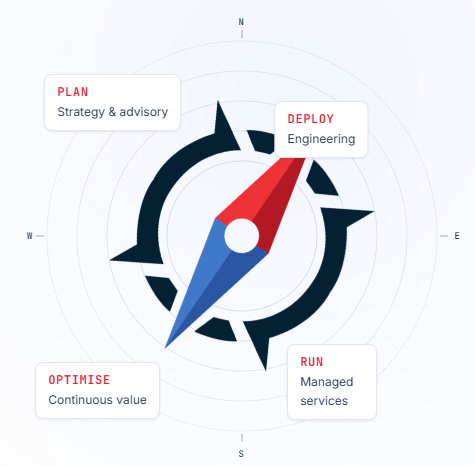
Navigator First combines Directions on Microsoft’s independent licensing, roadmap and negotiation expertise with First Technology Group’s Microsoft engineering, operations, managed services and support capabilities, creating a more joined-up way to plan, negotiate, deploy, operate and optimise Microsoft investments.
In Plain English:
- Directions helps you understand what you should be buying and negotiating.
- FTG helps you deploy it, support it, run it and optimise it and helps Directions understand your situation to give you even better advice.
Customers need more than analysis alone.
They need someone to help manage the chaos after the renewal is signed.
Navigator First is positioned as one accountable partner across the holistic Microsoft lifecycle:
- Plan
- Deploy
- Run
- Optimise, including licensing and contract optimisation, secure deployment, 24x7 managed services, concierge support, governance and reporting.
This also lines up with what we have already been saying in TOP STORIES for the last few weeks.
FTG’s Universal Support positioning is built around predictable, customised support, deep Microsoft skills, multi-vendor capability, and escalation into Microsoft where required - without the customer feeling that their support contract is just another route for Microsoft to sell them more.
Support is no longer just a line item, it is becoming a compounding expense that needs its own strategy.
The important conversation with customers is no longer “do you have Microsoft support?”
It is: “is your support agreement still commercially and operationally fit for purpose?”
Speak to your First Technology Group account manager about a Navigator First discussion before the renewal clock runs down.
Most importantly, ask about the Concierge Service to improve how a current agreement is used, governed and escalated.
| |
Microsoft Agent 365 Licensing Guide May 2026
Since Agent 365 is now officially Generally Available, I felt it would be useful to leave this article in as a reference to support the official announcement in the next headline
Microsoft has published a new Agent 365 Licensing Guide for May 2026, complete with the usual licensing placemats that try to explain what you already get with a Microsoft cloud subscription, and what needs the full Agent 365 licence.
This guide is "customer facing" so if you cannot download it, please contact your First Technology account manager to assist.
Microsoft’s view is that every agent has a human boss. The licence is assigned to a user, not to the agent, because the agent is either acting on behalf of a person, or has a human sponsor or manager watching over it.
Agent 365 is priced at $15 per user per month, or included as part of Microsoft 365 E7. Importantly, it does not give the agent its own mailbox, OneDrive, Teams, Word, Excel, or other productivity rights.
That is of course a separate licensing discussion.
The real value is not the licence itself. It is observability, governance and security for agents. That includes agent registry, usage insights, agent mapping, lifecycle controls, tool controls, policy templates, data loss prevention, insider risk management, threat detection, and control of unsanctioned local agents.
As AI agents start crawling around your business, you need to know what they are, who owns them, what data they can touch, and how to stop them before they do something expensive, stupid, or both.
Please contact your First Technology Group account manager to connect you with our Microsoft licensing, security and Copilot specialists to help work out what you already have, what you actually need, and where Agent 365 or Microsoft 365 E7 may make sense.
| |
Windows Agent 365 Generally available
When Agent 365 first appeared, licensing looked fairly painless.
That was not to be.
From 1 June 2026, Microsoft has added licence prerequisites for new Agent 365 purchases.
Enterprise customers need Microsoft 365 E5, Frontline Worker users need Microsoft Defender and Purview at F5 level, and....
SMB customers need Microsoft 365 Business Premium.
Microsoft 365 E7 customers are already covered, because E7 includes E5, Agent 365, Microsoft 365 Copilot and Entra Suite.
This makes sense, even if it does feel very Microsoft. If agents are going to do real work, access systems, use company data and act on behalf of users, then security, identity, compliance and management cannot be an afterthought.
Microsoft has also made Windows 365 for Agents generally available. This gives agents access to managed Cloud PCs when they need a Windows desktop to complete tasks, with access and permissions managed through Agent 365.
That is important because not every business process lives neatly behind an API. Some systems still need something to log in, click buttons, complete forms, copy information and deal with legacy applications that should probably have retired years ago, but didn’t get the memo.
From a cost perspective, Microsoft offers On-Demand Cloud PCs for agent workloads at $0.40 per hour in the US geography, billed on actual runtime and rounded up to the next full hour. For agents that need instant availability, Always Available Cloud PCs cost $5 per Cloud PC per month, plus the same pay-as-you-go usage. Pricing varies by geography, so check local pricing before quoting.
The key message: Agent 365 is moving from clever demo to operating model.
Licensing, security, compliance, Intune, Entra, Purview, Defender and cost control now need to be part of the discussion before the agents start doing actual work.
Please contact your First Technology Group account manager to connect you with our Microsoft licensing and Modern Work specialists to map the path forward, in particular planning to prepare for implement agents to do real work
| |
Microsoft dropped the Biggest (and best) update of 2026
Microsoft’s June Patch Tuesday update for Windows 11 brings more than the usual security fixes.
The biggest update is the Low Latency Profile, which gives Windows a short CPU boost when opening things like Start, Search, Quick Settings and Notifications. In plain English, Windows should feel a bit snappier, especially on lower-end machines.
There is also Multi-App Camera, which allows more than one app to use the same camera at the same time. Useful if you are in Teams or Zoom and another app also needs the camera.
A new Basic Camera Mode should also help troubleshoot whether camera issues are hardware, driver, or “Windows being Windows”.
Task Manager now shows NPU usage per process, which is useful for Copilot+ PCs and AI workloads.
At least now we can see which app is actually using the shiny AI chip we were told we needed!
Other smaller improvements include better Windows Search, Shared Audio for two Bluetooth LE Audio devices (comes with conditions), Windows Hello fixes, and the option to choose a custom user folder name during setup.
The important bit: Microsoft is also preparing for Secure Boot certificate expiry, which starts becoming a real issue from June 2026.
BUT... don’t rush this update straight into production. There are early reports of boot failures, BitLocker recovery loops and device-specific issues, so test it properly first. Patch rings exist for exactly this reason!
Please contact your First Technology Group account manager to help ensure that this update is carefully tested and rolled out as soon as you are happy it is stable. The Low Latency Profile REALLY make a difference to old machines suffering along on 16Gig!
| |
Microsoft REALLY REALLY wants you to switch to the "New Outlook"
Microsoft is continuing its long (uphill) march from Classic Outlook to the new Outlook, and this latest batch of updates may finally remove some of the sharper thorns.
The new Outlook is getting an All Accounts/Unified Inbox view, so users with multiple mailboxes can see mail in one place without hopping around like a caffeinated meerkat!
Microsoft is also adding stronger Mail Merge, better .PST support, favourite folder improvements, unread count controls and calendar tweaks.
The .PST story is particularly important for customers still carrying years of Outlook history around like digital luggage from 2007.
Microsoft’s latest release notes say PST import now supports all item types, including calendar events, contacts and tasks. This is a big one!
BUT.....this is not a reason to blindly switch everybody tomorrow. Microsoft’s own migration guidance still describes a staged move from opt-in, to opt-out, to eventual cutover, with Classic Outlook supported until at least 2029.
So yes, new Outlook is improving. No, it is not time to panic.
It is time to test your add-ins, shared mailboxes, offline requirements, PST processes and power-user workflows.
Please contact your First Technology Group account manager to connect you with our Microsoft specialists to help plan the move properly — before Microsoft plans it for you.
| | | | |