|
Supply Chain Management News
October 2023
| |
|
Dear Campus Community,
Supply Chain Management (SCM) would like to inform you of important updates and events.
This month's features:
- REMINDER: Scheduled BFS and the Blu Portal Maintenance
- BearBUY: 23.3 Upgrade Release
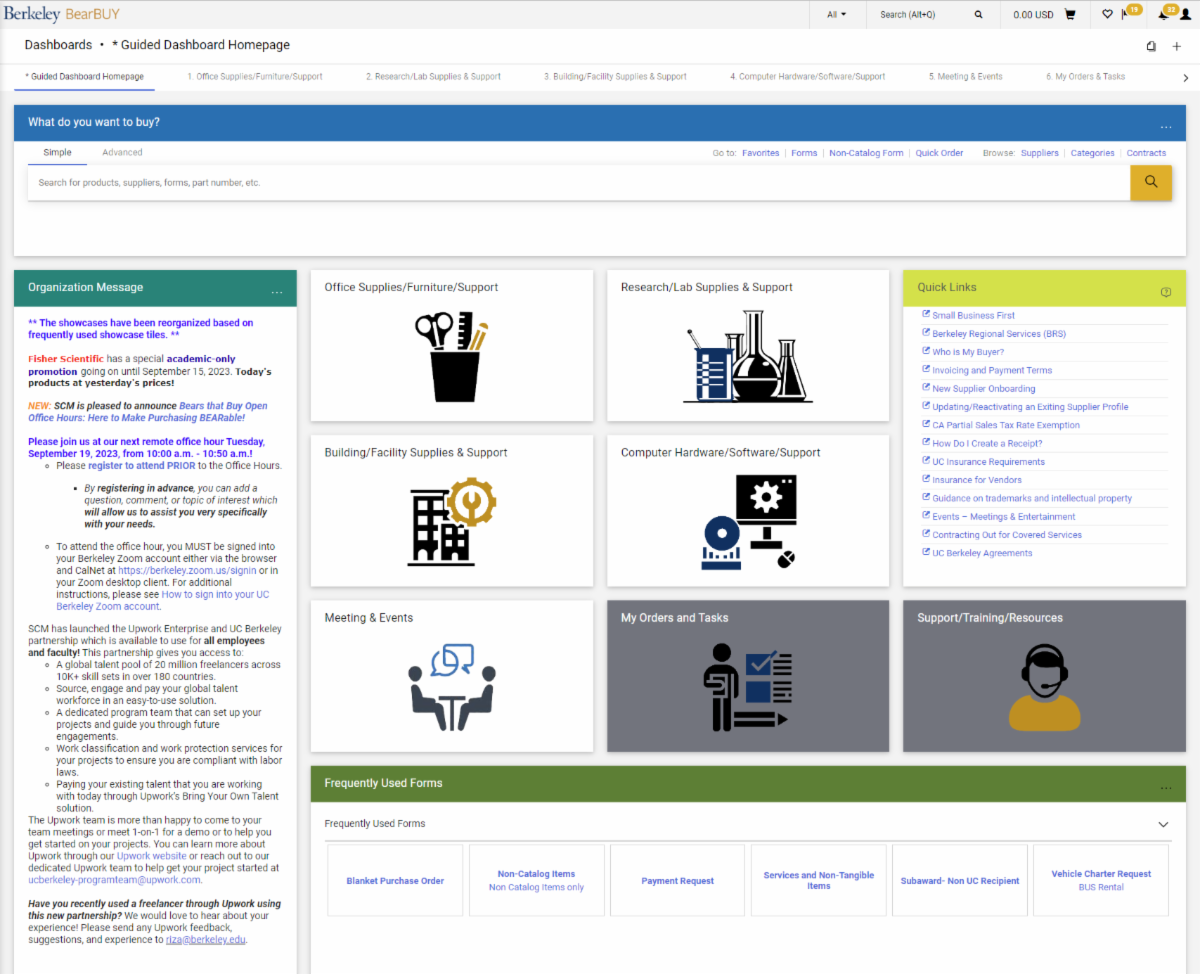
- COMING SOON! BearBUY Guided Dashboard Landing Page
- Bears that Buy Open Office Hours: Here to Make Purchasing BEARable
- Fisher Scientific On-Site Pipette Calibration 10/25-27
- Save the Date: Sustainable Travel Event on 11/7 and TSA PreCheck 11/6-9
- Skilled Freelancers and Independent Contractors through Upwork!
If you have any questions, please contact the BearBUY Help Desk at
510-664-9000 (options 1, 2) or bearbuyhelp@berkeley.edu for immediate assistance.
Thank you for your continued support,
Supply Chain Management
| |
|
REMINDER: Scheduled BFS and the Blu Portal Maintenance | |
As a reminder, BFS and the Blu Portal systems will perform maintenance on Friday, October 27, 2023, from 6:00 a.m. to 6:00 p.m. BearBUY will also be unavailable during this maintenance period. | |
BearBUY 23.3 Upgrade Release | |
|
As part of the Jaggaer 23.3 upgrade, BearBUY will be unavailable starting from Friday, November 3, 2023 at 6:00 p.m. PST to Sunday, November 5, 2023, at 9:00 a.m. PST.
The 23.3 upgrade release in BearBUY will go live on Monday, November 6, 2023.
| |
COMING SOON! BearBUY Guided Dashboard Landing Page | |
Starting Monday, November 6, 2023, the DEFAULT Landing Page in BearBUY will be the NEW Guided Dashboard Landing Page: | |
Please take a look at the Guided Dashboard Overview for a detailed breakdown of the new features.
Users will be able to reset their personal landing pages to the legacy, classic BearBUY landing page by viewing the How to set your personal default landing page in BearBUY Job-Aid.
| |
Bears that Buy Open Office Hours:
Here to Make Purchasing BEARable
| |
|
Please join us at our next remote office hour on Tuesday, October 31, 2023, from 10:00 a.m. - 10:50 a.m. In this office hour, the Solutions team will be going over the new BearBUY 23.3 upgrade release!
As a reminder, representatives from SCM will be on hand to listen to your questions and provide information about purchasing at Berkeley. This will be held every 3rd Tuesday of the month from 10:00 a.m. to 10:50 a.m.
Instructions and Zoom URL:
| |
Fisher Scientific On-Site Pipette Calibration October 25-27 | |
|
Fisher Scientific has partnered with Gilson to perform on-site pipette calibrations for the labs at UC Berkeley. Fisher and Gilson will be in the 2nd Floor Lobby of Li Ka Shing on Wednesday, October 25, 2023, through Friday, October 27, 2023, from 9:00 a.m. to 5:00 p.m.
If you are interested in having your pipettes calibrated, please fill out the registration form here. Please fill out the registration form as soon as possible to reserve services. The registration link will close after reaching the maximum number of 450 pipettes.
As a reminder, the following service fees and part numbers will apply:
Lite, Single Channel (part number SVC101101G): $22
Lite, Multi-Channel (part number SVC101102G): $31
Premium, Single Channel (part number SVC101199G): $34
Premium, Multi-Channel (part number SVC101200G): $42
Please contact our account representative, Sabrina Binczewski, if you have any additional questions or concerns.
| |
Save the Date: Sustainable Travel Event on 11/07/23 and TSA PreCheck on 11/06/23 - 11/09/23 | |
|
A Sustainable Travel Event on Tuesday, November 7, 2023, from 11:00 a.m. to 3:00 p.m., at the Recreational Sports Facility. The UC Berkeley Travel Team is partnering with the Campus Sustainability Office to offer a sustainable travel event. This event will focus on sustainable options for business travel, including how to reduce our travel-related carbon footprint. At the event, there will be raffle prizes, food, drinks, and vendors focused on sustainability and travel. We will post updates to the Sustainable Travel Guide page on the Travel website.
The TSA PreCheck event from November 6, 2023, to November 9, 2023, at the Recreational Sports Facility (2301 Bancroft Way), in room 42. At this event, there will be interview appointments to complete the TSA PreCheck enrollment process on campus. Visit the TSA PreCheck event page on the travel website to read detailed instructions on how to apply. If you are interested please do not delay, as we expect the appointments to fill up fast. Please reach out to the Travel Team with any questions at travel@berkeley.edu.
| |
Skilled Freelancers through Upwork! | |
|
Did you know? SCM has launched the Upwork Enterprise and UC Berkeley partnership which is available to use for all employees and faculty!
Through this partnership, departments are able to search and hire skilled freelancers and independent contractors without having to worry about obtaining and attaching a Certificate of Liability Insurance to Upwork orders.
Upwork will also take care of all onboarding and compliance tasks so there is no need to include extra supporting documentation on your PO besides the business justification, quote or estimate, and statement of work that is executed and provided to you by Upwork.
Interested in hiring a skilled freelancer or independent contractor? The Upwork team is more than happy to come to your team meetings or meet 1-on-1 for a demo or to help you get started on your projects. You can learn more about Upwork through our Upwork website or reach out to our dedicated Upwork team to help get your project started at ucberkeley-programteam@upwork.com.
Did you also know? If you know of a skilled freelancer or independent contractor that you would like to work with and they are not already in Upwork, you can easily get them on board by contacting the Upwork team!
Have you recently used a freelancer through Upwork using this new partnership? We would love to hear about your experience! Please send any Upwork feedback, suggestions, and experience to riza@berkeley.edu.
| |
Order Status
Please note that your SCM assigned Buyer will not receive the requisition until it has been approved by the department Org Node approver.
| |
Expediting an Order
If an order warrants expedited handling, please change the priority on the requisition to "Urgent". If you have already submitted the requisition, please contact your assigned Buyer via email and be sure to include the requisition number.
| |
Who is My Department's Assigned Buyer?
If you are unsure of how to start your purchasing transaction, contact your Buyer for assistance by using your Org Node and Department Name to find your assigned Buyer located in this matrix.
| |
Splitting Chart of Accounts (COA) At Header Level Vs. Line Level
Splitting COA at the Header Level will apply the split to all lines on the PO.
Splitting COA by Line Level allows you to customize COA percentage allocated to that specific line.
BEST PRACTICE for Subawards
-
Line 2 should always be set at the Header Level Chartstring using Account Code 57810.
-
Line 1 should be overridden at the Line Level Chartstring using Account Code 57811.
| |
SCM Service Level Turnaround Times
Urgent requests will be handled on a first-in-first-out basis. Standard turnaround time (Service Level Agreements) for purchase and contract types are available on our Service Level web page.
Please be aware that contract negotiations with suppliers may cause delays.
| |
Ship To Address vs Final Destination
A Ship To Address is the address that is sent to the supplier. When the supplier is delivering items, they will deliver to the ship to address (which is also visible on the PO they receive).
A Final Destination code is an address only associated to UC Berkeley. Final destination code are used when departments have a central receiving location. The ship to address is the central receiving facility. When the packages are received, the department central receiver looks the PO up in BearBUY and looks for the final destination code. The final destination code is then the office/room number of where shopper needs the items. Final destination codes are never sent to the supplier and are NOT reflected anywhere on the PO.
| |
Below are links to the BearBUY homepage, instructional aids, training courses, and information on how to create Service Now tickets for BearBUY related issues.
| |
Whether you are an experienced or a new BearBUY shopper, it is always best practice to take the BearBUY: Basics for Shoppers training if you haven't already.
To take this ESSENTIAL training, please click on this course #: BEESS950-Online
| | | | |