Stay Safe Online: FBI Warns of Tech Support Scams Targeting Older Adults
How to Navigate Through "Dark Patterns" on Websites and Apps
Celebrating 20-Years of Providing In-Home Service for All of Your Technology Items
FBI Warns of Tech Support Scams Targeting Older Adults
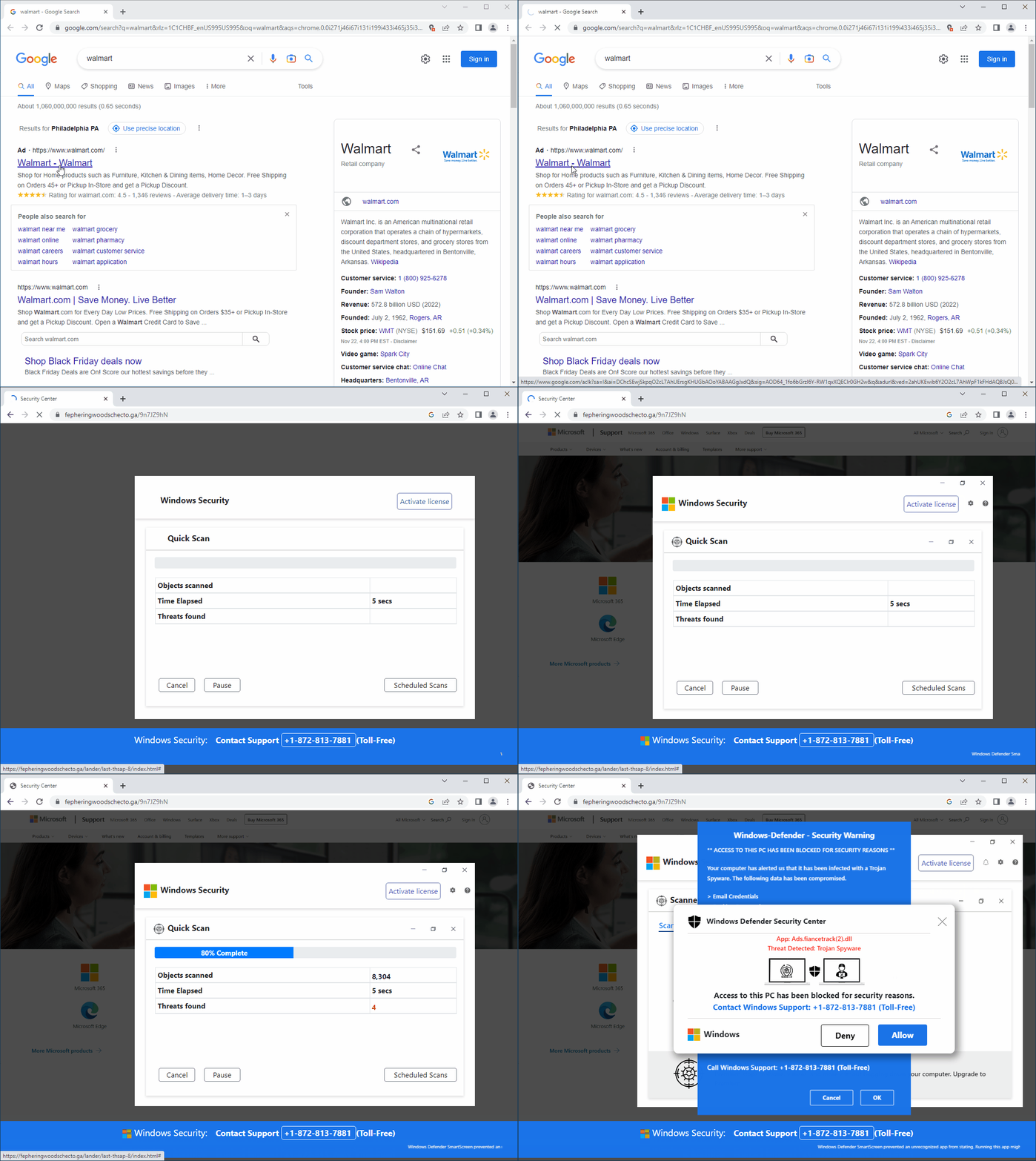
The FBI has issued an alert warning about the increase in tech support scams that target older adults. These scams involve fraudsters posing as tech support representatives who claim to have detected a virus or other problem on their computer. They then direct the victims to send cash through shipping companies to fix the issue.
TIPS TO PROTECT YOURSELF
Never download software at the request of an unknown individual who contacted you.
Never allow an unknown individual who contacted you to have control of your computer.
Do not click on unsolicited pop-ups, links sent via text messages, or email links or attachments. Do not contact the telephone number provided in a pop-up, text, or email.
How to Navigate Through "Dark Patterns" on Websites and Apps
Dark patterns are user interface (UI) designs that are intentionally deceptive or manipulative to trick users into making unintended choices, or choices that the creator wants you to make. They are often used by websites and apps to get users to sign up for services, make purchases, or share personal information.
Some examples of dark patterns include:
Trick questions: This is where a website or app asks you a question in a way that makes it difficult to give the correct answer. For example, a website might ask you to agree to a term of service that includes a hidden clause.
Misdirection: This is where a website or app uses confusing or misleading language to trick you into making a certain choice. For example, a website might use the word “free” to describe a product or service, even though there are actually hidden costs associated with it.
Disguised ads: This is where ads are disguised as content or features. For example, a website might have a “featured article” that is actually an ad for a product or service.
Bait and switch: This is where a website or app offers a product or service at a low price, but then makes it difficult or impossible to actually purchase it. For example, a website might offer a free trial of a service, but then make it difficult to cancel the subscription after the trial period ends.
Celebrating 20-Years of Providing In-Home Service for All of Your Technology Items
Computer Techs began business in 2003, providing in-home computer repair and troubleshooting. Did you know that Computer Techs can help with more than just computers? Check out some of our services that you may have not known about:
New computer or mobile device (smartphone/tablet) buying advice
New computer or mobile device set-up & transfer settings and apps from an old device
Help with recovery of forgotten passwords or hacked accounts
Printer troubleshooting or setup
TV streaming media device setup & troubleshooting
Smart speaker / voice assistant device setup
Wireless camera and security device setup
Software installation
Microsoft Office help
Email setup/customization
Wireless router & Internet set-up
Wi-Fi optimization and troubleshooting
Computer data back-up solutions
Diagnose misc. software or hardware problems
Telecom bill audit/review to help you save money on your phone/internet/TV services
Computer security analysis following access by a tech support scammer
Visit our YouTube Video Playlist to Learn About the Latest Scams and Computer/Internet Tips
Watch our featured video showing a fake security pop-up telling you that your PC has been blocked, and to call the number presented for "Windows Support". As mentioned before, you should NEVER call a number that pops up on your screen. In the video we show you how to close out of these pop-ups whenever they occur.