HV Power

Customer Newsletter - May 2025

DIGSI 5 Software and Windows 11 Compatibility


DIGSI 5 for managing SIPROTEC 5 protection relay is Windows 11 compatible, but there is a known issue with the Automation Licence Manager (ALM) that is needed to authorise DIGSI 5 (and other Siemens software) operation, so it may stop DIGSI 5 from running.


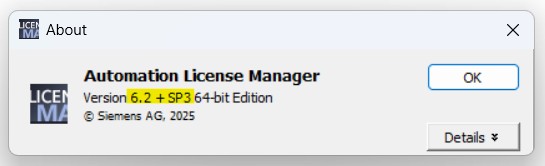
Windows 11 (or updates to it) may cause older versions of the Automation License Manager service to stop, so we recommend upgrading the ALM to V6.2+ SP3 (Version 6.2 with service pack three).

  • Your DIGSI version does not have to be upgraded. 
  • To ensure a seamless transition, temporarily transferring licenses off your PC hard drive is recommended before upgrading the ALM.


The ALM download is approx. 300 MB. You will need Siemens SiePortal access to download, or contact us if you have difficulties with this. (SiePortal is the new replacement for Siemens Industry Mall and SIOS sites)


ALM Download: Siemens ALM Download Link


From our experience

  • Temporarily move your licences from a hard drive to a USB stick before the upgrade
  • The download will want to unpack installation files and will default to putting those in a hard-to-find user location (APP DATA). Change the location to your desktop or similar, in case you need to run the installation a section time as when running the installation it may prompt you to restart Windows. (There is a known issue with Windows Defender that causes ALM setup (and other setups) to always request a system reboot, even after a reboot has already occurred. The issue can be worked around by deleting the "PendingFileRenameOperations" registry key under "Computer\HKEY_LOCAL_MACHINE\SYSTEM\CurrentControlSet\Control\Session Manager".)
  • The upgrade process seems to take several minutes with long pauses in some screens where you might think the program has hung. Be patient and it should get to the final installed confirmation screen.


FYI related software versions:

  • DIGSI 5 current version is V9.90 HF1. We expect the next release of DIGSI 5 will have the later version of ALM included. 
  • SIPROTEC (5) Tools which does not require the ALM remains at V2.2


DIGSI 4 - A new version for Windows 11


There is a new version of DIGSI 4 (for SIPROTEC 4 and COMPACT protection relays), but its naming might get a bit confusing between DIGSI 4 and DIGSI 5 as there is now:

  • DIGSI 4 V5.00 for SIPROTEC 4 devices
  • DIGSI 5 V9.90 for SIPROTEC 5 devices


Version 5.00 of DIGSI 4 has been released to better support Windows 11, and resolves the connection issues with SIPROTEC COMPACT relays. There is no other significant changes to function/drivers compared to 4.96. This latest version still supports Windows 10.


It’s a large 5GB download as it contains all released drivers.

DIGSI 4 V5.00 Full Version + Device Drivers (without license key usable as 30-day... - ID: 109987306 - Industry Support Siemens

SIPROTEC Technical notes and support

There is a wide range of support on the internet for SIPROTEC 5 protection relay users, but we recommend:


Siemens technical notes: SIPROTEC 5 Application Notes - ID: 109811596 - Industry Support Siemens


Siemens webinars. Register and get links to past webinars:

Webinars for energy automation and distribution systems - Siemens Global


SIPROTEC Pro Tips (SIPROTEC Tools):

SIPROTEC Tools - Siemens Global


IEC 60446 Wiring


HV Power is currently working on customised LV control wiring for a client 8DJH-36 (Siemens 36 kV gas insulated switchgear) panels at the moment.


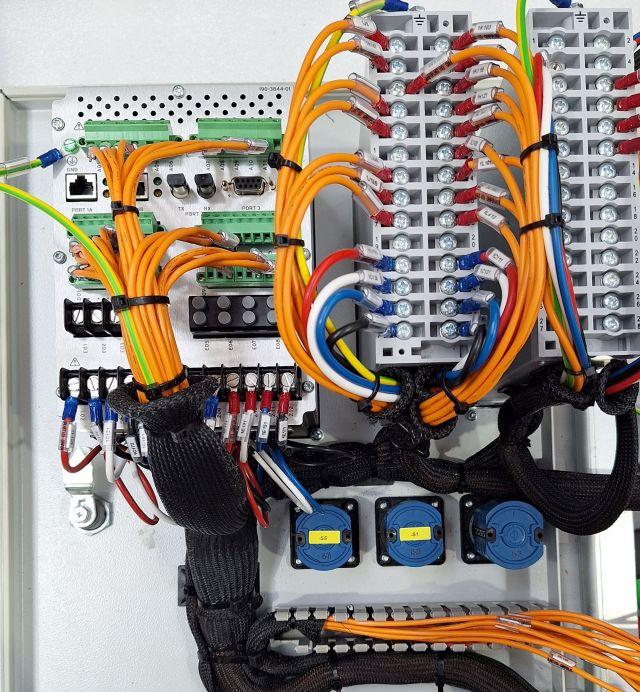
They have requested us to follow IEC 60446 (which provides general rules for identifying conductors) with orange wire for the 110V dc control wiring. This makes a change from our usual black wiring, and makes for a good photo.


This is just part of the customisation we can do for our customers as part of our Siemens VAR Partner status. This is where we are authorised to take Siemens standard factory switchgear and assemble the LV wiring and control as required by the local customer.

For more information on any items in this newsletter contact HV Power via sales@hvpowerautomation.com, phone +64 9 377 2001 or via our web form at www.hvpower.co.nz