|
One Cool Tip Newsletter
November 21, 2026
| Your daily dose of tech-savvy brilliance! | |
😀 Greetings! Happy Saturday, Cool Tipper!
Get ready to streamline your digital life with simple, actionable tips delivered straight to your inbox.
Cool Tip Theme: Google Maps Ask Maps (Holiday Travel and Prep Updates)
Use Google Maps' updated Ask Maps tool on iOS and Android to build road trip itineraries, check route tips, search saved lists and find appointments.
New here? Subscribe to the One Cool Tip Newsletter for daily updates. It's FREE!
| |
3️⃣
If you enjoy the One Cool Tip Newsletter, please forward this newsletter to THREE friends or colleagues or share it on social media using the links below.
Leave a $$$ Tip!
Share this One Cool Tip Newsletter!
| | |
🚨 ✈️ Don’t Let a Holiday Travel Scam Ruin Your Trip 🚨
Holiday travel planning is hectic, and scammers are taking advantage of travelers hunting for bargains.
Fake third-party airline booking sites can look legitimate while offering unusually cheap fares through social media ads, texts and other messages.
Some victims may pay for tickets that were never actually booked, while others can encounter unexpected fees.
Before entering your payment information, check an unfamiliar travel site's reputation and compare the deal with the airline's official website.
Be especially cautious about bargain fares delivered through unsolicited links, and don't let a limited-time offer pressure you into acting quickly.
A few extra minutes of checking could help protect both your vacation plans and your wallet.
The Cool Tip:
🧳 Verify travel deals with the airline's official website before you book or enter payment information.
And always use a trusted travel agent!
And in Other News...
- 🏠 Google Is Saying Goodbye to the Nest App. Here’s What to Do
If you still use the Nest app to manage your smart home, a big change is coming.
Google will retire the Nest app on Jan. 25, 2027, and compatible Nest devices will move to the Google Home app.
Your supported devices, settings and camera video history will automatically transfer, but custom video clips saved on home.nest.com will not, so download any clips you want to keep before the deadline.
Google is also retiring Google Assistant on speakers and smart displays on Aug. 2, 2027, replacing it with Gemini for Home.
If you still have an older Nest account that has not been migrated, Google says you'll need a Google Account to use the Google Home app.
Taking care of the transition early can help ensure your smart home is ready when the Nest app goes away.
The Cool Tip:
Install the Google Home app (iOS / Android) now and download any saved Nest video clips you want to keep before Jan. 25, 2027.
| |
| 🤔 Which new Ask Maps feature will you try first? | | | | |
🛍️ Cool Deals for Your Next Holiday Road Trip
Keep your phone charged and ready for Ask Maps navigation on long holiday drives.
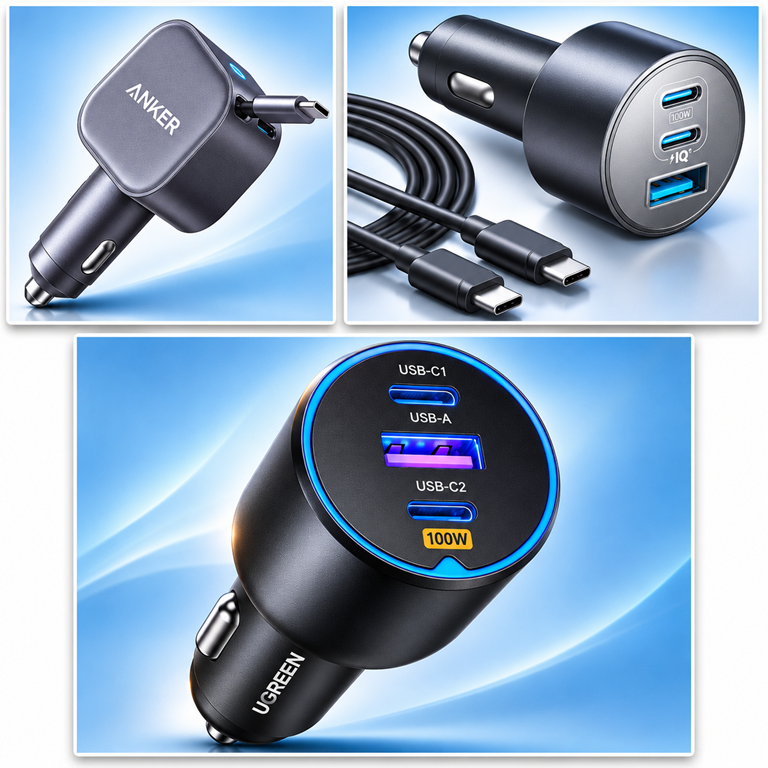
🔌 Anker Nano Retractable USB-C Car Charger (75W)
Keeps your dashboard free of tangled cables while fast-charging your phone as Google Maps runs live traffic and itinerary updates.
$21.37 · Save 29% · ⭐ 4.7
Shop the Anker Nano Retractable Car Charger on Amazon
🔋 Anker Car Charger (3-Port)
Powers your navigation phone, a passenger's tablet and an older USB-A device at the same time during family road trips.
$32.28 · Save 40% · ⭐ 4.8
Shop the Anker Car Charger on Amazon
⚡ UGREEN 130W USB-C Car Charger
Delivers enough high-speed wattage to top off a laptop in the passenger seat while keeping your navigation phone at 100%.
$18.02 · Save 40% · ⭐ 4.7
Shop the UGREEN 130W Car Charger on Amazon
*Prices accurate when originally published.
One Cool Tip may earn a commission from qualifying purchases.
| |
Have you tried the Upside app? Everyday cash back on gas, groceries and dining.
Help Support One Cool Tip.
Use this Amazon link when you shop online.
| | Plan Holiday Road Trips Faster With Google Maps' New Ask Maps Tools | | |
Google Maps is rolling out major upgrades to its Ask Maps assistant on iOS and Android so you can build multi-day road trip itineraries, search your saved lists for live availability and let AI hunt down local service appointments.
Learn how these new mobile tools work alongside the web version of Google Maps, and how to put them to work before your next holiday drive.
| | |
By Rodger Mansfield, Technology Editor
November 21, 2026
Subscribe
Holiday travel usually means juggling five open apps at once.
You map a route in one window, hunt for dinner reservations in another, scroll through saved bookmarks in a third and call around town for a last-minute pet grooming slot.
On Nov. 16, 2026, Google began rolling out four new updates to Ask Maps inside Google Maps for iOS and Android to pull those scattered chores into a single conversation.
Instead of typing rigid search keywords, you can ask Google Maps to assemble a multi-day itinerary, warn you about tolls and parking before you leave, check your saved lists for open tables or even call local businesses to find an open appointment.
Here’s a Cool Tip: Use the updated Ask Maps assistant in Google Maps on iOS or Android to build editable road trip itineraries, export them to Google Docs on desktop and delegate holiday errand calls.
Feature Explanation
Ask Maps is the conversational AI assistant built into Google Maps, powered by Google's Gemini models.
While core Ask Maps Q&A is available on mobile and desktop browsers, the Nov. 16, 2026 mobile update turns the iPhone and Android apps into an active trip planner and errand helper.
The upgrade introduces four distinct capabilities:
-
Step-by-step travel itineraries: Ask Maps generates day-by-day plans for a quick shopping trip or a multi-day road trip, complete with insider tips and numbered map pins for every stop.
-
"Know before you go" route tips: When you pull up directions, Google Maps surfaces practical route details like where to park, where to charge an electric vehicle, weather conditions, potential delays and tolls.
-
Agentic appointment search: Ask Maps can check online availability or call local businesses on your behalf for beauty, pet care, auto and home repair appointments.
-
Live saved-list search: Ask Maps scans your existing saved lists and checks real-time availability, helping you pick a spot for visiting guests without opening every bookmark individually.
These updates solve the biggest headache of seasonal planning: switching between static research and live logistics.
Travelers, busy families and anyone hosting out-of-town guests stand to benefit the most.
What You’ll Gain
-
Save time by building a pinned, day-by-day road trip itinerary in a single prompt on iOS or Android.
-
Reduce travel stress with upfront alerts on parking, EV chargers, tolls and weather.
-
Skip phone tag by letting Google call nearby service businesses to check open appointment slots.
-
Find open tables faster by searching your own saved lists for real-time availability.
Step-by-Step Instructions
Here's how to do it.
iPhone/iPad (iOS) / Android
-
Open the latest version of the Google Maps app for iOS or Google Maps for Android.
-
Under the search bar, tap Ask Maps.
-
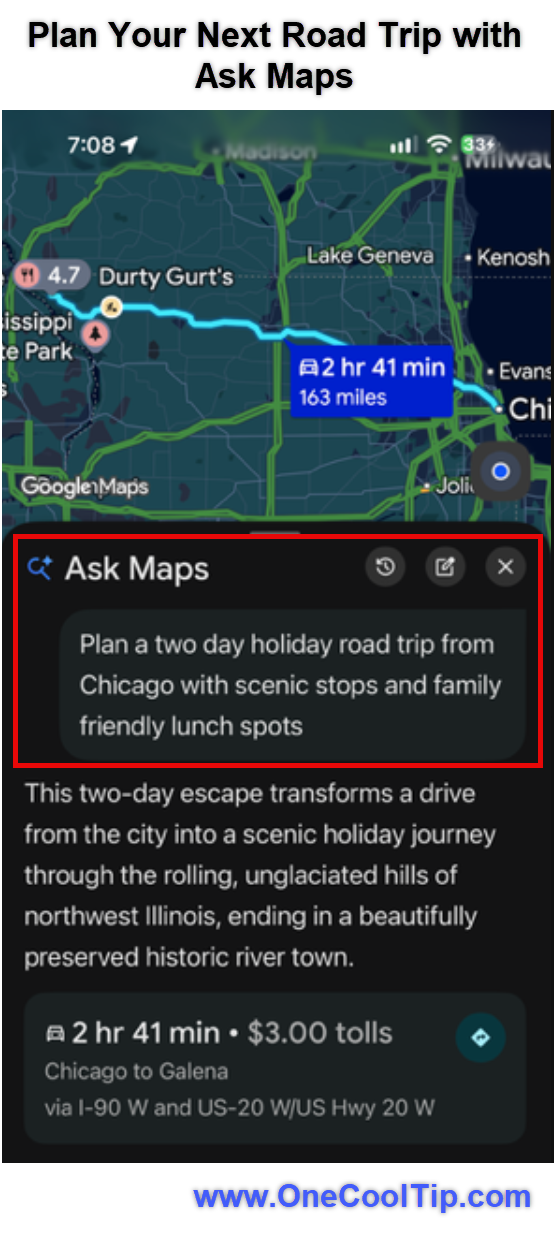
In the prompt box, type your request or tap the Microphone icon to speak. For example, enter: "Plan a two-day holiday road trip with scenic stops and family-friendly lunch spots" or "Which spots saved in my lists have availability for five people in the next 30 minutes?"
-
Tap Send.
-
To check local service appointments in the U.S., type a request such as "Find me a 4 p.m. nail appointment near me," tap Send, then tap Check for me.
-
Confirm whether Google can call businesses on your behalf (or type "don't call" to restrict the search to online listings), review the details and tap Looks good.
-
To revisit a saved trip later, open Ask Maps, tap History and look for the itinerary badge in your chat history. From there, you can ask to add a lunch stop, tap Share to send the plan to travel companions or tap directly into turn-by-turn directions.
| | fig. 1 - Plan Your Next Road Trip with Ask Maps | | |
Web/Desktop
-
Open Google Maps in a desktop web browser and sign in to your Google Account.
-
Click Ask Maps under the search bar (or click Menu and select Ask Maps) to ask general map questions, view your past chat history or manage shared links.
-
Open a saved road trip itinerary created in the mobile app and select the option to export it to Google Docs for easier editing, printing or sharing.
Cool Tips:
- The four new holiday updates (step-by-step itinerary building, "Know before you go" route tips, agentic appointment calling and live saved-list search) are rolling out on iOS and Android first.
- Full agentic appointment calling is not currently available on Windows, macOS or web browsers.
Pros and Cons
Pros:
- Works across both iOS and Android, keeping route planning, live traffic and itinerary edits inside one app instead of scattered notes.
- Cuts down on phone calls for routine errands like pet grooming, oil changes and salon visits.
- Makes forgotten saved lists genuinely useful by layering live availability over your personal favorites.
- Exports itineraries to Google Docs on desktop for easy sharing with coworkers or family members.
Cons:
- The four new holiday features are rolling out on mobile first, leaving desktop web users with core Ask Maps Q&A and Google Docs export for now.
- "Know before you go" route tips and appointment finding are launching first in the U.S., leaving international users waiting.
- Automated phone calls for appointment checks can take up to 30 minutes to return results.
- Generative AI responses can still contain errors, so travelers must double-check hours and reservations.
Who Should Skip This
Drivers who prefer manual route control and do not want AI-generated suggestions crowding their map.
Users who plan trips exclusively in a desktop web browser and want full mobile itinerary or appointment-calling features there today.
Users outside the U.S. who only care about appointment calling or "Know before you go" route cards right now.
People who rarely save places to Google Maps lists or prefer dedicated travel booking tools that track hotel budgets and ticket costs.
Users under 18, as the appointment-checking feature requires being 18 or older.
Troubleshooting and Limitations
Problem: The Ask Maps button or new itinerary features do not appear on iOS or Android.
-
Why it happens: The update began rolling out Nov. 16, 2026, and availability may vary by app version, account or region.
-
Fix or workaround: Update Google Maps from the Apple App Store or Google Play Store, restart the app and check again in a few days.
Problem: Ask Maps does not appear on the desktop web version of Google Maps.
-
Why it happens: The web version requires a browser with WebGL enabled, and the new holiday features are rolling out to mobile apps first.
-
Fix or workaround: Check your browser's hardware acceleration and WebGL settings for core Ask Maps Q&A, or switch to the iOS or Android app for the new holiday travel tools.
Problem: Ask Maps will not call local businesses for an appointment.
-
Why it happens: The calling feature is currently limited to English-speaking users age 18 or older in the U.S., and availability varies by state.
-
Fix or workaround: Verify you are signed into a personal Google Account that meets the age requirement, or use the web-only search option.
Problem: Appointment results seem stuck after tapping "Looks good."
-
Why it happens: Online checks take a few minutes, but automated phone calls to businesses can take up to 30 minutes.
-
Fix or workaround: Turn on Agent updates notifications in Settings and leave the app; a blue dot will appear on the thread in your Ask Maps history once results are ready.
Problem: A suggested stop is closed or has inaccurate details.
-
Why it happens: AI-generated summaries can occasionally misread holiday hours or outdated web listings.
-
Fix or workaround: Tap the linked business listing inside the itinerary to verify current hours before driving there.
Privacy and Data Notes
When Personalized Recommendations are enabled in supported countries, Ask Maps tailors answers using your Google Account activity, including map interactions, recent searches, saved or starred places, reviews and your saved home or work addresses.
If you allow Ask Maps to call a business for appointment availability, Google only shares the specific details you entered and confirmed.
If you share an Ask Maps conversation via a public link, anyone with that link can view all questions and responses in that thread, though any follow-up questions you add later stay in a separate private chat.
You can delete full conversations anytime from your Ask Maps history.
Feature Access
All four new holiday updates are rolling out on iOS and Android, while desktop web users have access to core Ask Maps Q&A (with WebGL enabled) and Google Docs itinerary exports.
Ask Maps itself is expanding to 30 European countries, including Spain, Germany and the U.K., bringing total availability to more than 200 countries and territories worldwide.
Travel itineraries and saved-list search: Rolling out on iOS and Android everywhere Ask Maps is offered.
"Know before you go" route tips and appointment finding: Launching first in the U.S. on iOS and Android, with additional regions planned later.
Account and pricing requirements: Available at no extra subscription cost with a signed-in Google Account, though appointment checking requires users to be 18 or older and located in supported U.S. states.
Score
Criterion | Score (0–10) | Justification
Value | 8
Solves real travel and errand friction by combining live traffic, saved lists and appointment checks in one place.
Usability | 8
Natural-language prompts and numbered map pins make complex trip planning approachable on both iOS and Android.
Wow Factor | 8
Letting Maps call local businesses for open slots and scan personal lists for live tables feels genuinely clever.
Total: 24/30 | 👍 Good
Ask Maps' holiday update turns Google Maps from a passive navigation tool into a practical trip coordinator on both iOS and Android, even if mobile-first and U.S.-only limits hold back a higher score for now.
Compared with standalone AI trip planners, it lacks deep budget tracking, but its live traffic and turn-by-turn integration make it far more useful once you are actually on the road.
Key Takeaways
Google Maps' latest Ask Maps upgrade for iOS and Android lets you plan multi-day trips, preview route headaches like tolls and parking, search your own saved lists for live tables and offload local appointment calls.
Because everything stays tied to live navigation, your chat history and desktop Google Docs exports, you can adjust plans on the fly without starting over.
Cool Tip Snapshot
-
Feature Name: Google Maps Ask Maps (Holiday Travel and Prep Updates)
-
Platform(s): iOS, Android (core Ask Maps Q&A and Google Docs export on Web/Desktop)
-
Quick Benefit: Build pinned itineraries, check route tips, search saved lists and find local appointments with AI
-
Best For: Travelers, families and busy commuters
-
Access Type: Free, Rolling Out
-
Difficulty: Easy
Learn More
Read Google's official product announcement for full details on the new itinerary planner, saved-list search, route tips and regional rollout.
Try It Yourself
Open Google Maps on your iPhone or Android phone today, tap Ask Maps and test it on your next weekend drive or holiday errand list.
Subscribe to the FREE One Cool Tip Newsletter for daily tech tips, and share this Cool Tip with family, friends and coworkers heading out on the road this season.
READ MORE
Read the Full Cool Tip!
| | |
Check Out These Cool Tips & Tricks
-
Export to Docs: You can move any Ask Maps trip plan into a printable document for your family. Build your itinerary in the iOS or Android app, then open it on desktop and choose the export to Google Docs option.
-
Edit Mid-Trip: Plans change quickly on the road, and you do not have to rebuild your itinerary from scratch. Open your saved itinerary in Ask Maps and type a request to add a lunch spot or scenic stop along the way.
-
Skip Automated Calls: You can still use Ask Maps to check local service slots without letting Google phone businesses for you. Type "don't call" in the Ask Maps prompt box before tapping Send.
-
Enable Agent Alerts: Automated business calls can take up to 30 minutes, so let the app ping you instead of watching the screen. Go to your profile picture, tap Settings, then Notifications, then Ask Maps and turn Agent updates on.
-
Use Voice Prompts: Typing long travel requests on a phone keyboard slows you down. Tap the Microphone icon inside the Ask Maps prompt box and speak your full question naturally.
-
Find Old Trips: Every itinerary you build stays tucked inside your conversation log for quick access before departure. Open Ask Maps, tap History and look for threads marked with the itinerary badge.
-
Share Full Threads: You can send your entire trip brainstorm to a travel partner in seconds. Tap Share at the bottom of an Ask Maps response to create a link for email or messaging apps.
-
Revoke Shared Links: If you no longer want a public Ask Maps link active, you can remove it anytime. Go to Ask Maps, tap History, tap More options and select Manage shared links.
-
Verify Holiday Hours: AI-generated itineraries pull from live listings, but seasonal hours can change without warning. Tap any numbered pin inside your itinerary to confirm the business is open before heading out.
-
Clean Your History: Keeping your Ask Maps history tidy makes active road trips easier to spot. Tap History inside Ask Maps and tap Delete next to any finished trip thread.
| | ICYMI - In Case You Missed It ... | | | | |
Write Like a Renaissance Master With Michelangelus
A little Renaissance history just arrived for your font collection. Michelangelus is a new serif typeface inspired by Michelangelo’s handwriting and works, giving documents, presentations, invitations, and creative projects a distinctive connection to the Renaissance.
Read the Full Version.
Read the Newsletter Version.
| | |
Tomorrow's Cool Tip is waiting to amaze you.
Until then, go forth and conquer the tech world with your newfound knowledge!
Be sure to visit www.OneCoolTip.com for Cool Tech Tips for a Cooler Life!
And if you like One Cool Tip, please support us with TipJar!
Enjoy!
Rodger
Chief Cool Tipper
onecooltip.com@gmail.com
| |
| What do you think of today's One Cool Tip Newsletter?
| | | | Connect with One Cool Tip! | | |
|
As an Amazon Associate, One Cool Tip may earn a small commission from qualifying purchases.
Our media content is intended solely for informational purposes. Please do not construe anything here as legal, tax, investment, financial, marital or other advice.
Copyright © 2026 | www.OneCoolTip.com | All Rights Reserved
|
| | | |