Learn21's Weekly EdTech Update

April 25, 2024

School Tech, Personal Tech, and You

A good analogy for handling your school & personal accounts and technology is “don't cross the streams.”


I’m not going to pretend that I don’t do personal tasks on school equipment. Most of us do it to some extent, whether it’s checking social media, online shopping, or handling personal emails. However, it’s essential to keep a clear distinction between both facets of your digital life for several reasons.


Minimizing Security Risks

One reason is because it helps to minimize potential security risks. Mixing personal and school activities can leave your personal information open to cyberattacks as academic institutions are often targeted due to their vast amount of data. Should your school’s system be compromised, your personal data could also be affected if you’re conducting personal affairs on school equipment or with school accounts.


Better Organization and Productivity

Keeping your personal information from intermingling with your professional data promotes better organization and productivity. Having separate devices or accounts for school and personal use can assist you in staying focused on the task at hand. It will serve to help limit distractions from personal notifications popping up in the middle of teaching or when you’re in a meeting. Also, it separates your personal and academic files, making it easier to manage your documents and reducing the risk of accidentally submitting a personal file for an academic assignment.


Responsible Use Policy

Your school district has a responsible use policy or acceptable use policy that students and teachers are to follow. An easy way to respect your school’s resources and policies is to keep your personal and professional data separate. Schools typically have rules against using academic resources for personal activities. By strictly using school tech for academic purposes, you not only demonstrate respect for these resources but also prevent potential conflicts with school policies and disciplinary actions.


Open Records

There are also open records laws that you may have to follow if you use personal equipment, including a smartphone for work. This means that during a legal action you may be required to submit data from your personal laptop or even have your phone be subpoenaed! Additionally, any personal business you have handled on your school issues device is not private - it's subject to search in a public records request or by your school/district.


Don’t Cross the Streams

In conclusion, not crossing the streams between school tech and personal tech is not just about following rules — it is a crucial part of managing and protecting your personal data along with your school data.

Tips and Tricks - Separate Lives

How do we separate our personal and professional lives? Here are a few tips and tricks:


Virtual Separation

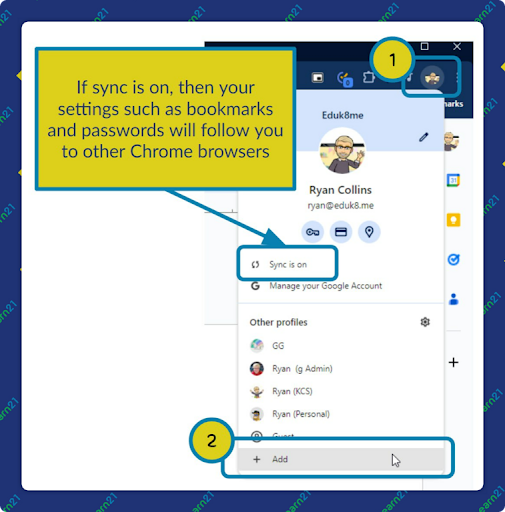
Virtual separation is using different browsers or separate browser profiles for school and personal activities. All of the major browsers support profiles. Any browsing in a personal profile will not show up in the professional profile. Setting up profiles varies from browser to browser, but to set up a profile in Chrome you click on the Profile Browser in the toolbar and follow the directions.

For Google users and profiles you can turn on syncing which will sync your bookmarks, passwords, and other data among all of the Chrome browsers that you have created a profile and turned on syncing.


Microsoft Edge’s Profiles look the same. Firefox’s ability to have profiles is not obvious but once set up, works the same as the others.


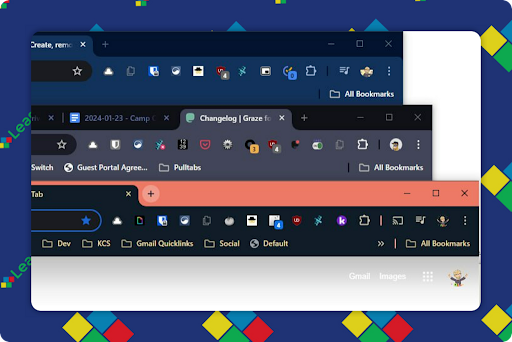
Each profile will have its own extensions and themes.

I recommend setting each profile to a vastly different color theme, so you know what profile you are using when you switch to it. Above is my Eduk8me profile, my personal profile, and then my work profile.


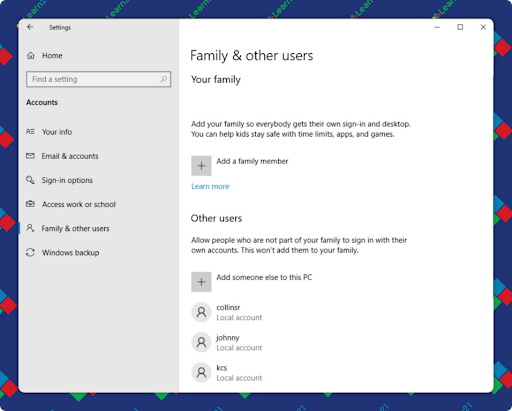
Another technique for virtual separation is to create multiple accounts for your computer. You’ll probably not have access to do this on school equipment (and I recommend against putting any personal information on a school computer) but for your personal computer you can add a school user account. This is great because it keeps EVERYTHING separate.

Use Multiple Devices

If possible, have separate gadgets for personal and school use. This helps enforce the distinction and lessens the chance of your personal information potentially being compromised if the school’s systems are hacked. This is what I personally do, carrying my personal laptop along with my school issued laptop in my computer bag. I also purchased another phone to use for school and put it on Tracfone for service. The phone cost $49 and the service is about $7/month. Well worth it for peace of mind. Your personal cellphone can be subpoenaed if you have used it for school purposes, including texting.


Personal and Professional Email Accounts

Keep a separate email for school and personal interactions. Gmail accounts are free, as are several other services. Use a personal account for your personal stuff and not your school account.


Notifications

I’m a big proponent of muting as many notifications as possible. Research has shown that it takes 15-20 minutes to recover from an interruption, so it is pretty beneficial to eliminate as many as possible. My default text tone is silence, although a couple of people do get a customized sound just in case. I use an iPhone and set apps to only be able to change their badge number. They are not allowed to send me a notification or make noise. Once I started doing this it felt like a great weight had been lifted.


It’s weird being able to work 30-60 minutes without any notifications. You do have to set people’s expectations though. I have no idea why people try to text everything. If it’s an emergency, call. If not, send me an email and I’ll respond when I get a chance. People don’t believe me that I don’t get text notifications, but once you set it up you wonder how you tolerated getting interrupted for so many years.

Learn21 Update

Empowering Education: Learn21’s Self Service Solution


There are many quotes about silver linings, but one of our favorites is “I believe that there is a silver lining in everything, and once you begin to see it, you’ll need sunglasses to combat the glare” (Sophia Amoruso). Sure, no one at Learn21 would have wished for a global pandemic, but we have to admit there have been some positive outcomes across education. It showed how passionate educators were about making learning happen across a variety of mediums for their students and how quickly technology teams can deploy thousands of devices! We like to think that we are a supportive partner for educators and technology departments in trying (and good) times. 


A Touchless Exchange: The Beginning of Learn21’s Self Service Kiosk

As schools deployed these zillions of devices, the reality of a zillion repairs started to set in. Devices are not immune to wear and tear. Accidents happened — screens crack, keyboards malfunction, and batteries fail. Life happens! As these events started to occur, schools struggled with scheduling enough support desk hours, offering drive-up support in parking lots, or relying on drop-off and pick-up locations that may be unsecured and unmonitored. 


As schools and districts shared these stories with Learn21, we knew we could devise a solution that was safe, secure, and scalable. Thus was born Learn21’s Self Service Kiosk! This kiosk addresses the need for students to exchange damaged devices securely while minimizing staff interaction. This solution required a smart locker partner that we trusted. We explored several vendors and found the LocknCharge FUYL tower to be the most capable locker solution for our kiosk. We relied on our strong partnership with the University of Cincinnati Co-op and supported two of our Co-ops students as they designed the kiosk as a part of their senior design project. Learn21’s Self Service Kiosk served as a perfect fit to meet their capstone requirements as well as accelerate development on something we knew schools needed. The goal: Create a system that would empower students and families while minimizing the risks of Covid19 on staff.


The Ingenious Technology


Through Learn21’s partnership with LocknCharge, the team was able to integrate with FUYL towers to manage device handouts, swaps, and drop-offs. These smart lockers provide a touchless experience for students and staff seeking device replacements. Here’s how it works:


  • Self Service Access: From any location, students can submit incidents and reserve a bay at the FUYL towers independently. There is no need to wait in line or tie up staff time to make an exchange
  • Instant Notifications: When a student reports a damaged device, the system triggers an alert. Within minutes, the student receives notifications with replacement instructions. The technicians at the district also receive notifications regarding the new incident creation.
  • Swift Resolution: Armed with these instructions, students retrieve a ready-to-use loaner device from the FUYL tower. Classroom disruptions are minimized, and learning continues seamlessly. Technicians can retrieve damaged devices from the towers and perform repairs.
  • Safe Returns: Once repairs are completed, student notifications are delivered to direct them to the appropriate tower and pick up their repaired device. When the repaired device is picked up, the automation notifies technicians so they can verify the loaner device is in working order and cleaned for the next student. Then the process starts again!


Impact and Beyond


Since its inception, the Self Service Kiosk has facilitated more than 9,000 reservations across 191 schools. Learn21 continues to engage with our schools for feedback on workflows and ways to further enhance our solutions to evolving needs and uses.


Learn21’s Self Service Kiosk revolutionized technical support and shows that innovation thrives, especially in challenging times. And here’s the part where you’ll want to put on those sunglasses we mentioned in the opening. While Self Service Kiosk was designed to solve a problem identified by the pandemic, it’s proved to be an even better solution for schools reigning in spending as ESSR funds come to an end. Working smarter with technology and helping schools save funds that can go back into classrooms is a hallmark of Learn21 and a big reason why we’re a non-profit edtech organization. If you’re interested in a demo of the Self Service Kiosk or want to learn more, contact Learn21 at info@learn21.org. 


Video 2: Navigating the Challenges of Generative AI

We're excited to announce the second video in our 11-week series, "Turning Research into Practice: Leveraging Generative AI in K-12 Education." This week we are looking at some of the challenges that can arise with generative AI. This video discusses potential issues such as data privacy concerns, bias in AI algorithms, and the importance of critical oversight in AI implementation. Check it out, leave a comment and let us know what you think. We're reviewing and reporting on the research to amplify your abilities. Let us know how we're doing. Oh, and Like and Subscribe while you're there.

Video 2: Navigating the Challenges of Generative AI

Extra Credit

Meta, the parent company of Facebook, is bringing their Quest VR devices to schools. It will work a lot like their Meta Quest for Business, streamlining the set up and usage of the virtual reality headsets in the classrooms. Not mentioned is any sort of privacy or security policy.


Over on the TCEA blog is a listicle with 23 ways to check for understanding. As much as we like routine, students like it when we mix things up from time to time. This is a great list of different ideas you can use in your classroom instead of doing yet another exit ticket.

Which articles do you love the most in Bytes and Insights?
Tech Tips
Tech Information
Practical Applications of Technology
Using Technology in the Classroom
Learn21 Updates and Happenings

🙋‍♂️ Bytes and Insights is written by Eduk8me’s Ryan Collins who writes about education and educational technology. He is also the Director of Technology for Kenton City Schools in Ohio. Sign up for his Of Bits and Bytes newsletter at https://eduk8.me!


If you'd like to take a hiatus from Bytes & Insights, please use the Update Profile link below. This will allow you control over which emails you receive from Learn21.

X Share on X
LinkedIn Share on LinkedIn

www.learn21.org

LinkedIn        X        YouTube        Instagram