Welcome to the October issue of Tiger Bytes. This is your monthly serving of technology tips and tricks created by your Secondary BTIL team members and delivered to your inbox for you to use.


Teacher Hack: Keyboard Shortcuts

by Kenton Engels and Hannah Nash


These are simple to learn and make everyday tasks easier. Once you get used to them, they become second nature. Most work in any browser or app.

  1. Ctrl + Shift + T: Reopens the tab you just closed. Press it again to bring back the one before that.
  2. Ctrl + Plus / Ctrl + Minus: Zooms the page in or out so the back row can read it. Ctrl + 0 resets it.
  3. Ctrl + F: Finds a word on the page. Useful for jumping to the right spot in a long reading or a rubric.
  4. Ctrl + L: Jumps to the address bar so you can type a new URL without reaching for the mouse.
  5. Ctrl + 1 through 8: Jumps straight to that tab number. Line up your tabs in lesson order before class, then move through them by number.
  6. Ctrl + Shift + V: Pastes text without the original formatting, so you don't bring over odd fonts and colors. (Hannah's favorite!)
  7. Ctrl + W: Closes the current tab. Pair it with #1 if you close the wrong one.
  8. Ctrl + A: Selects everything in a document or text box. Saves a lot of scrolling on longer docs.
  9. Windows Key + Shift + S: Opens the snipping tool so you can screenshot part of your screen and paste it anywhere.


Google Tips & Tricks: Uses of Google Keep You Should Try

by Danae Dieken


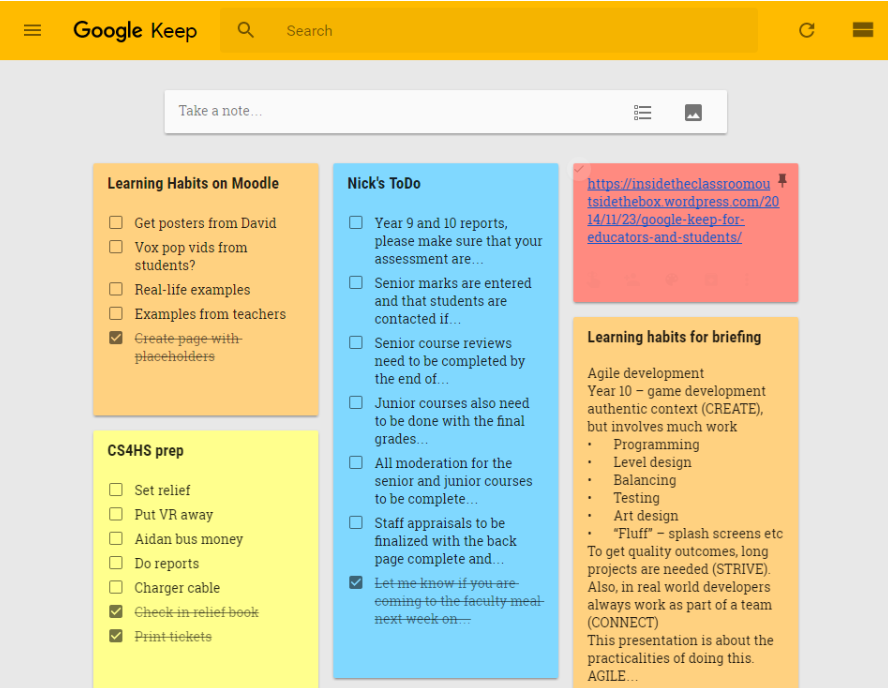
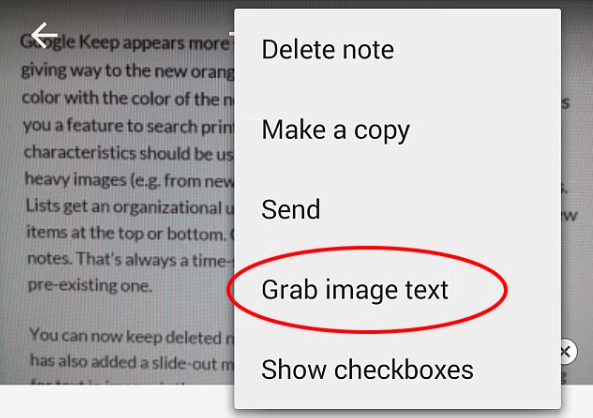
Google keep is already loaded into your drive! It lets you make checklists, grab text from an image, and so much more! It is a great tool for helping students (or teachers) that lose physical copies of work logs, planners, or homework trackers. Also, you can share a note between people, so you could add tasks for a particular student in need of a little extra help with tracking deadlines, or a student that was gone and has work to make up. I’ve found the “grab image text” feature super helpful for speech/theatre scripts or poems for class where I only have the physical copy. 

Here are some images of Google Keep in action! 


ITEC Reflection: Reflections & Thoughts to Share From This Year's ITEC Conference

This is a way for those who have attended ITEC to be able to share some thoughts and ideas. If you have any questions feel free to follow up with Maria.


Maria Hoekstra

Takeaway #1: Accessibility- I want to focus on improving the accessibility of my materials as I revise what I currently have or generate new. This thinking can be applied to AI tools and UDL, as Patrick Donovan discussed during his Monday morning session, or in relation to students using assistive devices in our classroom, as I learned from Jena Fahlbush & Cynthia Curry in their Tuesday morning session.


Takeaway #2: AI & Student Reflection- As part of my test retake process, I would like to incorporate a reflection process that is tailored to the student. Eric Curts discussed the potential for this work during his Monday morning session The "Gem" in AI. Eric has a HUGE collection of Gems that are available to us related to many topic areas. One of them attempts to offer that reflective process I am looking for. While it is not exactly a match to what I would like, it is a great starting point for me!