HMIS New Clarity Interface is Live Today – What You Need to Know

HMIS User Notice


Applies to: [All Users]

Effective Date: 09/21/2026

Effective today, Monday, September 21, 2026, the new Clarity interface is now enabled for all LA CoC HMIS users.  


What You’ll See When You Log In Today 


When you log in to Clarity HMIS, the new interface will automatically appear as your default view. Don’t worry – you're in the right place! The system may look different, but you will still have access to the HMIS information and functionality you use to complete your work. 


Not ready to fully make the switch? 


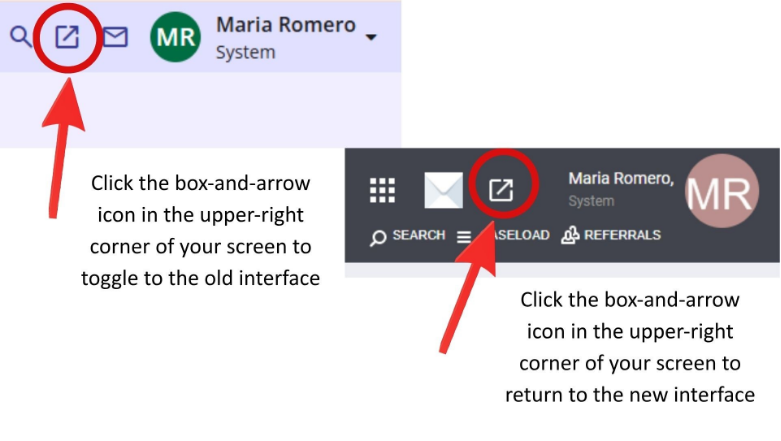
From September 21 through September 30, you can toggle between the new and existing Clarity interfaces by clicking the box-and-arrow icon in the upper-right corner of your screen. 

Beginning October 1, 2026, the new Clarity interface will become the only interface available, and the option to toggle back to the existing interface will be removed. 


Need Help Getting Started? 


We have several training and support options available to help you get comfortable with the new interface:  

  • New Clarity Interface Orientation – A quick overview of the new look, navigation and primary HMIS screens. 
  • HMIS New Interface Deep Dive – A more comprehensive, 3-hour training for existing HMIS users who want additional practice navigating and completing common HMIS tasks. 
  • New Clarity Interface Office Hours – Drop in for technical support, questions, and help navigating the new interface. Office hours are available today, September 21, from 10:00 – 11:00 am. 
  • Self-Service Resources – Job aids and videos will provide additional on-demand support as they become available. 


Click here to download the Training & Office Hour Schedule PDF

Description

Dates

Registration

New Clarity Interface Orientation Sessions


Brief overview of the new interface


We will cover:

  • An overview of the new look and feel of the interface
  • A demonstration of the new interface with primary HMIS screens and functionality
  • A Q&A session

Choose one session from the dates below:


Wednesday, 9/16, 12:00 pm – 1:00 pm, session is full


Wednesday, 9/23, 12:00 pm – 1:00 pm,


Wednesday, 9/30, 12:00 pm – 1:00 pm


Monday, 10/5, 10:00 am – 11:00 am


Monday, 10/12, 10:00 am – 11:00 am


Monday, 10/19, 10:00 am –11:00 am


Monday, 10/26, 10:00 am – 11:00 am

Register for an orientation

HMIS New Interface Deep Dive


Comprehensive overview of the new interface for existing users


Learning Objectives:


  • Execute basic navigation and basic tasks in the new interface: HMIS searching, adding a profile, release of Information, household management, program management, referrals
  • Apply best practices for inputting HMIS data in the new interface
  • Practice with scenarios

Choose one session from the dates below:


Thursday, 9/17, 9:00 am – 12:00 pm


Tuesday, 9/22, 1:00 pm – 4:00 pm


Wednesday, 10/7, 9:00 am – 12:00 pm


Wednesday, 10/14, 9:00 am – 12:00 pm


Wednesday, 10/21, 9:00 am – 12:00 pm


Wednesday, 10/28, 9:00 am – 12:00 pm

Register for a session

Basic Navigation for HMIS Access


Required for obtaining a new HMIS account


Learning Objectives:


  • Intro to Clarity HMIS
  • Identify key pages
  • Search for participant
  • Create participant profile
  • Complete program enrollment
  • Record program services
  • Enter case notes
  • Administer assessments
  • Complete program exit

Choose one session from the dates below:


Thursday, 10/1, 9:00 am – 2:00 pm


Tuesday, 10/6, 9:00 am – 2:00 pm


Thursday, 10/8, 9:00 am – 2:00 pm


Tuesday, 10/13, 9:00 am – 2:00 pm


Thursday, 10/15, 9:00 am – 2:00 pm


Tuesday, 10/20, 9:00 am – 2:00 pm


Thursday, 10/22, 9:00 am – 2:00 pm


Tuesday, 10/27, 9:00 am – 2:00 pm


Thursday, 10/29, 9:00 am – 2:00 pm

Register for HMIS access session

New Clarity Interface Office Hours


Office hours for technical support and questions regarding the new interface

Monday, 9/21, 10:00 am – 11:00 am

Register for Sept. 21 office hours


Tuesday, 9/22, 10:00 am – 11:00 am

Register for Sept. 22 office hours


Tuesday, 9/29, 10:00 am – 11:00 am

Register for Sept. 29 office hours


Friday, 10/2, 10:00 am – 11:00 am

Register for Oct. 2 office hours


Monday, 10/5, 10:00 am – 11:00 am

Register for Oct. 5 office hours


Tuesday, 10/6, 10:00 am - 11:00 am

Register for Oct. 6 office hours


Wednesday, 10/7, 10:00 am – 11:00 am

Register for Oct. 7 office hours


Friday, 10/9, 2:00 pm – 3:00 pm

Register for Oct. 9 office hours


Tuesday, 10/13, 10:00 am – 11:00 am

Register for Oct.13 office hours


Additional Clarity Interface support offered during weekly Data & HMIS office hours.


Thursday, 9/24, 2:00 pm – 3:00 pm


Thursday, 10/1, 2:00 pm – 3:00 pm


Thursday, 10/8, 2:00 pm – 3:00 pm


Thursday, 10/15, 2:00 pm – 3:00 pm


Thursday, 10/22, 2:00 pm – 3:00 pm

Register for a weekly HMIS office hour

Self-Service Learning Resources


Access job aids and videos whenever you need additional guidance

Resources are in development and will be available online soon

Link will be shared once available

Important Reminder for New HMIS Accounts 


Beginning September 28, 2026, enrollment in the existing HMIS eLearning courses will close. Users who are already enrolled must complete all their courses by September 30 to receive credit. 


Starting October 1, 2026, Basic Navigation Training for HMIS Access will transition to a live, virtual instructor-led certification course offered twice per week. 


Click here to download the New Clarity Interface Transition Timeline PDF


Thank you for your flexibility as we make this transition. We encourage you to begin exploring the new interface today and take advantage of the training and support available to you. 


Questions or Technical Issues? 


If you have further questions about this process, please submit an HMIS Support ticket via LAHSA Enterprise Ticketing System. Click here to access the LAHSA Enterprise Ticketing System Job Aid