cpp logo
chrs banner
 
CHRiS Mascot

Hello Managers and Timekeepers, 


It’s CHRiS again - your guide as we continue preparing for the launch of the Common Human Resources System (CHRS) on March 23. Today, we’re spotlighting a key part of your work: Absence Management.  


CHRS brings a more consistent, transparent, and streamlined experience for entering, approving, and reviewing absences. To help you prepare, I’ve gathered the essential Knowledge Articles for both Manager and Timekeeper roles.  

Explore Your Absence Management Knowledge Articles

Each guide includes screenshots and step-by-step instructions, so you can preview how Absence Management tasks will function once CHRS is live. 


Please take a few minutes to review the articles listed for your role. 


Manager Absence Management Knowledge Articles 


These guides show how to review and act on employee absences, support your team as needed, and stay informed about leave balances and approvals. 

Timekeeper Absence Management Knowledge Articles 


These resources outline how to review, correct, and maintain absences, run essential reports, and support managers and employees throughout the process. 

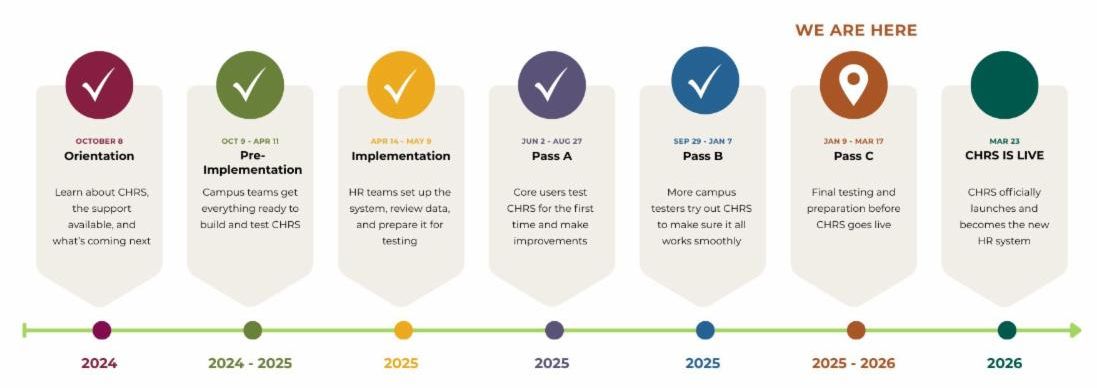
CHRS Roadmap 

We’re progressing right on schedule! Here’s where we are in the CHRS timeline and what’s ahead as we continue preparing for launch. 

Timeline titled CHRS Timeline showing project phases from 2024 to 2026. Phases include Orientation on October 8 2024 Pre Implementation from October 9 2024 to April 11 2025 Implementation from April 14 to May 9 2025 Pass A from June 2 to August 27 2025 Pass B from September 29 2025 to January 7 2026 Pass C from January 9 to March 17 2026 marked as We are here and CHRS Is Live on March 23 2026 when CHRS officially launches as the new HR system.

Topics Checklist

Below is your learning checklist. We’ll continue checking off items together: 


  • Personal Profiles ✔️ 
  • Time & Labor ✔️ 
  • Absence Management ✔️
  • Benefits 

CHRS Bronco Knowledge Round-Up

CHRiS Thinking Mascot

Win $5 in Bronco Bucks by answering this week’s question. Review the Knowledge Articles listed above and submit your answer using the button below. The first three employees with the correct answer wins! 

Where should managers go to approve employee absence requests in CHRS? 


A. The Approvals tile on the Manager homepage 


B. Menu > Manager Self Service > Time Management > Approve Time and Exceptions > Multiple Absence Requests  


C. The Employee Self Service homepage 


D. The Payable Time Summary page 

Congratulations to the winners of last week's CHRS Bronco Knowledge Round-Up!

1st place

Jacqueline Rios

2nd place

Pamela Adams

3rd place

Carolyn Erwin

Note: All answers will be posted on the CHRS Website.

Helpful Links

If you have questions about absence workflows or reporting, feel free to submit them through the form - we’re here to help. 

Countdown to CHRS Launch 

54 days to go!

Thank you for your continued partnership and preparation. Your role is essential in ensuring accurate and timely absence reporting once CHRS goes live. 


Your CHRS Companion, 


CHRiS