MLS-Touch Mobile App is Here |
|
Our New MLS App, MLS-Touch is here! Designed exclusively for real estate professionals, it has all the essential features you need including powerful search tools, listing and showing details, property history, and instant comparables. It also has some advanced features that really set it apart like hotsheet activity, market stats, listing edit, and access to Realist® tax data, property lines, and flood zone data.
MLS-Touch also features deep integrations with Matrix™ and OneHome™. Add a contact in MLS-Touch? It syncs instantly with Matrix. Send listings from Matrix? It’s automatically tracked in the mobile app. Your client ‘favorites’ a listing in OneHome? It’s tracked in the app. And … with MLS-Touch you can create your own branded app in seconds and give your clients access to ALL the listings in our market. You’ll be able to collaborate with your clients and track their activities like never before, all from the convenience of your phone!
MLS-Touch is a user benefit, available to you at no additional cost.
MLS-Touch’s features replace the branded IDX search of SavvyCard and the on-the-go searching of GoMLS. Now, you can do all that and more in one, easy-to-use app.
|
|
Broker Attribution is here, but what is it? |
|
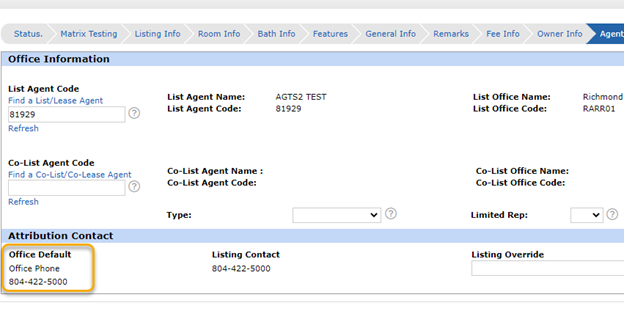
The Broker Attribution Mandate came out of NAR’s BOD in November 2021. NAR enacted this rule for more transparency on external displays of listings, which includes IDX sites and third-party portals. The listing firm already is disclosed on these sites, but the office attribution contact field will also ensure that the office’s contact info is displayed, too.
The firm will have to decide what they want displayed as a default, which can be either firm number, firm email, listing agent number or listing agent email. Anyone with broker or office manager access can update the default information at any time, as well as allow agents to override the office attribution field on a listing-by-listing basis.
Brokers and office managers that opt to not allow agents to override the office attribution field default can still edit the field on a listing-by-listing basis.
|
|
MarketStats is currently disabled due to the MarketStats team completing data mapping work to align with our updated residential property type. CVR MLS staff will confirm when MarketStats has been restored.
• What you need to do:
If you have any live charts posted, pull them down. Static charts will not be affected
• How do you pull stats in the meantime?
FastStats reports through August 2022 can also still be used.
Thank you for your patience as the MarketStats team works to complete the data mapping.
|
|
SentriLock is in the process of updating its security to include an additional layer of validation to its SentriKey website and mobile app. Over the next few weeks, updates will be made that will require you to establish security questions and verify your cell phone number. SentriLock’s Customer Support will use these questions to validate your identity if you can’t remember your PIN or password.
SentriLock has reported that some users are running into issues with the text verification tool in the app. SentriLock is actively working with phone carriers to resolve the issue. You may skip the text verification prompt in the meantime until the issue has been resolved. We will communicate updates as we receive them on your MLS Dashboard.
If you had enabled biometrics in your SentriKey app that no longer work, you will need to go in and reenable your settings. These updates may have turned off your biometric settings.
|
|
Pay Attention to the Grace Period |
|
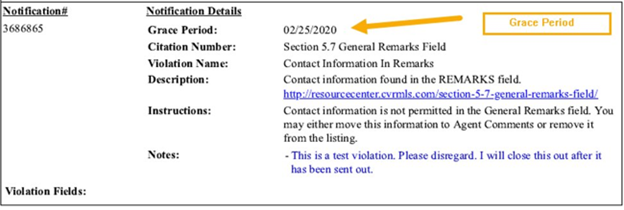
If you received a compliance notice, please make sure you respond within the Grace Period on the notice. |
|
The Grace Period is the last day that you can respond or correct a violation. Failure to do so by the Grace Period date may result in a fine.
Since many corrections need to be reviewed and closed manually by CVR MLS staff, we recommend that you reply to the notice once you have made the correction to ensure that CVR MLS staff can review it and close it appropriately.
|
|
Click on the links below to register.
|
|
 |
Follow CVR MLS on Facebook, Twitter, Instagram, and LinkedIn. Click any of the icons below for timely notification about system outages, updates, maintenance, training, education, tips, and more.
|
|
|
|
The CVR MLS Monthly Monitor provides the users of the Central Virginia Regional Multiple Listing Service with updates, product highlights, training opportunities, market data, compliance tips, and other noteworthy news affecting real estate professionals in our MLS. Click the View Archive button to see all archived CVR MLS newsletters. |
|
|
|
|
|
|
|