One Cool Tip Newsletter

April 28, 2026

Your daily dose of tech-savvy brilliance!

😀Greetings! Happy Tuesday, Cool Tipper!


Get ready to streamline your digital life with simple, actionable tips delivered straight to your inbox.


Cool Tip Theme: ChatGPT Health


New here? Subscribe to the One Cool Tip Newsletter for daily updates. It's FREE!

3️⃣

If you enjoy the One Cool Tip newsletter, please forward this newsletter to THREE friends or colleagues or share it on social media using the links below.


Leave a $$$ Tip!


Share this One Cool Tip Newsletter!

X Share This Email
LinkedIn Share This Email
Pinterest Share This Email

🚨Fake SSA Emails Are Back. Spot the Scam Fast 🚨


Scammers are sending convincing emails that pretend to be from the Social Security Administration, warning you about “suspicious activity” or “account problems.”


The messages look official but link to fake login pages designed to steal your SSN, bank info, or benefits details.


Some even threaten account suspension to push you into clicking.


How to protect yourself:


Never click links in unexpected SSA messages. Go directly to ssa.gov or call the SSA using the number on their official site.


Real SSA emails never demand immediate action, threaten consequences, or ask for personal information.


Learn more about SSA scams: https://www.ssa.gov/scam/


And in Other News...


Musk vs. Altman Showdown Heads to Court


A high-stakes legal battle between Elon Musk and Sam Altman has officially moved into the courtroom, putting the future direction of OpenAI under intense scrutiny.


At the center of the dispute: Musk claims OpenAI abandoned its original nonprofit mission to develop AI for the benefit of humanity, pivoting instead toward a profit-driven model backed by major partners like Microsoft.


Altman and OpenAI strongly deny the allegations, arguing the shift was necessary to scale AI development and was agreed upon years ago.


The trial, which began this week in California, involves massive stakes, with Musk seeking damages reportedly exceeding $100 billion and even calling for leadership changes at OpenAI.


Why it matters:


This is more than a personal feud. The outcome could reshape how AI companies balance profit, ethics, and control, setting precedents for the entire industry as AI becomes central to business and society.


👉 Bottom line:


The courtroom battle between two of AI’s most influential figures could define the rules of the AI economy for years to come.


Cool Deals of the Day

Help support One Cool Tip. Use this Amazon link when you shop online.


Check out these Cool Deals:


🧠 Withings ScanWatch Health Smartwatch: Tracks heart rate and sleep trends for deeper insights. Overall Pick! $369.95 Check it out on Amazon!


📱 Apple Watch Series 11: Integrates directly with Apple Health for seamless data tracking. Amazon's Choice. Save 25% $299. Check it out on Amazon!


🩺 iHealth No-Touch Thermometer: Fast and hygienic readings for home use. Save 20% $19.99 Check it out on Amazon!


*Prices accurate when originally published.

One Cool Tip may earn a commission from qualifying purchases.

Fuel Your Adventure

Try Big Mike's Jerky!


bigmikesjerky.com


Now on TikTok!


Today's Cool Tip

ChatGPT Health: Smarter, Safer Health Conversations


ChatGPT Health introduces a focused environment for discussing personal health topics with enhanced privacy and context awareness. Access is limited today, but you can join the waitlist to be among the first to try it.


What if you could ask detailed health questions and get answers that actually feel tailored to you, without digging through forums or generic search results? 


Here's a Cool Tip:  ChatGPT Health.


ChatGPT Health is aiming to make that possible, but here’s the catch: you can’t just turn it on yet.


Right now, access is limited and controlled through a waitlist. 


Knowing how to request access is the first step to getting ahead of the rollout.


Feature Explanation


ChatGPT Health is a dedicated environment for discussing personal health topics. 


It is designed to provide more relevant, structured, and privacy-conscious responses compared to general-purpose AI chat.


Here’s what sets it apart:


  • A focused interaction space specifically for health-related discussions.
  • Optional integration with personal health data and medical records.
  • Use of enhanced reasoning models for complex health questions.
  • Stronger privacy boundaries, separating these conversations from standard chat.


Why it matters: 


  • health questions require nuance. 
  • Generic answers often fall short. 
  • This feature is built to provide more context-aware, personalized responses.


What You’ll Gain


  • More relevant answers tailored to your situation.
  • Better continuity for ongoing health discussions.
  • Optional integration with your own health data.
  • A more private environment for sensitive topics.


Step-by-Step Instructions


Here's how to do it.


How to Join the ChatGPT Health Waitlist


  1. Visit the official ChatGPT Health waitlist page.
  2. Click Join the waitlist.
  3. Sign in with your ChatGPT account if prompted.
  4. Submit your request and confirm your interest.
  5. Watch for an email or in-app notification when access is granted.


Pro Cool Tip: Use the same account you actively use for ChatGPT. 


Web/Desktop (After Access Is Granted)


  1. Navigate to ChatGPT, www.ChatGPT.com.
  2. Log in to your ChatGPT account.
  3. Select Health in the left-hand column.
  4. Start a new ChatGPT conversation.
  5. Enter your health-related question.
  6. Optionally connect supported health data sources.


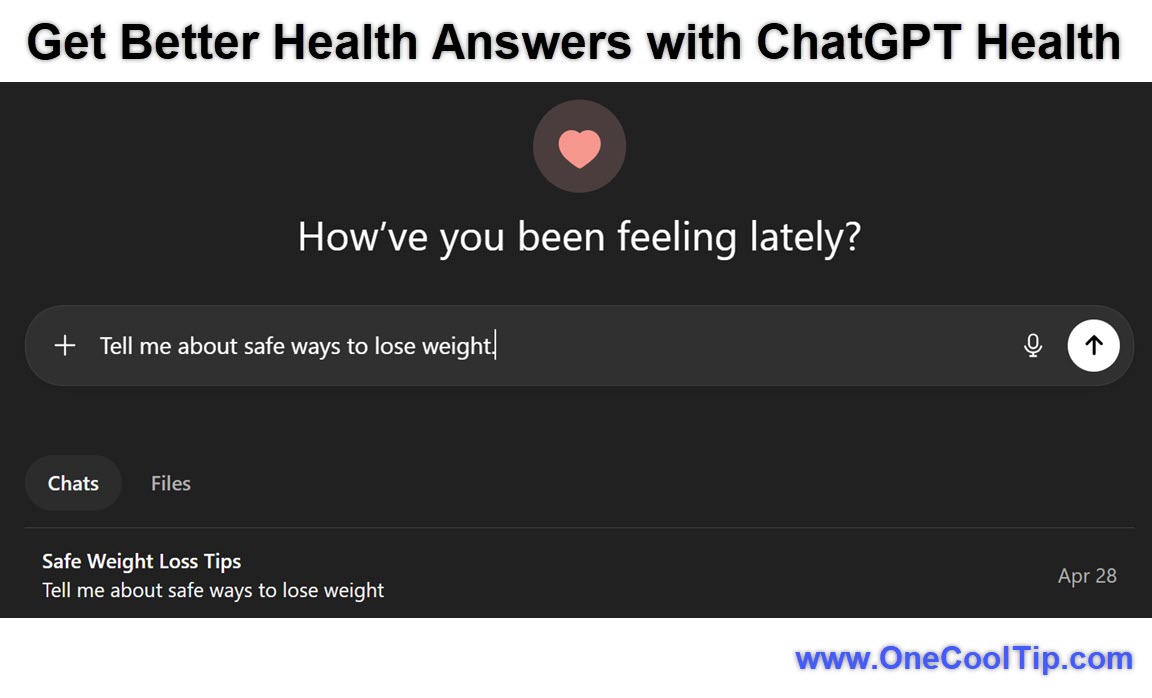
fig. 1 - ChatGPT Health Example

Example: Ask, “What are safe ways to lose weight?” and refine with follow-up questions.


iOS / Android


  1. Open the ChatGPT app (iOS / Android).
  2. Select Health from the left-column. 
  3. Enter your question.


Pros and Cons


Pros:


  • More contextual and relevant health responses.
  • Ability to integrate personal health data.
  • Structured, step-by-step explanations.
  • Designed for sensitive topics.


Cons:


  • Access currently limited via waitlist.
  • Rollout timing may vary by region.
  • Not a substitute for professional medical care.
  • Data integration may not appeal to all users.


Feature Access


  • Availability: Limited preview with waitlist access.
  • Platforms: Web, iOS, Android.
  • Access Type: Request-based early access.
  • Rollout: Currently rolling out in phases.


If you don’t see the option yet, joining the waitlist is required to be considered for access.


Score

Criterion | Score (0–10) | Justification
Value | 9 
Highly relevant for personalized health insights and daily decision-making.
Usability | 7 
Easy to use once enabled, but waitlist access adds friction.
Wow Factor | 8 
Strong impact due to AI plus personal health context integration.
Total: 24/30 |  👍 Good
A powerful feature with real-world impact, slightly limited today by its waitlist-only access model.


Key Takeaways


ChatGPT Health offers a more thoughtful way to explore personal health questions using AI. 


The waitlist model means early adopters have an advantage. 


Joining now positions you to benefit as the feature expands.


Cool Tip Snapshot


  • Feature Name: ChatGPT Health
  • Platform(s): Web, iOS, Android
  • Quick Benefit: Personalized, privacy-aware health insights
  • Access Type: Waitlist / limited preview


Try It Yourself


Join the ChatGPT Health waitlist today, then watch for access notifications. 


When enabled, start with a simple health question and build from there. 


Share this Cool Tip with your family, friends and coworkers!


READ MORE


Read the Cool Tip on OneCoolTip.com.

Check out these Cool Tips & Tricks.


  • Start Simple: Ask a broad question first. Begin with a general symptom overview.


  • Add Details: Include context like timing or lifestyle. Provide specifics in follow-ups.


  • Track Patterns: Ask about recurring trends. Build insights over multiple prompts.


  • Clarify Terms: Request simpler explanations. Ask for definitions when needed.


  • Compare Options: Ask for pros and cons. Use side-by-side comparisons.


  • Follow Up: Continue refining answers. Ask deeper questions each time.


  • Use Examples: Request real-world scenarios. Ask how it applies daily.


  • Check Limits: Ask what it cannot diagnose. Understand boundaries.


  • Summarize: Request quick summaries. Use bullet-point outputs.


  • Protect Privacy: Share sensitive info gradually. Control what you connect.


ICYMI - In Case You Missed It ...

Import Your AI Memories and Chat History to Gemini


Stop starting from scratch with every new AI tool and learn how to migrate your existing conversations and preferences directly into the Gemini ecosystem. 


Read the Full Cool Tip.


Read the Newsletter Version.

Looking for your next adventure?


Call Denise at Travel For You.

314.660.3039


Sign Up for the Monthly Newsletter


http://www.travelforyouvacations.com/


https://www.facebook.com/TRAVEL.FOR.U/


See You Tomorrow

Tomorrow's Cool Tip is waiting to amaze you.


Until then, go forth and conquer the tech world with your newfound knowledge!


Be sure to visit www.OneCoolTip.com for Cool Tech Tips for a Cooler Life!


And if you Like One Cool Tip, please support with TipJar!


Enjoy!


Rodger

Chief Cool Tipper

onecooltip.com@gmail.com


What Do You Think?

What do you think of today's OneCoolTip newsletter?
Positive        Neutral        Negative
X Share This Email
LinkedIn Share This Email

Connect with One Cool Tip!!

Facebook  X  Instagram  Web  Pinterest  YouTube  LinkedIn
 

As an Amazon Associate, One Cool Tip may earn a small commission from qualifying purchases.


Our media content is intended solely for informational purposes only. Please do not construe anything here as legal, tax, investment, financial, marital or other advice.


Copyright © 2026 | www.OneCoolTip.com | All Rights Reserved