Welcome to the October issue of Tiger Bytes. This is your monthly serving of technology tips and tricks created by your Elementary BTIL team members and delivered to your inbox for you to use. This issue is brought to you by the Southdale BTIL Team. Shout out to Amy Chopard, Kirsten Hassman, Kendra Wilcox, and Tiffany Waller!

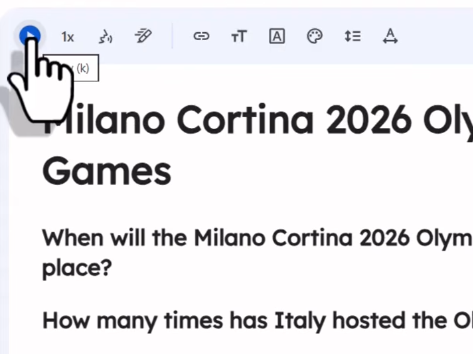
Curriculum Connection: Use Google's Reading Mode for another option in text to speech


Did you know that you can use Google’s Reading Mode to activate a narrator to read aloud text on any webpage?  Watch this short video for a quick tutorial!


Google Tips and Tricks: Have you tried Google Vids?


Google Vids is a newer tool that allows you to create videos without having to know much about video editing or AI. You can give it a slideshow and ask it to create a voice over for you, with or without an AI avatar. You can write a script into several small “scenes” and it will use an AI avatar to create your script into a video. There are many other tools within it that are worth checking out. You could use it to create mini-lessons or explain directions to multiple groups who are doing different things at the same time, introducing a new topic, making review videos, creating announcements, etc.


Google Vids Tutorial


Teacher Hack: Support your lessons using PBS Learning Media


Check out PBS Learning Media to support your lessons. This resource has lesson plans, video clips, and more for preschool through high school. PBS Learning Media is a free resource that also supports all curricular areas. They also make it easy to search by grade ban or subject area. Take a few minutes to see if any of their resources will assist your instruction!