Internet Browsing Best Practices
The internet is a powerful tool that nearly every business utilizes to both expand and streamline their processes. That does not mean that the internet is always a safe place. In order to keep yourself best protected, there are a few good practices that you should follow when using the web.
Which Browser to Use?
While there are a plethora of internet browsers to choose from, the most common are Microsoft Edge (or Internet Explorer, depending on your Windows system), Google Chrome and Mozilla Firefox. The reason these three top the charts is because one comes pre-installed on more than half of all devices and the other two are considered to be somewhat more secure and flexible choices.
While Edge or IE function, they lack some of the filtering and protection that both Firefox and Chrome boast. If it isn't too much of a hassle, it is always suggested that you consider using Firefox or Chrome and it may even be to your benefit to have those programs pre-installed for you if you are purchasing new devices through Ridge Support. Please note that you can have all three installed at the same time and decide which one to use for any particular purpose.
Turn Off Saving Passwords
One of the biggest security hazards are browsers storing your passwords. If someone were able to move over to your computer and use your browser, this might allow them to visit websites and login to accounts anywhere between social media sites and bank accounts.
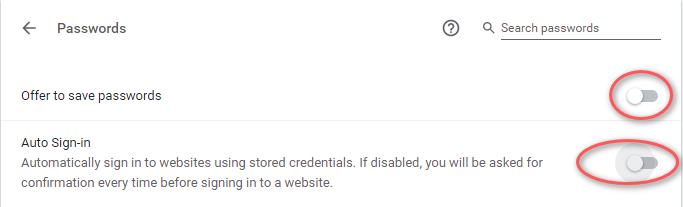
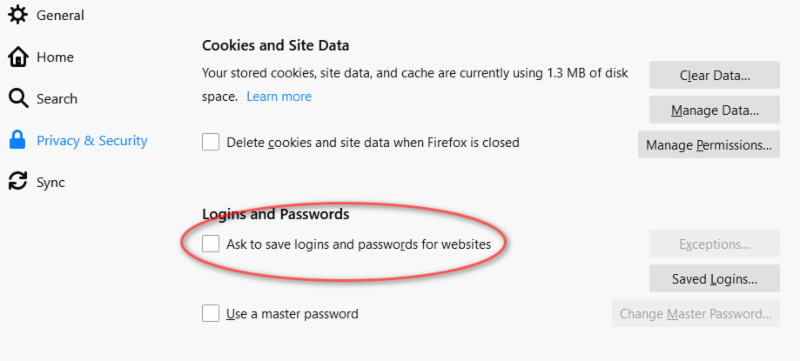
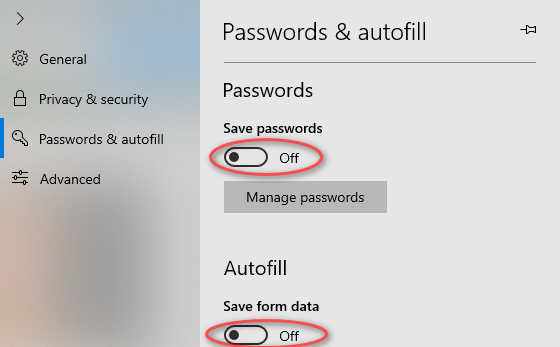
To do this in Chrome, simply go to Settings, select Passwords, and then turn the options to save passwords and automatically sign in. To do this in Firefox, go to Options, then select Privacy & Security before turning off the option to offer to save passwords. In Edge, select Settings, then View Advanced Settings before turning off the save form entries and the offer to save password options.