|
Computer Options: What To Know and When To Buy
We often find clients, particularly those who may not normally get their new computers through us, struggling with options. The landscape of computers is so diverse that it can be particularly hard to distinguish things for those who don't spend a whole lot of time looking at options and stock levels. So what are some things to consider?
Computer Sizing and Features
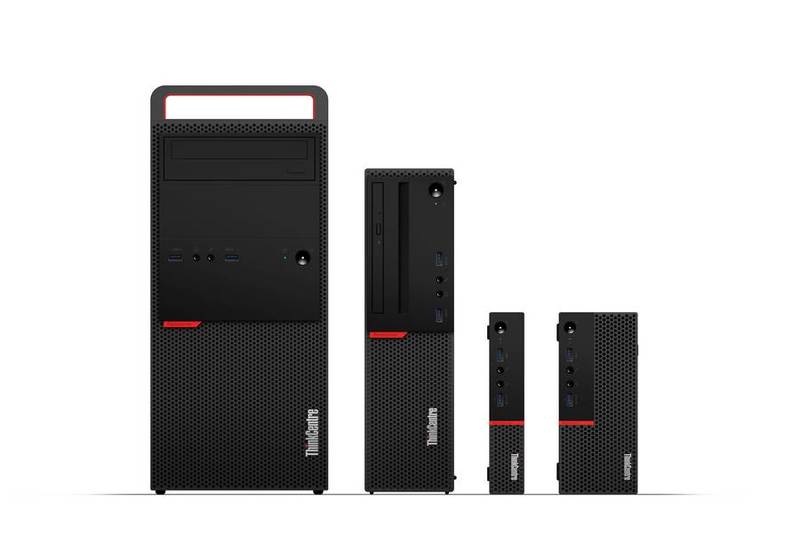
One of the things that's important to some and totally unimportant to others is the size of the unit. There are tower units, which are more in line with the size of a traditional PC. There are Small Form Factor options that take the size down to a more commonly-used size in modern hardware. Then there are tiny units, which are very small and could even be mounted behind a monitor so users don't see them despite their ability to function just as well as other sized units.
Something that may play into the decisions with the sizing of the units could be the Optical Drive (commonly referred to as a CD or DVD drive). These are no longer standard on devices and the smaller they get, the less likely they are to have a built-in optical drive.
Laptop Sizing and Features
Laptops usually come somewhere between 13 and 18-inch screens. The weight and maneuverability of course change as the size goes up, but the screen size may be very important to folks. With the sizing, it is also important to remember that 15-16" laptops are currently the standard, so the further away in sizing you aim, the more likely the price is to increase.
Other things to consider about laptops could be what needs to be attached to the laptop when at rest and, as a result, what dock you may need.
What Else To Know/Why Ridge Support
The other thing some may struggle with is when to replace their computers and/or when to plan to replace them. For starters, Ridge Support's policy is to ensure a manufacturer warranty of three years on all devices unless specifically requested by a client otherwise. This ensures that hardware issues can be resolved and not require a replacement computer for at least those three years.
On average, it's probably time to look at replacements by year seven at the latest. Current estimates can hover around five years for laptops and closer to seven for desktops, but the seven years is a pretty good rule of thumb whereby, even if there aren't specific issues, the user of that device likely feels the sluggishness of actions by that point.
Beyond that, it's helpful to have an IT partner like Ridge Support in your corner. The up-front cost of our hardware may not be the best, but by purchasing units through us we can ensure that any hardware or software issues are handled before they even get to your organization. It also ensures that all specs and licensing are as needed for the given purposes. Plus, our having the device in our office first means we can put it on our bench and get far more of the process done ahead of time without the need to have someone from your office waiting for that process to happen.
Should you have any questions about your devices, please feel free to reach out. We help clients will all aspects of getting new units from determining needed specs, to sourcing hardware, to even putting together plans for what might be a good plan to replace which computers when so that they don't all have to be done at the same time.
|