
| |||||||||
Wireless mesh access points: what they do well, and where they breakDr. Waleed Hosny, Ph.D. · CEO & Founder, WH-Consult Canada | |||||||||
|
Running an Ethernet cable to every access point is still the gold standard. But across a campground, a parking lot, a warehouse yard or a heritage building, that cable is often expensive, slow to install, or simply impossible. That is where wireless mesh earns its place. | |||||||||
How mesh worksIn a mesh network, only a few access points are cabled to the switch. These are the root APs. The other APs, called mesh APs, need only power; they connect back to a root AP over the air, using a radio link called the backhaul. Each wireless link a packet crosses on its way to the wired network is one hop. | |||||||||
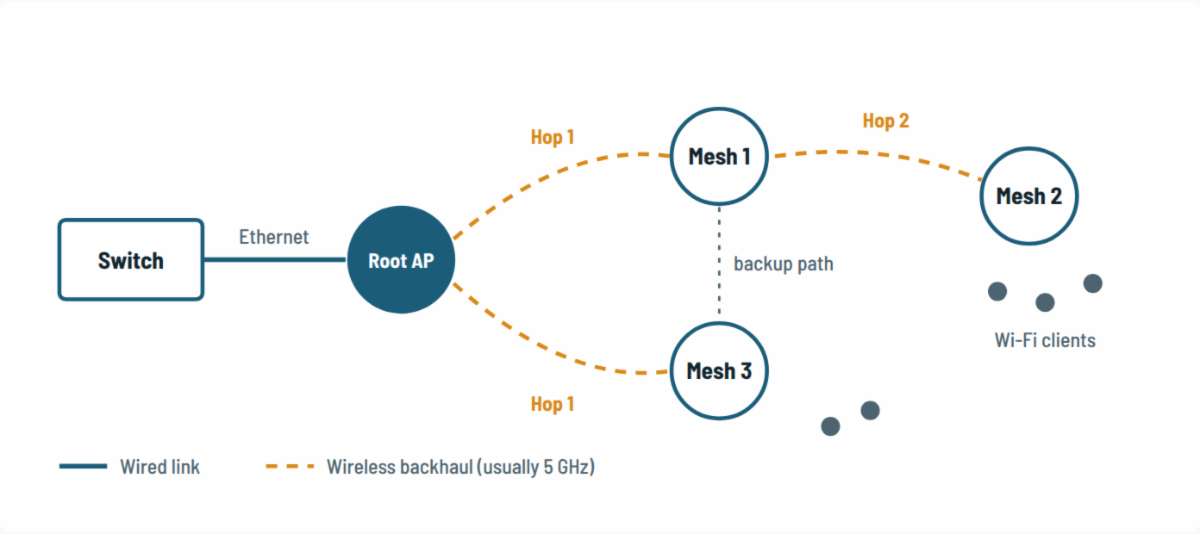
Figure 1. Only the root AP is cabled. Mesh 1 and Mesh 3 are one hop away; Mesh 2 reaches the network through Mesh 1, so it is two hops away. If a link fails, a mesh AP can re-route through a neighbour. | |||||||||
The benefits
| |||||||||
The catch: every hop costs capacityWi-Fi is half-duplex: a radio cannot send and receive on the same channel at the same time. When a mesh AP uses one radio for both its clients and its backhaul, every packet is transmitted twice on the same channel, so usable throughput roughly halves at each hop. Using a dedicated backhaul radio on a separate channel reduces the loss a lot, but never removes it. | |||||||||
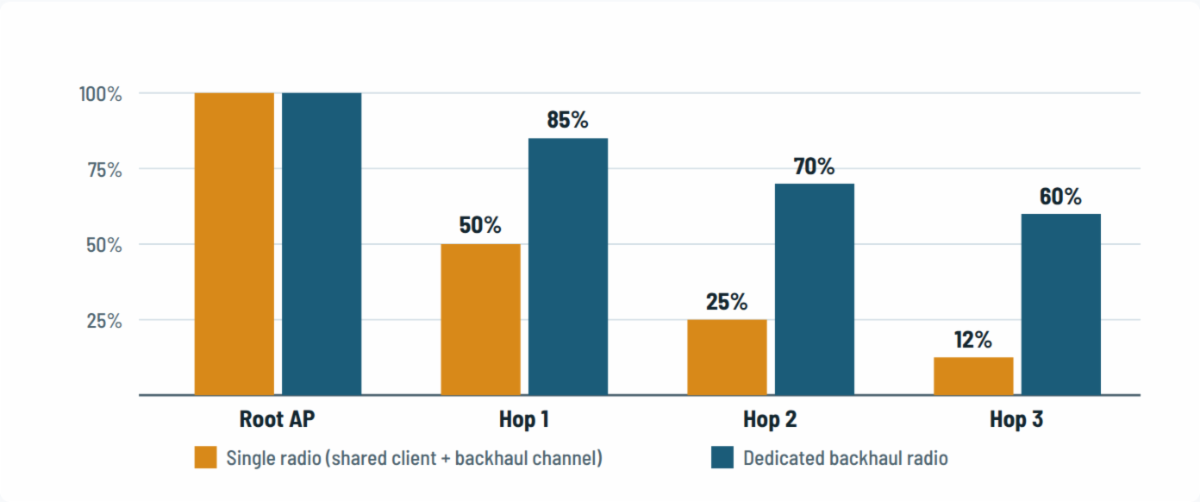
Figure 2. Illustrative share of the root AP's throughput available at each hop. Real numbers depend on the product, channel width and RF conditions, but the trend is always downward. | |||||||||
Design restrictions to respect
| |||||||||
|
Bottom line: mesh is an excellent way to reach places cable cannot, but treat it as a cable replacement with limits. Cable where you can, mesh where you must, and keep every mesh AP close to a wired root. |